
 en
 中文

 Current location:
 Release date: 2026-10-15
 Clicks:
Don't start with product names, start with classroom tasks and budgets
In the smart classroom project, the purchaser is often confused by a bunch of product names: ordinary blackboard, push-pull green board, interactive whiteboard, interconnected blackboard and nano blackboard. Suppliers say that they are good, and dealers may not be able to clarify the boundary. The result is that the bidding documents are not clearly written, the bid evaluation cannot be compared, and only after the arrival of the goods can it be found that the equipment does not match the teaching task, or the budget is over-spent, but the function is not used.
Really effective selection, not from the product name, but from the classroom tasks and budget to start. Is this classroom mainly chalk blackboard writing, or courseware, screen projection and digital annotation? Do you need to keep traditional writing? Do you need to record and broadcast, remote classroom or platform docking? Can the wall load, power network and installation space be satisfied? Confirm these clearly, and then decide whether to use ordinary blackboard, push-pull green board, interactive whiteboard or interconnected blackboard, so that it is not easy to make mistakes.
Core Judgment:Interconnected blackboard, push-pull green board, interactive whiteboard and ordinary blackboard are not simple "upgrade relationship", but correspond to different blackboard writing requirements, display requirements, interconnection capabilities, engineering conditions and total cost of ownership. The purchaser should confirm the classroom tasks and budget before selecting the equipment combination, rather than being led by the product name.
1. first define the role boundaries of the five types of equipment
Each of the five types of equipment has its own division of labor, which cannot be sorted by "high and low end", but should be positioned according to teaching tasks, display capabilities and interconnection capabilities.
| Device | Core Role | mainly solve what problem | What to focus on when purchasing | Typical applicable scenarios |
|---|---|---|---|---|
| Ordinary Blackboard | traditional blackboard writing | Chalk writing, derivation, drawing, classroom explanation | Size, material, writing, cleaning, environmental protection | Limited budget, blackboard writing, simple maintenance |
| Push-pull green plate | Expandable board book + screen occlusion | Expand the blackboard writing area to protect or expose the interactive tablet | Track, sliding, size adaptation, safety, load-bearing | Classrooms with existing or planned interactive tablets |
| Interactive Whiteboard | Digital display and touch interaction | Courseware, screen casting, annotation, interaction and saving | Display, Touch, System, Software, Interface | Digital teaching-oriented, interactive classroom |
| Interconnected Blackboard | Integration of blackboard writing and digital teaching | Keep chalk writing while accessing the connected teaching function | blackboard writing area, display area, interconnection function, integration condition | Recording and broadcasting classroom, smart classroom, blackboard writing + digital combination |
| Nano Blackboard | Integrated writing and display | Middle display, writing on both sides, surface integration | Surface material, touch, display, writing, cleaning | New wisdom classroom, the pursuit of integrated appearance |
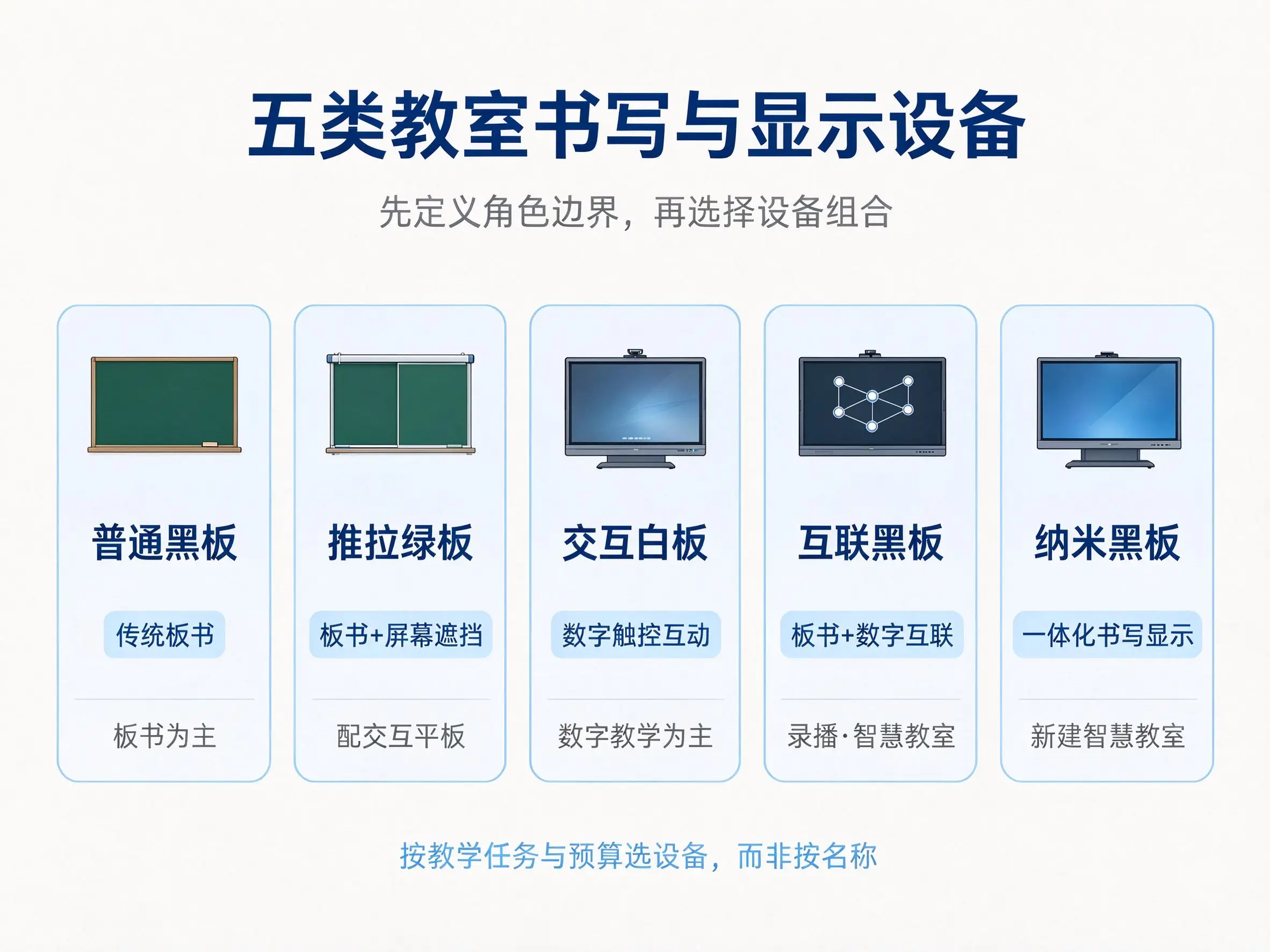
It should be noted that the nano blackboard is not completely equivalent to the interconnected blackboard. Nano blackboards usually emphasize an integrated surface, with a display area in the middle and writing areas on both sides. The interconnected blackboard emphasizes the connection between blackboard writing and digital content, including blackboard writing preservation, screen projection, recording and broadcasting, and platform docking. When purchasing, we should judge according to the actual teaching needs, and we should not default to complete functions just because there is "interconnection" in the name.
Comparison of 2. hard parameters: write requirements to acceptable
The key to parameter writing is that they must be measurable, verifiable, and acceptable upon completion. Only writing "high quality" and "interactive fluency" cannot be compared in the bid evaluation stage and cannot be judged in the acceptance stage. The following are the main hard parameters of the blackboard writing area and display area, which can be adjusted by the purchaser according to the actual project.
Hard parameters of blackboard writing area
| Parameter item | Ordinary Blackboard | Push-pull green plate | Interconnected Blackboard | Procurement Recommendations |
|---|---|---|---|---|
| Length of whole plate | According to the wall custom | ≥ 4000mm | Confirm by model | Write the minimum value and set the asterisk item. |
| Board material | Metal paint or plain paint | Metal paint writing board | compound writing surface | Request Test Report |
| Glossiness | Usually no explicit requirements | ≤ 12 gloss units | Confirm by model | Suggest Write Score Item |
| Formaldehyde release amount | By standard | ≤ 0.2mg/L | By standard | Asterisk items are recommended |
| Border Specifications | By model | Transom ≥ 57 × 78mm, vertical frame ≥ 29 × 100mm | By model | Write specific dimensions |
| Pulley life | Not applicable | ≥ 100000 times | Not applicable | Require a commitment or report |
| Locks | None | One lock to lock, key universal | By model | Write Acceptance Item |
| Environmental standards | GB28231-2011 | GB28231-2011 | GB28231-2011 | Request Test Report |
Display area hard parameters
| Parameter item | Interactive Whiteboard/Interconnected Blackboard | Procurement Recommendations |
|---|---|---|
| Display size | 65/75/86/98 inches | Select by classroom viewing distance |
| Resolution | 4K UHD | It is recommended not to be less than 3840 × 2160 |
| Brightness | 350–500 cd/m² | Confirmed by lighting conditions in classroom |
| Touch Points | 20:00/40:00 | Confirmed by interactive teaching needs |
| System | Android/Windows dual system | Confirm whether OPS is included |
| Interface | HDMI, USB, RJ45, Audio | Confirm by peripheral demand |
| Screen projection protocol | AirPlay、Miracast、DLNA等 | Confirm if additional hardware is required |
| Software License | Buyout or annual fee | Write Total Cost Assessment |
Interconnection function hard parameter
| Function Item | What needs to be confirmed | Procurement Recommendations |
|---|---|---|
| blackboard synchronization | Photo upload, real-time digital, local save | Require a live demonstration |
| Content Save | On-premises/cloud, whether to charge, storage period | Write Technical Agreement |
| Screen mirroring | Protocol, Latency, Concurrent Quantity | On-site testing |
| Recording and broadcasting interface | HDMI/SDI/RTMP, Support Guide | Confirm by recording and broadcasting system |
| remote classroom | Platform compatibility, bandwidth requirements, audio and video configuration | Docking test required |
| Teacher Account Number | Whether it supports and is compatible with the school platform | Confirm docking mode |
| Device Management | Remote operation and maintenance, batch management, firmware upgrade | Write in after-sales terms |
| Third-party platform | compatibility, API, whether customization is required | Request for case |
Tip:The above parameters are general references, and the specific values shall be subject to the project requirements and actual product specifications.
3. cost vs. budget: B2B purchases must be calculated as total cost of ownership.
Equipment unit price is just the tip of the iceberg. Installation construction, power networks, software licensing, maintenance spare parts, training costs, and later upgrades all affect the total cost of ownership of the project. If you only look at the equipment quotes, it’s easy for additional charges down the line to blow your budget.
| Cost item | Ordinary Blackboard | Push-pull green plate + interactive tablet | Interconnected Blackboard | Interactive Whiteboard |
|---|---|---|---|---|
| Equipment procurement | low | Middle and high | high | middle |
| Installation construction | low | middle | Middle and high | middle |
| Power supply network | None | Need | Need | Need |
| Software License | None | Configure by Tablet | Possible annual fee | Possible annual fee |
| Maintenance Spare Parts | low | middle | Middle and high | middle |
| Training costs | low | middle | Middle and high | middle |
| Upgrade Extension | low | middle | Middle and high | middle |
| Total cost of ownership | low | Middle and high | high | middle |
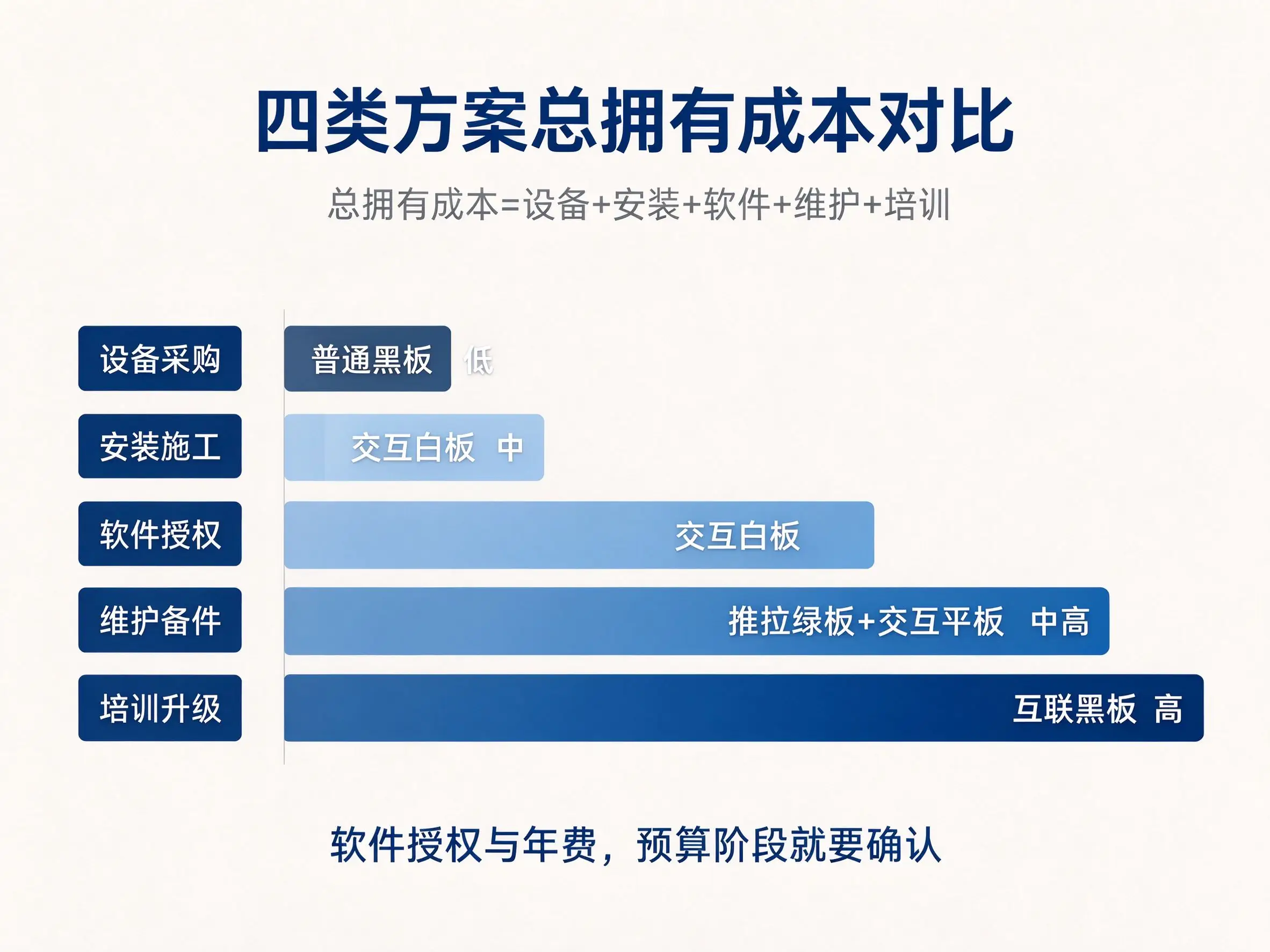
For classrooms with limited budget and mainly writing on the blackboard, it is still reasonable to use ordinary blackboard or ordinary blackboard plus simple projection. If there is an interactive tablet and the board book area needs to be expanded, the push-pull green board plus interactive tablet is a combination with high cost performance. Digital teaching, interactive frequent, interactive whiteboard is more appropriate. If blackboard writing is combined with digital teaching and there is a need for recording and broadcasting, the interconnected blackboard is worth investing in. If you build a new smart classroom and pursue an integrated appearance, you can consider nano blackboard or interconnected blackboard. Software license, annual fee and platform docking fee must be clearly confirmed at the budget stage.
4. installation and engineering conditions: determine whether the project can be landed.
Installation conditions are often underestimated. The wall does not bear enough weight, the power socket is not located correctly, the network bandwidth is insufficient, the ventilation and heat dissipation space is blocked, any problem will lead to rework or addition, and the cost of project addition is sometimes higher than the equipment price difference.
| Project item | Ordinary Blackboard | Push-pull green plate | Interconnected Blackboard | Interactive Whiteboard |
|---|---|---|---|---|
| Wall bearing | low | Middle and high | Middle and high | middle |
| Power supply | None | Need | Need | Need |
| Network | None | Need | Need | Need |
| Cable Path | None | Need | Need | Need |
| Heat dissipation space | None | Need | Need | Need |
| Maintenance space | None | Need | Need | Need |
| Installation period | Short | middle | Medium to long | middle |
| Professional installation | No | Yes | Yes | Yes |
The site conditions to be confirmed before installation include: wall type, thickness, material and load-bearing capacity; Location, quantity and power of power socket; Network access mode, network port location and bandwidth; Whether the cable path is hidden, safe and easy to maintain; Whether there is ventilation gap and maintenance space between the green board and the flat plate; Whether the platform, door and passage affect sliding and viewing; Classroom visibility, viewing distance and rear row; whether reinforcement, new lines or modification are needed. These contents are best to form a site survey record before the contract is signed as the basis for the installation plan.
5. selection path by classroom type
Different classroom types have different selection logic. The following path can be used as a reference for purchasing and distributor allocation.
| Classroom type | Priority Evaluation Equipment | Selection reasons | Budget reference |
|---|---|---|---|
| Ordinary classroom (blackboard writing mainly) | Ordinary blackboard or push-pull green board + interactive tablet | Taking into account blackboard writing and occasional digital teaching | Low-Medium |
| Ordinary classroom (digital-based) | Interactive Whiteboard | Courseware, screen casting and annotation are the main | middle |
| Lecture hall | Large-size interconnected blackboard or push-pull green board + large-size whiteboard | Need larger blackboard and display area | Middle and high |
| Recorded classroom | Interconnected Blackboard + Recording and Broadcasting System | Need to record teacher, blackboard and screen | high |
| Training institution | Interactive whiteboard or interconnected blackboard | Emphasis on courseware, interaction and curriculum experience | Medium-High |
| Laboratory/Training Room | Interconnected Blackboard + Video Booth | Demonstrate experimental materials and operating procedures | Middle and high |
| Small Training Room | Interactive whiteboard + mobile stand | Limited space, flexible movement | middle |
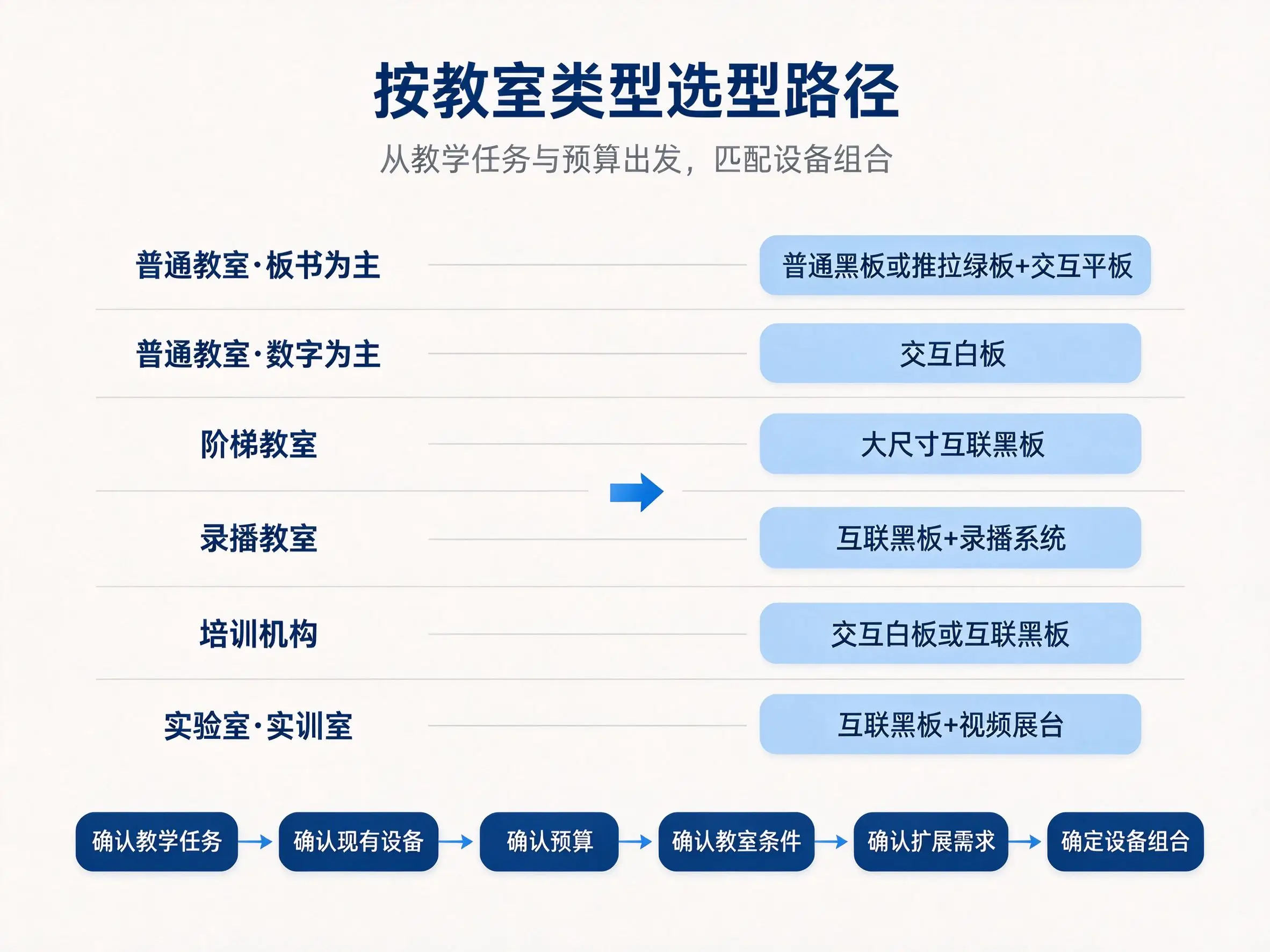
The selection path can be summarized into six steps: first confirm whether the teaching task is blackboard-based, digital-based, or a combination of the two; Then confirm the existing equipment, whether there are interactive tablets, recording and broadcasting systems, video booths; Confirm the budget scope, including the total cost of equipment, installation, software and maintenance; Confirm classroom conditions, including wall, power supply, network, space and viewing distance; Confirm expansion requirements, whether recording and broadcasting, remote and platform docking are required; Finally, determine the equipment combination.
6. acceptance criteria: covering blackboard writing, display, interconnection and teaching process
Acceptance testing should not be limited to verifying whether the equipment can be powered on. The blackboard writing area, display area, interconnection function, installation quality and teaching process should have clear acceptance contents and testing methods.
| Acceptance Items | Acceptance content | Acceptance method |
|---|---|---|
| blackboard writing area | Size, material, gloss, formaldehyde, writing, erasing | Tape measure, gloss meter, test report and on-site writing |
| Display area | Size, resolution, brightness, touch, system | Specification, field test, touch test |
| Interconnection function | blackboard writing, screen casting, recording and broadcasting, remote, account number | On-site demonstration and platform docking test |
| Installation quality | Solid frame, level track, clean cable, power network | Level ruler, on-site inspection |
| Heat dissipation maintenance | Ventilation gap, OPS heat dissipation and maintenance space | Field measurement and operation test |
| teaching process | blackboard writing + courseware + screen projection + annotation + save | Teacher complete teaching process test |
| Training handover | Training record, operation card and repair process | Training sign-in and operation assessment |
Take the push-pull green plate as an example, check whether the length of the whole plate is above 4000mm, whether the gloss of the plate surface is not higher than 12 gloss units, whether the formaldehyde emission is not higher than 0.2mg/L, whether the horizontal frame is not less than 57mm × 78mm, whether the vertical frame is not less than 29mm × 100mm, whether the pulley life is not less than 100000 times, whether the lock is locked and the key is universal. These indicators should be written into the contract annex and checked item by item during acceptance.
7. Supplier Inquiry and Contract Attachment
The final conclusion of the selection shall be translated into a verification procurement requirement. It is suggested to provide the following information when inquiring: classroom type, size, viewing distance and lighting conditions; Teachers' blackboard writing and digital teaching requirements; Existing equipment, software, platform and recording and broadcasting system; Whether recording and broadcasting, remote classroom or video booth are required; Number of classrooms, installation conditions and delivery time; Budget scope, quality assurance requirements and after-sales requirements; Whether software authorization, platform docking and customized development are required.
The contract annex suggestions include: equipment configuration list and technical parameter table, technical parameter response and deviation table, blackboard writing area and display area and interconnection function confirmation table, installation condition and site investigation confirmation table, cost and budget schedule, acceptance standard and test record table, quality assurance spare parts training and after-sales service scope, software authorization and platform docking instructions. Having these documents prepared ensures that the bid evaluation has a solid basis, acceptance criteria are clearly defined, and disputes in the later stages will be significantly reduced.
Frequently Asked Questions
What is the difference between the interconnected blackboard and the ordinary blackboard? On the basis of keeping the chalk writing, the interconnected blackboard increases the display area and interconnection function, and supports courseware, screen casting, annotation and saving. Some models also support recording and broadcasting and remote classroom. Ordinary blackboard only solves the problem of traditional blackboard writing. When purchasing, it is necessary to judge whether the interconnection function is needed according to the teaching task.
What is the difference between an interconnected blackboard and a push-pull green board? The core of a push-pull green board is an expandable board book and screen occlusion, which is usually used in combination with an interactive tablet; an interconnected blackboard places more emphasis on the ability to connect the board book with digital content, and is usually an integrated design. The two can be combined or selected separately according to the needs of the classroom.
What is the difference between the interconnected blackboard and the nano blackboard? The nano blackboard usually emphasizes the integrated surface, the middle display and the writing on both sides; the interconnected blackboard emphasizes the interconnection capabilities such as blackboard writing preservation, screen projection, recording and broadcasting, and platform docking. Bidding should be based on functional requirements, not just the name.
Does the interconnected blackboard support chalk writing? Most interconnected blackboards reserve a chalk or dust-free pen writing area, but the specific type of pen supported and the size of the writing area depends on the model. The supplier shall be required to demonstrate on site prior to procurement.
Does the interactive smartboard support saving handwritten notes? Some models support taking photos for upload or real-time digital saving; the storage location may be local or in the cloud. Whether a fee applies and the duration of storage must be clearly specified in the technical agreement.
How to choose the interconnected blackboard, push-pull green board and interactive whiteboard? Choose ordinary blackboard mainly for blackboard writing and limited budget; choose push-pull green board for existing interactive tablet and need to be expanded; choose interactive whiteboard mainly for digital teaching; choose interconnected blackboard for combination of blackboard writing and digital, and choose interconnected blackboard for recording and broadcasting.
Should the recording and broadcasting classroom choose the interconnection blackboard or the push-pull green board + recording and broadcasting system? If the recording and broadcasting system has been independently configured, the push-pull green board + interactive tablet can also meet the demand; if the blackboard and screen content need to be recorded synchronously, the integration scheme of the interconnection blackboard is more convenient. It depends on the requirements of recording and broadcasting interface and platform docking.
How are the software licensing fees for interactive smartboards calculated? There is significant variation among vendors: some offer a one-time buyout, others charge an annual fee, and still others base their pricing on the number of classrooms. When making an inquiry, be sure to clarify all details and include them in the total cost assessment.
How does the interconnection blackboard interface with the existing platform of the school? Platform compatibility, API interface, data format and whether customized development is required need to be confirmed. It is recommended that the supplier be required to provide similar docking cases.
How to write the bidding parameters of the interconnected blackboard? Write the size, material, glossiness, formaldehyde emission, display resolution, touch points, screen projection agreement, blackboard writing storage, recording and broadcasting interface, software authorization and so on into measurable and acceptable terms, and set asterisk items and scoring items.
How to test the interconnection function during the acceptance of interconnection blackboard? On-site test blackboard saving, screen casting, recording and broadcasting, remote classroom, teacher account login and equipment management, confirm that the function is normal, the delay is acceptable, and the data can be saved or exported.
In which scenarios are ordinary blackboards still a reasonable choice? Ordinary blackboards are still suitable for classrooms with limited budget, mainly blackboard writing, simple maintenance and no need for digital teaching. There is no need to over-configure in order to pursue "wisdom.
Conclusion
Interconnected blackboard, push-pull green board, interactive whiteboard and ordinary blackboard are not simple upgrade relationships, but serve different blackboard writing, display, interconnection and budget requirements respectively. The Education Bureau, schools and distributors should evaluate the overall plan according to "blackboard writing area + display area + interconnection function + engineering conditions + total cost", and then select the appropriate plan according to the classroom type and teaching task. The parameters, cost, installation and acceptance are advanced to the procurement stage, which is much lower than the cost of reworking or adding items after the arrival of the equipment.
 Previous:
 Return to list

 Partner Links:
