
 en
 中文

 Current location:
 Release date: 2026-09-23
 Clicks:
Interactive Whiteboard Application in Preschool Education: The Carrier of Game-based Learning
From literacy, counting, and shape recognition to storytelling, music, sports, and teamwork, analyze how Qtenboard can use 20 years of manufacturing experience, Q-AI systems, and safety design to make kindergarten classrooms more intuitive, proactive, and easier to participate in.
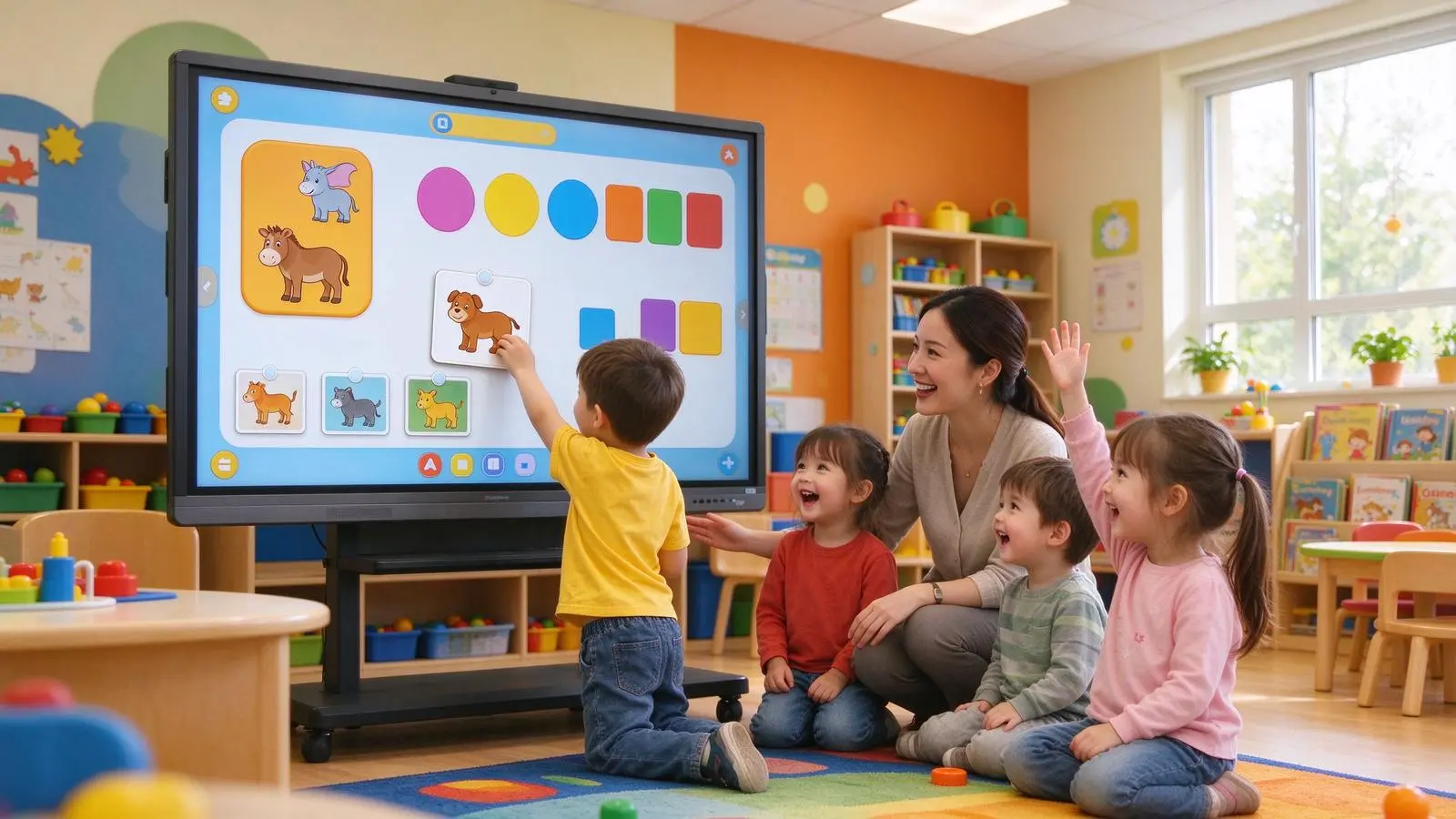
Kindergarten doesn't need "longer screen time". Games are not the opposite of the classroom, but the way young children understand the world. The teacher shows a group of animal pictures on the screen. The children drag the animals to the corresponding living environment in turn. Some children complete the classification by touch, while others choose the answer by sound or picture. The teacher guides the children to explain "why" with language. After the activity is over, the system saves the learning results jointly completed by the children.
For preschool children, play is an important way to explore, express and learn. The value of the interactive whiteboard is not to fix the child in front of the screen, but to combine images, sounds, movements, language and peer collaboration into a common activity guided by the teacher.
There is a need for clear educational boundaries:
Interactive whiteboards are no substitute for building blocks, paintings, outdoor sports and authentic materials
• Digital games should serve course objectives rather than simply pursuing animation and rewards
Screen activities should be short, clear, participatory and discussable
• Teachers must be involved in questioning, demonstration and feedback
Children should have the opportunity to leave the screen for physical manipulation and peer interaction
Texas Preschool Technical Guidance recommends that half-day courses have less than 30 minutes of screen time and full-day courses have less than 1 hour, and emphasize joint viewing, questioning and interactive connection, rather than allowing children to passively watch the media. Instead of advertising the interactive whiteboard as a "24/7 playback device", the article can translate this into purchasing and operating principles ".
Qtenboard (Shenzhen Qunmao)Founded in 2005, we have been dedicated to interactive display manufacturing for 20 years. We operate a 330,000㎡ smart manufacturing industrial park in Shenzhen and Guangzhou, comprising 16 modern factory buildings and 8 fully automated production lines, with a daily output capacity of 200 units. Our solutions serve 120 countries and regions worldwide, and we have provided services to over 15,000 corporate clients to date. Qtenboard interactive whiteboard covering 55-110 inch full-size segment, equippedQ AI System Level FrameworkandMediaTek Genio 520平台, Through AG anti-glare glass, 9H tempered glass, rounded corner design, fanless silent design and child safety configuration, it provides a complete solution from hardware to software for kindergartens and preschool education institutions.
1. what is game-based learning in preschool education?
Translate teaching goals into tasks that children are willing to participate in
1. Game-based learning is not the same as simply playing games.
Game-based learning can include:Clear goals, step-by-step tasks, interactive operations, immediate feedback, moderate rewards, roles and stories, repetitive exercises, cooperation and sharing.
Examples of teaching objectives:Recognize colors, recognize numbers, learn letters and sounds, train classification and sequencing, develop spatial cognition, learn to take turns and cooperate, express emotions and needs, and develop observation and problem-solving skills.
2. Why is interactive whiteboard suitable for gamification activities?
The picture is large and convenient for the whole class to watch together. Support touch, drag, click and writing; Can accommodate images, sounds, videos and animations; Teachers can adjust the difficulty instantly. Multiple children can participate in the same task; Activity results are easy to save and reuse. It is not necessary for every child to have personal equipment.
The Qtenboard interactive whiteboard supports 20-50-point touch, with a touch accuracy of 1.5mm, a single-point response time of 7ms, and a multi-point response time of 10-15ms. It is matched with Zero-Bonding zero-bonding technology and 1mm tempered glass to ensure that children can recognize with light touch and that multiple people can operate at the same time without conflict.
3. Design principles for children's game-based learning
Only a small number of options are presented at a time, the operation rules are simple and clear, the task duration is short, the visual elements are large and clear, the feedback is timely but not excessive stimulation, repeated attempts are allowed, the process is emphasized instead of winning or losing, personal operation and collective discussion are taken into account, and real materials and physical activities are returned after the activity is over.
2. interactive whiteboard how to serve the kindergarten five curriculum areas?
From a screen to language, mathematics, art, movement and social
Language and Early Reading
Gamification activities:Letter matching, picture and word matching, syllable splicing, story sorting, role dialogue, word classification, picture reading, voice imitation, multilingual vocabulary learning.
Qtenboard corresponding functions:4K displays enlarged pictures and letters, Q AI plays pronunciation, lets children drag text to pictures, records story sequence, lets teachers mark keywords, Q AI supports 166 language text-to-speech and speech recognition.
2. Mathematics and Logic Enlightenment
Gamification activities:Counting, number matching, number and number correspondence, shape classification, size sorting, regular recognition, simple addition and subtraction, puzzle and spatial relationship, item grouping.
Interaction method:Drag the numbers to the correct position, pair the same number of items, move the building blocks through touch, and identify the classification results with different colors, so that multiple children can complete the sorting task together. Qtenboard support 20-50 touch, multiple children can operate at the same time.
3. Science and Nature Cognition
Gamification activities:Animal and habitat pairing, plant growth sequencing, weather observation, seasonal changes, body part cognition, simple experimental simulation, insect and natural environment identification.
Qtenboard value:Use animation to demonstrate the process that is difficult to observe on the spot, combine pictures/sounds and videos, let the children predict the results, record the observation results on the digital whiteboard, review after class and share at home.
4. Art and Creativity
Gamification activities:Digital painting, color mixing, shape puzzles, music rhythm, character creation, story scene design, collective poster making.
Digital painting is no substitute for real paint, clay, paper cutouts and building blocks. Interactive whiteboards should be used as a tool for creative expression. Digital works can be printed, shared or processed after the event.
5. Social Emotions and Life Skills
Gamification activities:Emotional expression recognition, selecting today's mood, role playing, sharing and taking turns games, daily process sequencing, traffic safety judgment, personal hygiene steps, conflict resolution situations.
Teaching value:Help children express their emotions, train waiting and taking turns, let children understand the rules, support teachers to observe classroom interaction, and provide visual tools for individualized counseling.

Six Kinds of Classroom Play of 3. Game-based Interaction
Let the children point, drag, match, draw, say and cooperate
1. Point selection and judgment
Examples of activities:Point out the red fruit, select the weather icon, find the correct number, and determine which animals can fly.
Fit to Target:Color recognition, visual recognition, basic classification, attention training.
2. Drag and match
Examples of activities:Drag the animal to the corresponding habitat, drag the number to the corresponding number of items, drag the emotional expression to the situation picture, and drag the word below the correct picture.
Fit to Target:Hand-eye coordination, classification, pairing, causality.
3. Sequencing and Process
Examples of activities:Arrange the brushing steps, arrange the plant growth process, arrange the storyline, arrange the items from small to large.
Fit to Target:Time concept, logical thinking, narrative ability, life skills.
4. Painting and Writing
Examples of activities:Draw letters, connect dots and lines, draw weather, complete graphics, and create a picture together.
Fit to Target:Fine motor, hand-eye coordination, early writing, creative expression. The Qtenboard supports finger and stylus operation without the need to press hard.
5. Voice and story interaction
Examples of activities:Listen to the sounds of guessing animals, follow the words, role play, continue to write the story, choose a different ending.
Fit to Target:Language expression, auditory comprehension, vocabulary development, imagination, and social expression. Q AI supports 166 language real-time translation and speech recognition.
6. Multi-person collaboration
Examples of activities:Two children complete the puzzle together, the group collaborates to draw the map, many people complete the classification task together, one child operates one child to explain, and takes turns to complete the collective story.
Fit to Target:Cooperation, communication, rotation, conflict resolution, joint decision-making. Qtenboard supports 20–50-point touch, enabling multiple users to operate simultaneously without conflicts.
4. kindergarten scene how to choose interactive whiteboard?
Dimensions, mounting and touch must be child-centric
1. 55 inches: group activities and small classrooms
Suitable scenarios:Small class teaching, nursery or early education activity room, language corner, individual tutoring, resource classroom, group story activities.
Qtenboard configuration focus:High sensitivity touch (1.5mm accuracy), simple interface, AG anti-glare, low blue light mode, movable bracket or low position installation, large icon and large touch target.
2. 65 inches: flexible choice for regular kindergarten classrooms
Suitable scenarios:Ordinary classrooms with 10-20 children, daily group teaching, story/music and math activities, teacher demonstrations and children's rotation operations.
Qtenboard configuration focus:4K UHD display, 20-50 touch, 9H anti-scratch anti-glare safety glass, low blue light and anti-flicker, 2 × 15W or the same level of audio, Android 14/16 system and children's education applications, Windows OPS optional.
3. 75 inches: large class or deeper classroom
Suitable scenarios:20-30 children, large class group activities, multi-class shared classrooms, garden-based training and teacher training, need space for watching in the back row.
Qtenboard configuration focus:Higher display area, clear large picture and subtitles, AG anti-glare, low-position safe installation, 20-50-point touch, external audio or microphone (if required).
4. 86 inches and above: multi-shift activities and large training spaces
Suitable scenarios:Multi-function classroom, lecture hall, kindergarten teacher training, parent-teacher meeting, multi-class joint activities, large story theater or remote interactive classroom.
Qtenboard configuration focus:High brightness and wide viewing angle, long-distance readability, high-quality audio, camera and video conferencing, stable wall mounting or heavy-duty bracket, on-site safety management.
It is not recommended to install oversize in narrow classrooms in order to pursue "big screen. Toddlers can get close to the screen, and installation height and corner safety are more important than the size itself. Qtenboard supports wall-mount installation, mobile stand solutions, and height-adjustable stand options.
Safety Design of 5. Kindergarten Purchasing Most Need Attention
The first standard of children's equipment is not the most functional, but safe and controllable
1. Structural safety
Shatterproof or tempered glass, rounded corner design, stable wall hanging or anti-dumping bracket, reliable mobile caster lock, anti-pinch structure, hidden or fixed cables to prevent children from climbing and pulling, the screen installation height is suitable for children. The Qtenboard is designed with 9H impact resistant tempered glass and rounded border.
2. Display security
AG anti-glare, low blue light mode, anti-flicker design, adjustable brightness, avoid direct light, the screen is not excessively stimulated, control animation speed and color changes. Qtenboard offers optional brightness settings ranging from 350 to 500 nits.
3. Touch Security
The touch surface is scratch-resistant, supports light touch (7ms response), does not require children to press hard, avoids accidental touch of system settings, supports teacher lock mode, the stylus should not have sharp or easy-to-swallow parts, and the device should support appropriate cleaning and disinfection methods.
4. Sound Safety
Maximum volume limit, quick volume adjustment, one-key mute, avoid sudden high-volume sound, support external speakers but do not affect the classroom, use the prompt tone suitable for young children. The Qtenboard features a fanless design, ensuring silent operation.
5. Network and Content Security
Prevent access to pages that are not suitable for children, teachers control app and content permissions, devices support guest and teacher accounts, close unnecessary pop-up windows and advertisements, manage camera and microphone permissions, and protect children's image/recording and learning data. Qtenboard DMS supports application whitelist and permission management.
6. kindergarten teachers how to use the whiteboard?
Good equipment requires good activity design, and teachers are still the core of game-based learning.
1. Each activity is short and clear
Open pre-school teaching suggests that interactive activities be kept within a short, focused time, such as 3-7 minutes a activity, and maintain children's attention through questioning, repetition and joint participation.
Content design recommendations:An activity has only one main goal. There are not too many choices on the screen at one time. Every child has the opportunity to operate. After the activity is over, turn to discussion/painting/building blocks or sports to avoid watching animation continuously for a long time.
2. Use the "Teacher Questioning-Children's Operation-Joint Discussion" process
Example:1. The teacher displays three animals. 2. Ask: "Which animal lives in the water?" 3. Children take turns dragging the picture. 4. Other children observe and make judgments. 5. The teacher guides the children to state their reasons. 6. Go back to real toys or picture books for extended activities.
3. Design difficulty stratification
Simple click is suitable for initial contact, drag and match is suitable for medium difficulty, sort/story and open drawing is suitable for higher difficulty, tasks are adjusted for children of different ages/language and movement ability, children are allowed to repeat operations, and failure is not punished.
Encourage cooperation rather than mere competition
Two people complete the task together, one child operates a child to tell, the group completes the story together, let the child help the companion, use "we finish together" instead of "who is the fastest".
5. Combine with non-digital activities
After the interactive whiteboard can be arranged: paper and pen painting, building blocks, role playing, outdoor observation, music rhythm, physical classification, picture book reading, handmade.
Specific Application Cases of 7. Game-based Learning
From a "game", design a complete learning goal
Case 1: Little Color Detective
Event Schedule:The screen displays fruits of different colors, the teacher says a color, the child touches or drags the corresponding fruit, the system gives visual or sound feedback, and the child looks for the same color in the classroom.
Developing capabilities:Color recognition, vocabulary understanding, visual attention, migrating from digital content to real-world environments.
Case 2: Digital Small Train
Event Schedule:The screen displays train carriages with numbers. Children arrange the carriages in order. Teachers add the corresponding number of tasks. Children put the corresponding number of articles into the carriages. The whole class checks the results together.
Developing capabilities:Number cognition, number relation, sequence, hand-eye coordination, cooperative problem solving.
Case 3: Solitaire Story
Event Schedule:The screen displays pictures of characters and scenes, children select characters/places and actions, teachers guide children to organize stories, children touch to adjust the picture order, and the story page is saved after the class is over.
Developing capabilities:Language expression, narrative ability, imagination, take turns to speak, group collaboration.
Case Four: The Little Weather Anchor
Event Schedule:Children select the weather icon of the day, drag the icon to the calendar, record a weather report, the teacher guides the children to observe the actual weather outside the window, and form a week's weather record after class.
Developing capabilities:Time concept, language expression, observation ability, data recording, self-confidence.
Case 5: Emotional theater
Event Schedule:The screen shows different emotional expressions, the teacher tells the life scene, the child chooses the corresponding emotion, the child expresses the feeling with touch or voice, and the teacher guides the discussion on how to solve the problem.
Developing capabilities:Emotion recognition, self-expression, empathy, social problem solving.
Case 6: The Little Nature Observer
Event Schedule:The screen shows plant growth or insect pictures, children classify and sort, watch short videos or animations, go outdoors to observe real plants, and return to the classroom to upload photos or draw observations.
Developing capabilities:Scientific observation, classification, language and image expression, digital and real activities combined.
How does 8. Qtenboard serve kindergarten game-based learning?
From interactive hardware to content and project delivery, how does Qtenboard support preschool education?
1. Q AI system level framework
Qtenboard's launch ofQ AINot a simple software plug-in or cloud tool, but a native intelligent architecture deeply integrated into the hardware, software and algorithm layers. AI are not add-ons, but are built into the native architecture of the device and can work reliably in real kindergarten classroom scenarios-whether online or offline.
Q AI four design principles:Local computing first, optional cloud collaboration, AI interoperability, scene-oriented design.
The core transcription of the Q AI runs locally on the device, eliminating cloud latency and network dependency. Qtenboard integrate custom noise-canceling microphone arrays and local speech algorithms to ensure clear capture in multi-speaker, noisy classroom environments. Core capabilities include real-time noise reduction, speaker differentiation, 40 language and dialect support, industry term recognition, and custom vocabulary.
Qtenboard Q AI支持166 languagesVoice-to-text and real-time translation, covering regional dialects such as Cantonese, Vietnamese, and Malay. Thai language packs and OCR handwriting recognition have been added to Thai customers. Software-level language localization does not require hardware modification.
2. Kindergarten product configuration
- 55/65/75 inch interactive whiteboard, 4K UHD display
- 20-50 touch, 1.5mm accuracy, 7ms single point response
- 9H impact-resistant tempered glass, AG anti-glare
- Low blue light and anti-flicker mode
- Android 14/16 educational application, Windows OPS optional
- Wireless screen projection, support up to 9 devices at the same time screen projection
- Camera, microphone and audio
- Q AI handwriting, pattern recognition
- DMS Remote Device Management
3. Interactive experience for young children
Large icon, simple operation interface, low delay touch, multi-person operation at the same time, finger and stylus use, teacher lock and quick exit, adjustable brightness and volume, suitable for children to watch the display mode.
4. Kindergarten space installation scheme
Wall-mounted installation, low-position installation, mobile bracket, liftable bracket, rounded corners and anti-dumping structure, cable hiding, leaving room for children's activities and evacuation, and confirming the child's touch height through the prototype.
5. Gamification content and software support
Teaching interactive templates, color/number/letter and shape activities, story and music content, graphics/drag and sorting tools, classroom whiteboard preservation, Q AI handwriting recognition and graphic recognition, local language and regional content, docking with kindergarten LMS or content platform, OEM/ODM brand and software interface customization.
6. DMS device management system
Qtenboard is equipped with powerful DMS (Device Management System) software, enabling centralized backend control of all devices. Core functions include: teacher training, activity template production, equipment usage specification, remote software update, multi-classroom equipment management, application permission control, content security, equipment inspection and after-sales, spare parts and maintenance support.
AI-driven predictive diagnostics:The built-in AI module checks hardware health parameters such as panel temperature, internal voltage, and color values. If any indicator deviates from the normal range, the system will give early warning to avoid accidental shutdown of the equipment.
7. Hardware level AI:Genio 520 and 10 TOPS edge computing
The Qtenboard Genio 520 interactive tablet platform is based on the MediaTek Genio 520 (MT8371) chip, redefining the capabilities of educational interactive whiteboards at the hardware level. The 8th generation MediaTek NPU is available directly on the interactive tabletDedicated AI acceleration for 10 TOPS-AI noise reduction, gesture control all run on the device, zero Internet dependence, zero cloud latency, zero data privacy risk.
Based on TSMC's 6nm FinFET process, the Genio 520 achieves high performance with low thermal output, which enables QtenboardFanless interactive tablet designMake it possible-essential for uncompromised scenes of acoustic silence such as kindergarten classrooms. MediaTek’s official commitment to the Genio 520 is10 year standard supply life cycle, Eliminate the risk of obsolescence that consumer-grade SoCs usually eliminate in 2-3 years.
8. OEM/ODM and project support
Preschool education brand customization, kindergarten group unified Logo and start-up interface, local language package, customized curriculum resources, safety tips and teacher lock-in mode, 55/65/75 inch combined procurement, SKD/CKD local assembly, regional dealer training, multi-park unified deployment. Dedicated OEM production line: Customization does not affect the lead time for standard products; the lead time for customized orders is extended by only 3–5 days.
9. Manufacturing strength and quality assurance
- Established in 2005, 20 years of manufacturing experience
- 330,000 ㎡ industrial park, 16 factories and 8 full-automatic production lines
- SMT patch speed 120,000 components/hour, main board, sub-board independent production
- Class 10,000 clean room completes touch panel manufacturing and optical bonding
- Zero-Bonding zero-fit technology, 1mm tempered glass
- 48 hours high temperature aging test (72 hours for some items), comprehensive retest after aging
- The one-time pass rate of the whole machine is ≥ 97%, and the abnormal rate of aging is <1.5
- International Certification: CE, FCC, RoHS, ISO9001, CCC
- Service 120 countries and regions, after-sales response ≤ 4 hours
9. Kindergarten Purchase List
When purchasing interactive whiteboards, don't just ask "can you play games"
Display and Touch
- Is the screen size appropriate for classroom depth and child viewing distance?
- Does it support 4K and clear large image display?
- Anti-glare and impact resistant safety glass?(Qtenboard 9H tempered glass)
- Does it support low blue light and anti-flicker?
- Does Touch Support Touch and Multiplayer?(Qtenboard 20-50 points, 7ms response)
- Is the touch edge accurate?(Qtenboard 1.5mm accuracy)
- Does the device support a stylus, finger, and teaching tools?
Safety and Installation
- Is there an anti-tip bracket?
- Is low or liftable mounting supported?
- Are sharp corners and exposed cables present?(Qtenboard rounded design cables hidden)
- Is the screen running too hot or noisy?(Qtenboard no fan zero noise)
- Is the surface easy to clean and disinfect?
- Is there a child use and emergency shutdown process?
Software and Content
- Are apps and templates available for toddlers?
- Does it support images, sounds, videos, and drag-and-drop interactions?
- Can I restrict web pages, applications, and popup windows?(Qtenboard DMS supports application whitelists)
- Are Teacher Lock and Guest modes supported?
- Is local language and garden-based course content supported?(Q AI 166 languages supported)
- Does it support classroom content preservation and home sharing?
Project and after-sales
- Does it include installation, training, software, bracket and after-sales?
- Multi-campus device management available?(Qtenboard DMS)
- Do you have spare parts and local maintenance support?(Qtenboard service to 120 countries, after-sales response ≤ 4 hours)
- Calculate five year total cost of ownership?
- Do you support prototype trials and real-world scenarios for children?
- Is privacy treatment of children's images, recordings and learning data clear?(Q AI Core Transcription runs locally)
TCO and Item Value of Gamified Learning in 10. Kindergartens
Not a "glowing screen", but a set of long-term teaching tools.
1. Cost Composition
Interactive whiteboard, stand or installation, audio/camera and microphone, OPS or external computer, teaching application and content, software subscription and upgrade, teacher training, network transformation, spare parts and repair, DMS equipment management platform, security and data management.
2. Operational indicators that can be observed by the park
The number of times teachers use per week, the average duration of each activity, the proportion of different course areas, the number of children's active operations, the rotation and cooperative participation, the change of teacher preparation time, the reuse rate of digital content, the number of times parents view classroom materials, the online rate of equipment and the failure response time.
3. Indicators of teaching value
Whether children are more willing to express, whether children can complete more interactive tasks, language/math and classification activities, whether students can switch from screen activities to real material activities, whether teachers can better observe individual differences, and whether play activities support cooperation rather than pure competition.
You can't simply equate equipment usage time with learning effects. Early childhood education technology should serve joint participation, practical operation, language communication and games, rather than increasing passive screen time.
XI. Common Misunderstandings
Kindergartens use interactive whiteboards, and the most important thing is "moderate, active, and safe"
Myth 1: The interactive whiteboard as a TV
Play animation for a long time, children lack of operation and discussion, technology does not really produce interactive value. Correct approach: each activity is short and clear, and teachers guide questions and operations.
Myth 2: Equating gamification with rewards and leaderboards
Excessive competition may increase stress, and young children need to cooperate, explore and repeat attempts. The right thing to do: integrate game mechanics with learning objectives and encourage cooperation rather than competition.
Myth 3: The bigger the screen, the better
It may not be comfortable to install a large screen in a small classroom, but also consider the height of children's operation and the sight of teachers. Correct approach: combination of space, number and viewing distance selection. Qtenboard covers the entire size range from 55 to 110 inches.
Myth 4: Just look at the number of applications
Application is not equal to content suitable for young children. Ads, permissions, language, interaction quality and data policies need to be checked. Preference is given to teacher-controllable, editable, and savable content. Qtenboard DMS supports application whitelisting and permission management.
Myth 5: Ignore real toys and outdoor activities
Interactive whiteboards are not a substitute for building blocks, picture books, paintings, movement and nature observation. The right approach is to combine digital activities with physical activities.
Myth 6: Ignoring child safety
Brackets, corners, cables, glass, volume, brightness and cleaning all need acceptance. The equipment should be used under the supervision of the teacher. The Qtenboard adopts 9H tempered glass, rounded corner design, fanless silent design.
Conclusion: The core of gamification learning is not to let children stare at the screen, but to let children participate in it.
Interactive whiteboards can transform language, math, art, science, and social-emotional education into engagable classroom activities. For young children, click, drag, match, sort, draw and tell stories can all be learning portals. The equipment must be combined with teacher questioning, peer cooperation, physical operation and outdoor activities. Purchasers shall focus on security, size, touch, software, content, teacher training, data protection, and TCO.
For preschool education, the value of interactive whiteboards is not to digitize every activity, but to provide children with more ways to express, operate, cooperate and explore. A good interactive activity should allow children to continue to return to the real picture books, building blocks, brushes, music and outdoor world after completing tasks on the screen.
QtenboardBacked by 20 years of manufacturing experience, 330,000 ㎡ industrial park, 8 full-automatic production lines, Q AI system-level framework (166 language, local operation, 5-second summary), Genio 520 platform (10 TOPS equipment end AI, fanless mute design) and DMS equipment management system, it is oriented to kindergartens and preschool education institutions around the world, provide a complete solution from 55-110 inch hardware, 20-50 touch, 1.5mm precision, 9H tempered glass, AG anti-glare, low blue light mode to Android/Windows OPS dual system, child safety design, OEM/ODM customization and CKD/SKD localization. Serving 120 countries and regions worldwide, with a cumulative total of over 15,000 corporate clients. All devices support lifetime free OTA updates, ensuring the continuous evolution of AI capabilities.
Qtenboard can provide interactive whiteboard size, touch control, display, bracket, software and project delivery solutions suitable for preschool education according to kindergarten classroom area, children's age, class size, curriculum content and safety requirements, so as to help the kindergarten truly integrate technology into game-based learning, rather than let technology replace the game itself.
CTA:
Obtain a guide to the selection of preschool education solutions (PDF)
· Appointment Shenzhen/Guangzhou factory visit (or cloud visit)
· Contact sales team for project proposal
 Previous:
 Return to list

 Partner Links:
