 Current location:
Home
> News > Product News > Interactive Flat Panel
 Release date: 2026-09-28
 Clicks:0
From the analysis of critical illness cases, the interpretation of vital signs to the re-examination of simulated operations, the analysis of how Qtenboard can help hospitals connect theoretical teaching, teamwork and clinical skills training.
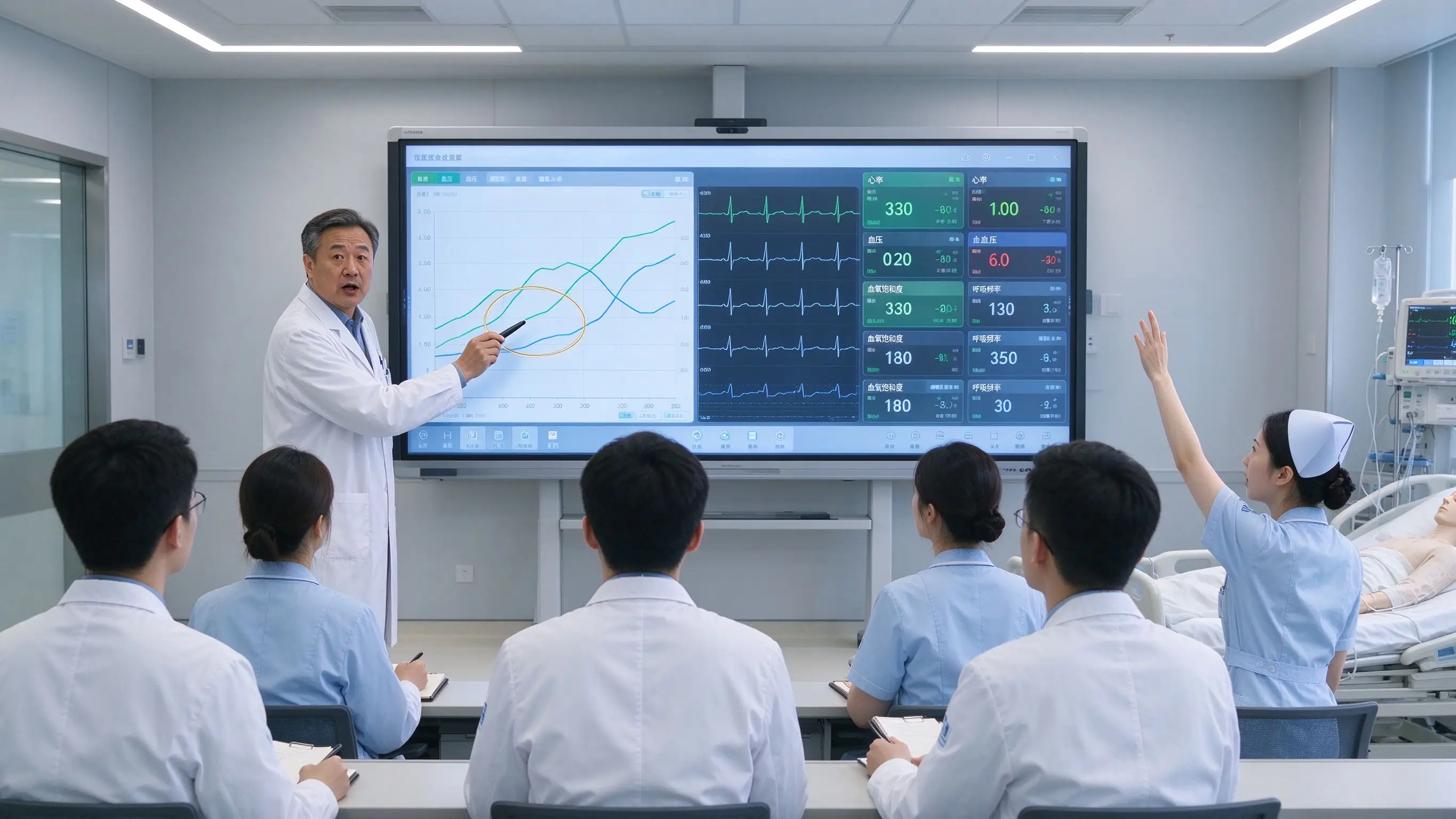
In an ICU training session, the teacher shows the patient's case and changes in vital signs, and the trainees need to judge the progress of the disease. The instructor marked the blood pressure, heart rate, blood oxygen and respiratory parameters on the screen, the nurse analyzed the nursing priority, the doctor discussed the respiratory support and medication plan, and the simulator produced new physiological response according to the trainee's operation. After the training, the team reviews each decision node together.
ICU clinical teaching often includes cases, images, data, equipment, processes and team decisions at the same time. It is difficult for traditional blackboards or ordinary projections to make these contents form a common space that can be operated, annotated and repeated. The interactive whiteboard can bring complex cases, monitoring data, anatomical maps, operation videos and simulation training results into the same teaching interface.
Qtenboard (Shenzhen Qunmao)Founded in 2005, we have been dedicated to interactive display manufacturing for 20 years. We operate a 330,000㎡ smart manufacturing industrial park in Shenzhen and Guangzhou, featuring eight fully automated production lines with a daily output capacity of 200 units. Our solutions serve 120 countries and regions worldwide, and we have provided services to over 15,000 corporate clients to date. The Qtenboard interactive whiteboard covers 55-110 inch full-size segments and is equipped with Q AI system-level framework and MediaTek Genio 520 platform, providing a complete solution from hardware to software for ICU clinical teaching, medical simulation center and remote medical education.
ICU cases involved vital signs, test data, imaging, medication, and treatment timelines. Participants need to understand multiple variables at the same time. Paper cases and ordinary PPT are difficult to present dynamic changes, and teachers often need to switch between multiple devices and files. A complete ICU case may contain dozens of parameters, changing trends at multiple time points, and response records of different treatment options-if this information is scattered in different carriers, it is difficult for students to establish a complete clinical cognition.
What to observe first? What indicators need to be prioritized? When to upgrade respiratory support? When to notify the superior doctor? How to divide the team? How to judge whether the treatment is effective? If the trainees only see the final answer, they cannot understand the complete decision-making process. The core challenge of ICU teaching is to make students understand "why they made that decision at that moment" on the timeline, rather than just remembering the "correct answer".
Intubation, puncture, tubing management, and equipment setup tend to have small operating spaces. Students in the back row may not be able to see the teacher's hand movements clearly. The same operation needs to be repeated over and over again. The real patient environment is not suitable for all students to observe closely. A typical scene is: the teacher demonstrates tracheal intubation on the simulator. Of the 20 students, only 3-5 people in the front row can see the operation details clearly, while the rest can only understand it through video playback or secondary explanation.
The participants only remember the results and are not sure where the error occurred. Teachers need to manually organize operation records, training videos, data and comments are scattered, and team communication problems are difficult to be visualized. Replay is the most valuable part of simulation teaching, but without a systematic replay tool, many key decision nodes and teamwork issues will be missed.
ICU training may involve critical care physicians, nurses, respiratory therapists, pharmacists, control personnel, emergency teams, and medical engineers. Different specialties need to build a common understanding around the same case and process. However, in actual training, different majors often use different teaching materials and lack a common visualization platform to align cognition.
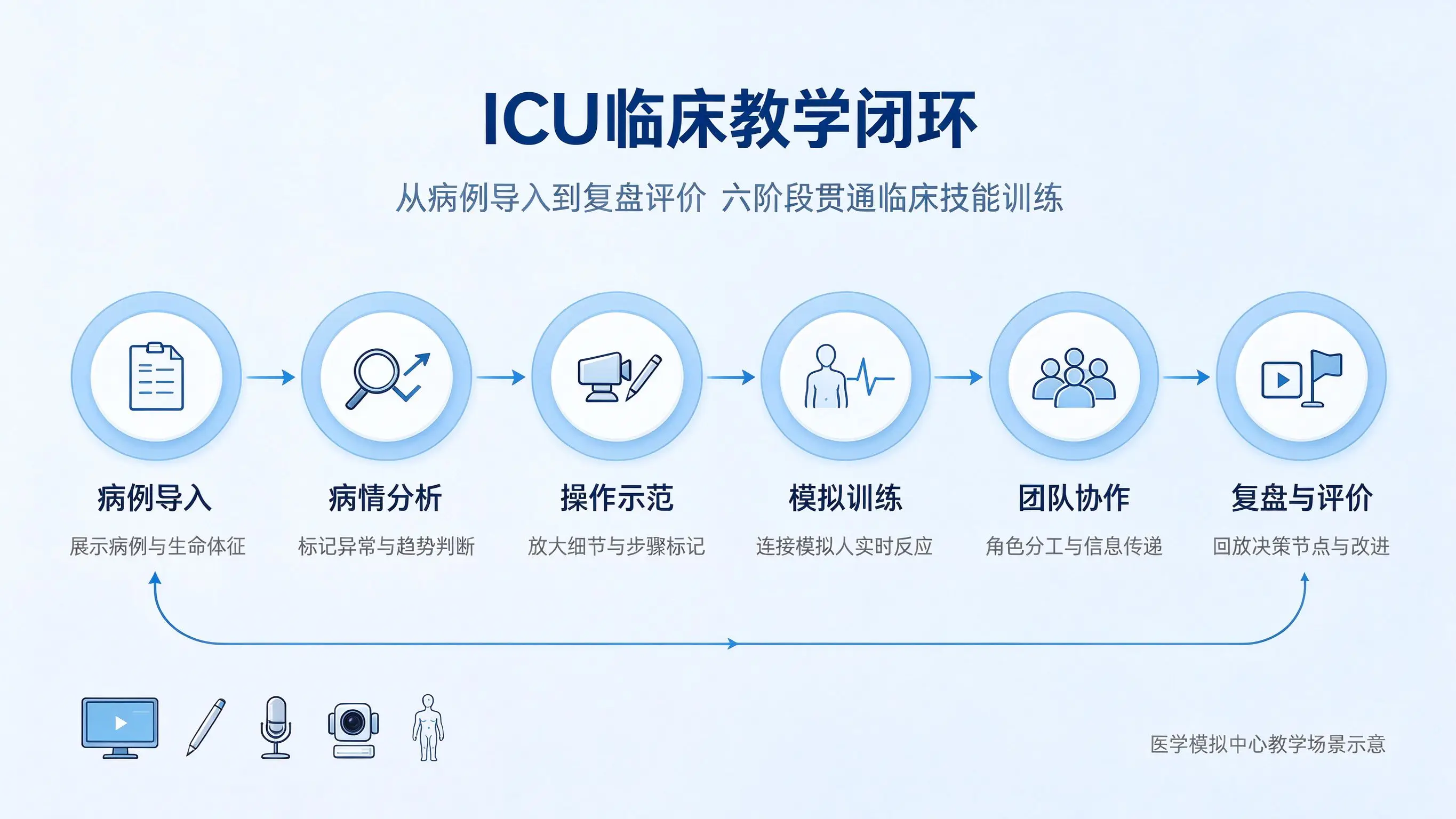
Teachers can display the patient's basic situation, reasons for admission, past medical history, current symptoms, laboratory tests, imaging data, changes in vital signs, medication and treatment records. Trainees can mark key abnormalities on the screen to establish a preliminary judgment of the case. Qtenboard 4K UHD display and AG anti-glare glass ensure that the details of image data and monitoring data are clearly visible, and 20-50 touch supports multiple students to mark at the same time.
Draw a timeline of the patient's state, mark the deterioration nodes, compare normal values with abnormal values, connect symptoms, indicators and possible causes, group students' views, and zoom in on images and monitor data through touch. Q AI supports handwriting recognition and graphic recognition, and flowcharts and mind maps drawn by students on whiteboards can be quickly converted to standard graphics.
Play the operation video, zoom in on the teacher's hand movements through the camera, mark key steps on the device interface or flowchart, pause and discuss risk points, and compare standard operations with common errors. Qtenboard supporting external cameras and microphone arrays, the teacher's operating area can be enlarged and projected onto a large screen to ensure that all students can see the details.
Connect the simulator or training equipment to display the heart rate, blood pressure, blood oxygen and breathing parameters. The students make judgments according to the situation. The teacher records the operation sequence on the whiteboard and demonstrates the changes of the disease through the virtual scene. Qtenboard support Windows OPS to run medical simulation software, Android Windows dual system switching time <3 seconds.
Assign tasks to different roles, record the actions of doctors, nurses and respiratory therapists, show team communication processes, analyze whether information is delivered in a timely manner, and identify overlapping or missing responsibilities. Qtenboard support 20-50 touch, multiple team members can work on the whiteboard at the same time.
Replay key decision nodes, compare standard processes, mark incorrect operations, discuss alternatives, save team replay results, and form training records and improvement plans. Q AI Conference Intelligence can record the whole training process, automatically distinguish speakers, and generate a structured review summary in 5 seconds.
Teaching content:Heart rate, blood pressure, oxygen saturation, respiratory rate, body temperature, urine volume, blood gas analysis, laboratory parameters.
Qtenboard applications:Draw the data at different time points into trend graphs, mark abnormal changes, discuss the relationship between indicators, let students predict the next stage of the disease, and compare the results of different interventions. The 4K resolution ensures that small print and fine data are clearly readable, and the AG anti-glare glass adapts to the different lighting environments of the ICU training room.
Teaching content:Oxygen therapy, noninvasive ventilation, invasive mechanical ventilation, ventilator parameters, alarm identification, line management, offline assessment.
Qtenboard applications:Show the ventilator interface, mark the meaning of parameters, simulate the results of different settings, analyze the cause of the alarm, and discuss the strategy selection of different cases against the standard operation process. Windows OPS supports running professional ventilator simulation software.
Teaching content:Cardiopulmonary resuscitation, defibrillation process, airway management, drug preparation, team division, time management, shift communication.
Qtenboard applications:Display countdown and task nodes, mark chest compressions, ventilation and medication sequences, display simulated ECG changes, record each operation time, resume team communication and role division. Q AI automatically record timelines and key decision nodes.
Hand hygiene, wear and take off of protective equipment, isolation area, medical waste disposal, pipeline and equipment cleaning, cross infection risk. Qtenboard can show flowcharts, risk areas, and operational videos, and have participants complete step sequencing and error identification.
Drug check, dose and concentration, infusion pump settings, high warning drugs, medication handover, adverse reaction identification. Decision-making exercises can be conducted through case scenarios, but formal clinical applications must follow hospital systems, drug specifications, and professional audits.
The doctor analyzes the diagnosis, the nurse reports the nursing situation, the pharmacist discusses the medication risk, the respiratory therapist analyzes the ventilation plan, the team jointly formulates the next plan, and saves the teaching content of the ward round. The Qtenboard supports multi-window display for simultaneous presentation of images, monitoring data and case documents.
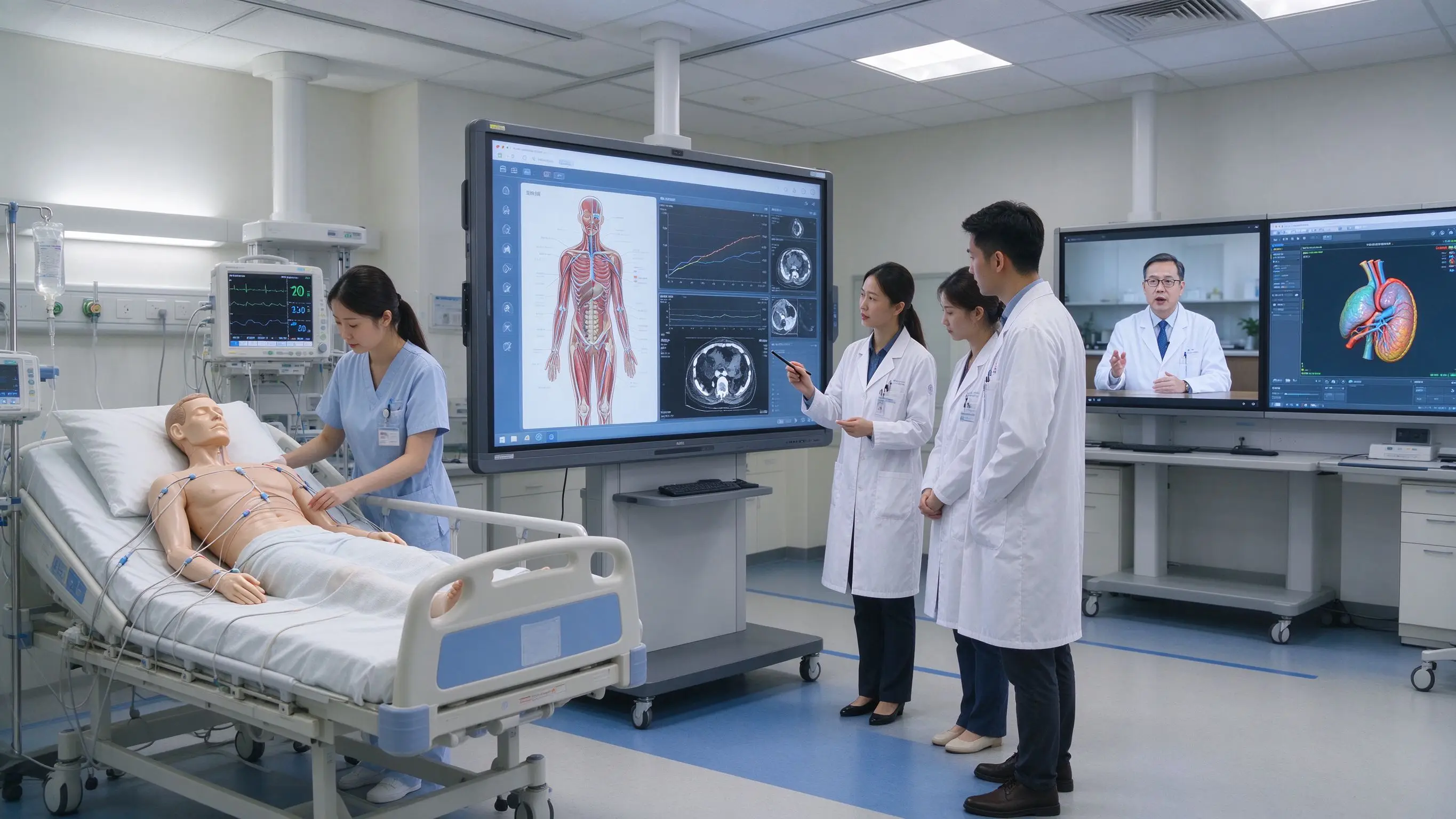
The high-fidelity simulator can change vital signs, ECG rhythm or blood pressure according to the operation of the student. The interactive whiteboard is used to display the situation, record the decision-making and organize the repetition. The Qtenboard can be used as a central display and collaboration platform for the simulation center, connecting the simulator control system and teaching software.
Suitable for airway management, venipuncture, central venous catheter, chest drainage, infusion pump, ventilator, defibrillator, wound and line care. The Qtenboard supports camera access, which can enlarge the operation details on the trainer to a large screen.
Collectively analyze virtual cases, observe the results of different choices, discuss risks and alternatives, provide rehearsals for real equipment training, and record student choices and wrong paths. Qtenboard Windows OPS supports running virtual simulation software.
Replay student actions, pause analysis of key actions, mark team communication issues against operational standards, save instructor comments, and generate a personal improvement list. Qtenboard supports video pause, frame-by-frame playback, and picture annotation.
Top hospital experts teach remotely, display equipment and operating areas through cameras, and interactive whiteboards simultaneously display courseware, videos and cases. Remote students can ask questions, mark and participate in discussions. Qtenboard Q AI supports real-time translation and real-time subtitles in 166 languages.
The general hospital and the branch hospital share cases, multiple training centers are connected at the same time, different hospitals compare the processing procedures, experts explain the specifications in a unified way, and save and distribute teaching materials after class. Qtenboard supports screen mirroring for up to 9 devices simultaneously.
A center for simulation, other hospitals remote observation, through the whiteboard marking decision-making nodes, participants jointly analyze the operation process, the formation of cross-institutional teaching records. Q AI automatically generate structured resume minutes and synchronize to Microsoft Teams or Google Workspace with one click.
On-site students operate simulation equipment, remote students view synchronously, teachers explain on the whiteboard, upload course content after class, and support shift medical staff to study flexibly.
Try to use de-identified cases, delete names, hospitalization numbers, contact information and identifiable images, control rights to images, medical records and monitoring data, clarify the retention period of teaching data, and avoid uploading patient information directly to unknown cloud services. Qtenboard Q AI core transcription runs locally on the device, it can be used without networking, reducing data privacy risks at the architectural level.
Whiteboards can be used for teaching, presentation, and collaboration, and should not assume the core functions of an electronic medical record without verification, and should not modify clinical orders or patient records without authorization. Medical data connectivity must comply with hospital IT and information security specifications. Integration with HIS, EHR, PACS, or other systems requires a formal technical assessment.
Q AI is not a cloud-based plugin; it is a native intelligent architecture deeply integrated into the hardware, software, and algorithm layers. Core transcription runs locally on the device, eliminating cloud latency and network dependency. Core capabilities include real-time noise reduction, speaker differentiation, 166 + language support, industry term recognition, and custom vocabulary. Q AI supports the generation of structured resume minutes in 5 seconds, shortening the original 1-hour finishing time by more than 75%.
The Qtenboard Genio 520 interactive tablet platform is based on the MediaTek Genio 520 (MT8371) chip, and the 8th generation MediaTek NPU directly provides 10 TOPS dedicated AI acceleration on the interactive tablet. Based on TSMC's 6nm FinFET process, Genio 520 achieves high performance with low thermal output, which makes Qtenboard fanless interactive flat panel design possible-essential for demanding acoustic environments such as ICU training rooms. MediaTek officially commits to the Genio 520's 10-year standard supply life cycle.
The ICU of a tertiary hospital receives 30-50 new nurses every year and needs to understand the monitor, ventilator and first aid process. The real ICU is not suitable for multi-person onlookers and repeated operations. Training materials, videos and evaluation records are scattered in different systems.
After the Qtenboard 86-inch interactive whiteboard is deployed, the teacher displays the case and equipment interface through a large screen, the camera enlarges the teacher's operation, the students sort the nursing process on the whiteboard, the simulated person carries out operation training, and the training results are replayed on the whiteboard. Q AI automatically generate training minutes, and DMS uniformly manages the equipment of 3 training rooms. New nurses have significantly improved their understanding of the process before entering the clinic, and the time for teachers to record error points has been reduced by about 60%.
A hospital ICU weekly multidisciplinary case discussion, doctors, nurses, pharmacists and respiratory therapists focus on different, the meeting information is difficult to unify, decision-making and training content is not easy to retain.
After using Qtenboard 98-inch interactive whiteboard, the team introduced de-identified cases and monitoring trends. Each major marked risks on the same whiteboard, jointly set processing priorities, and saved decision paths and teaching conclusions. Q AI automatically organize discussion points and generate multidisciplinary meeting minutes with one click. Multidisciplinary communication efficiency has been significantly enhanced, and a reusable library of teaching cases has been established.
A provincial hospital needs to provide intensive medical training to five grass-roots hospitals. Grass-roots hospitals lack of intensive medical experts, experts can not teach on-site for a long time, and the training standards of different hospitals are inconsistent.
After the deployment of Qtenboard 75-inch interactive whiteboard, the central hospital will conduct remote demonstration through video conference and whiteboard. Branch students will simultaneously view cases, equipment and operation procedures, annotate and guide remote experts, and save courses and resume contents after class. Q AI supports real-time subtitles in over 166 languages, significantly enhancing the standardization of cross-campus training and reducing expert travel costs by approximately 70%.
| Indicator category | Traditional method | Qtenboard Programme |
|---|---|---|
| Training record arrangement | Manual finishing, about 60 minutes/time | Q AI 5 seconds to generate structured resume summary |
| Distance training coverage | Experts travel on business, covering 1 hospital area at a time | Remote coverage of 5 + hospital areas reduces travel by 70% |
| Device Management | Maintenance one by one, no unified platform | DMS unified monitoring, predictive diagnostics |
| Training data reuse | Scattered, difficult to retrieve | Digital whiteboard automatically saved, searchable, reusable |
| Participant Participation | Can't see clearly in the back row, low participation | 4K large screen camera zoom, all clearly visible |
The data is based on Qtenboard typical medical training deployment scenarios, with actual results varying depending on the size of the project and how it is used.
ROI example:If ICU of a hospital conducts 8 training sessions per month, it takes 60 minutes for each session to be replayed, and the time is reduced by 75% through automatic transfer of Q AI and 5-second generation of minutes, which can save about 8 × 1 × 75% = 6 hours per month. Coupled with the reduced expert travel costs of remote training and the IT operation and maintenance time saved by DMS centralized management, the annual overall efficiency can increase by hundreds of hours.
The whiteboard can assist in teaching and information display, and cannot be used to make diagnosis and treatment decisions, modify medical orders or core medical records without verification. The right thing to do: Position the whiteboard as a teaching and collaboration tool, with integration with HIS/EHR/PACS subject to formal assessment.
Remote experts can not see the operation, students can not hear the explanation, training effect will be greatly reduced. The right thing to do: plan the camera, microphone array, echo cancellation, and audio overlay simultaneously.
ICU data may contain sensitive patient information. Correct approach: use de-identified cases and comply with hospital information security procedures. Q AI core transcription runs locally, reducing data privacy risks.
Students understand the process, but not necessarily the operation. The correct way: whiteboard, simulation, simulation of people and real equipment collaboration. Qtenboard support Windows OPS to run medical simulation software.
Medical training spaces have higher requirements for surface cleanliness, equipment stability and environmental noise. The Qtenboard adopts 9H tempered glass and AG anti-glare coating, which supports wiping with common cleaners; the fanless design ensures zero noise during operation.
The medical training program also includes software, cameras, microphones, brackets, networking, training and after-sales. Correct approach: Use the full project TCO assessment.
Can the interactive whiteboard be connected directly to a monitor or ventilator?
Whether it can be connected depends on the device interface, teaching software, data format and hospital system. Interactive whiteboards can display authorized teaching data, video or simulation interfaces, but they need to be jointly verified by hospital IT, equipment manufacturers and system integrators before formal connection. Qtenboard supports running medical simulation software on Windows OPS, with a dual-boot switching time between Android and Windows of less than 3 seconds.
What size should ICU teaching choose?
Small skills training rooms can be assessed at 65 or 75 inches; multi-person case discussion and simulation centers can be considered at 86 or 98 inches. Finally, it should be confirmed in combination with the farthest viewing distance, the number of students, the position of the training platform and the details of the equipment interface. Qtenboard covers the entire size range from 55 to 110 inches and can provide recommendations for selecting the appropriate size.
Do I need to Windows OPS?
If used only for whiteboards, courseware, and video conferencing, Android may be sufficient; if you need to run medical simulation software, Windows teaching platforms, Office, or professional programs, you should evaluate Windows OPS or external workstations. The Qtenboard OPS module is based on the Genio 520 platform and is available with i5 or i7 configurations.
Can it be used for remote expert training?
Cameras, microphones, speakers, video conferencing platforms, and digital whiteboards can be configured to support remote presentations, case discussions, and analog playback. Qtenboard Q AI supports real-time subtitles and translation in 166 languages, and supports up to 9 devices simultaneously.
Can Qtenboard do hospital project customization?
Logo, startup interface, software entry, language, OPS, camera, microphone, stand, DMS and OEM/ODM configuration can be evaluated according to the project. Medical data interface and compliance requirements shall be further confirmed by the project party after providing technical specifications. A dedicated OEM production line ensures that customization does not affect the delivery schedule of standard products.
How to deal with equipment cleaning and disinfection?
The Qtenboard adopts 9H tempered glass and AG anti-glare coating, and the surface supports wiping with common medical cleaners. The fanless design avoids dust inhalation and reduces long-term maintenance requirements. It is recommended to confirm the compatibility of specific cleaning agents before purchasing.
If you are planning an ICU clinical teaching, medical simulation center, or telemedicine training program
Qtenboard provide 55-110 inch full-size interactive whiteboard, Q AI system-level framework (166 language, local operation, 5-second minutes), DMS device management and OEM/ODM/CKD/SKD customization services.
Get a selection guide for Qtenboard medical training options, or book a factory visit and prototype testing.
 Partner Links:

 en
 中文

 Previous:
 Return to list

