Service Hotline:

+8615920011166

en en

All-in-one interactive whiteboard solution

Solution of Qtenboard 9679 Intelligent Meeting Whiteboard System

Release date: 2026-10-10 Clicks:0
Qtenboard 9679-Intelligent Meeting Whiteboard System

One-screen integrated writing, projection and collaboration
Let the meetingGood drive, remember, pass

Integrated meeting whiteboard solution for meeting rooms, teaching and training, and government and enterprise office scenarios: intelligent whiteboard writing, wireless screen projection, document collaboration and AI applications are integrated into one device, allowing meetings to move from "can be opened" to "efficient opening and precipitation 」.
Multiple scenarios 10 Industry adaptation Multiple devices One-click wireless screen mirroring Multilingual AI voice transcription Continuous upgrade OTA USB Firmware
Qtenboard 9679 Smart Whiteboard Main Interface
Wireless screen mirroringmPhotool · Bozee · EShare

One screen with multiple functions

Whiteboard writing, wireless screen projection, file management, and AI applications are integrated into one device to reduce device stacking.

Multi-person collaboration

Collaborative room creation, two-dimensional code sharing, cloud file circulation, meeting results instant precipitation

Flexible screen projection

It is suitable for three screen projection software, supports one-button screen projection of wireless screen projection device, and is compatible with USB / Type-C

Secure and controllable

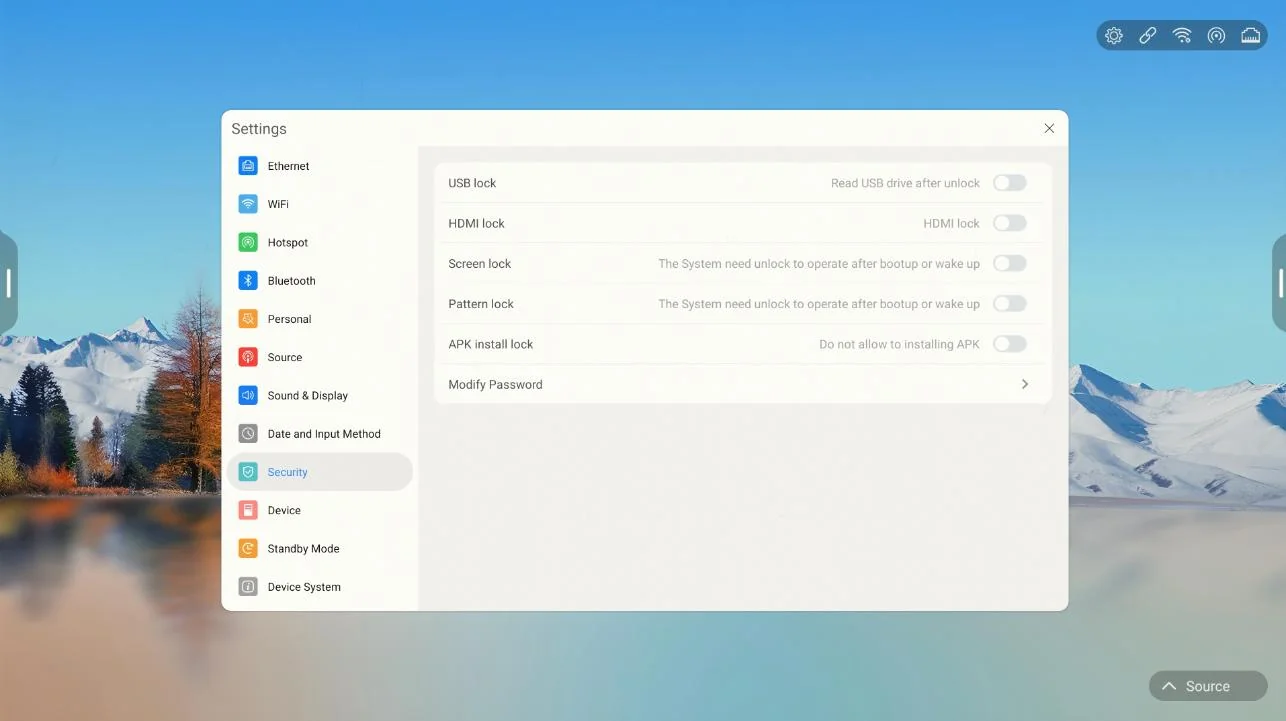
USB/HDMI/Screen/Pattern/APK/Fingerprint Multi-Layer Security

PRODUCT OVERVIEW

Product Overview

Qtenboard 9679 is an intelligent conference whiteboard system for conference and collaboration scenarios, with large-screen writing, wireless screen projection, file management and AI capabilities as the core, providing an integrated collaboration experience for various organizations.

Simple main interface, function entrance direct

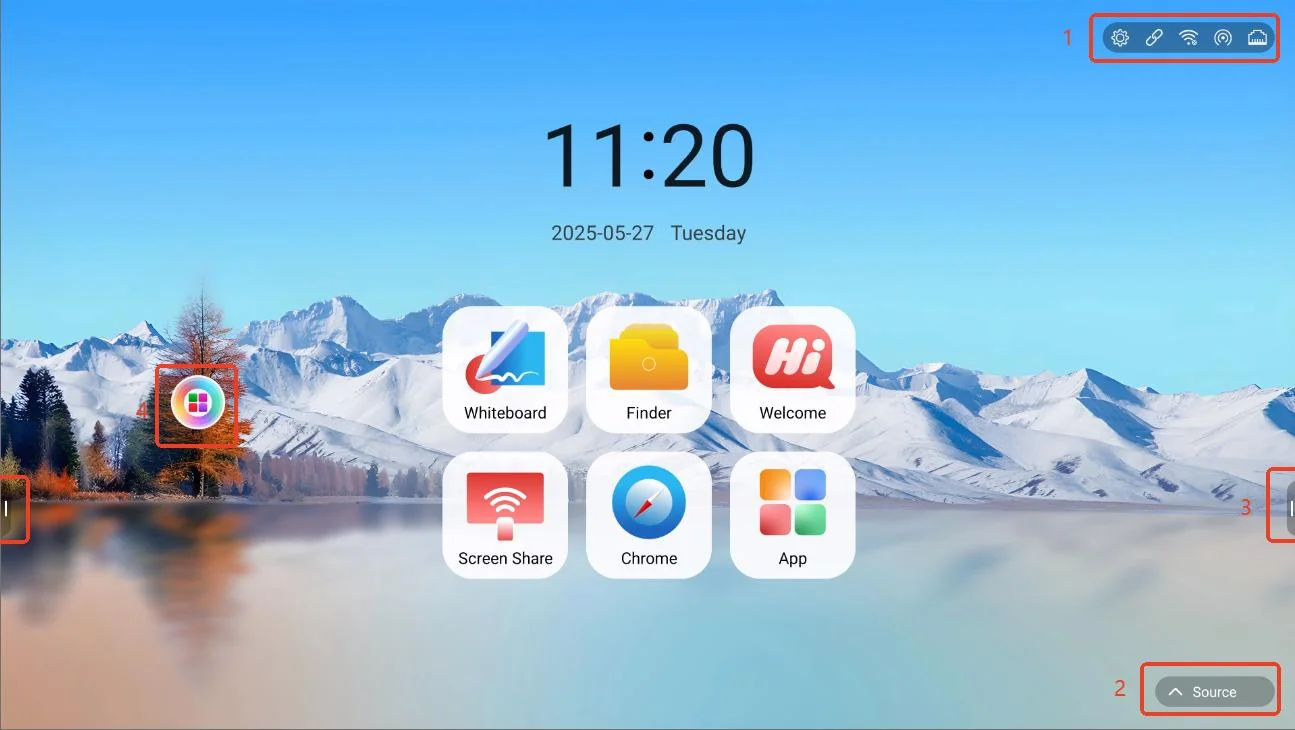
The layout of the main interface of the system is clear and the key information is clear at a glance: the network and server status are displayed in the upper right corner, the signal source is switched in the lower right corner, the sidebars on both sides carry quick operations, and the floating menu supports custom application combinations on demand.
  • Quick network settings in the upper right corner: settings, server connection, WiFi, hotspot, Ethernet status at a glance
  • Lower right corner of the signal source switch, fast access to different input devices
  • Symmetrical sidebar on both sides, supporting annotations, applications and shortcut settings
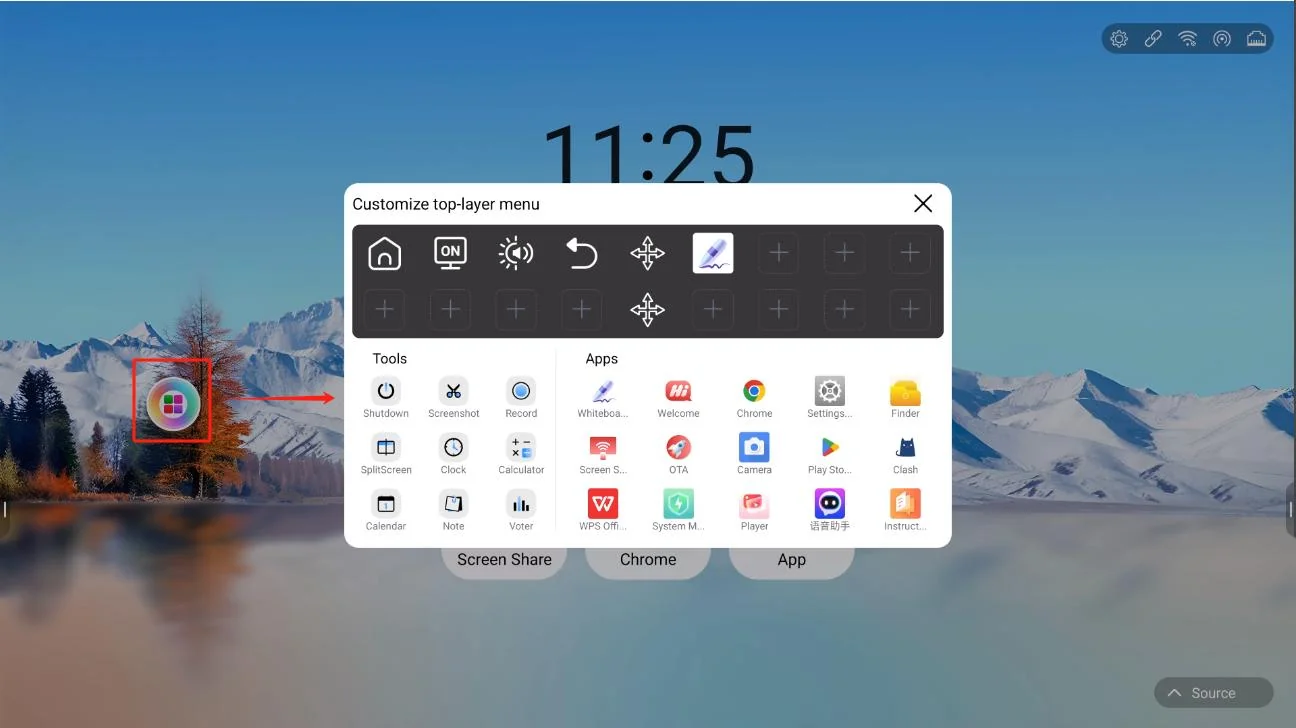
  • Floating menu "" Custom application function, combining frequently used applications on demand
Qtenboard 9679 Smart Whiteboard Main Interface
System main interface
Qtenboard 9679 Floating Menu Custom Apps
Floating menu customization app
CORE FEATURES

Core Functional Scenario

The ability matrix designed around the whole process of the meeting: write, recognize, pass and control.

SMART WHITEBOARD

Smart Whiteboard

A variety of pen type and recognition ability, so that writing is not only a record, but also content production.
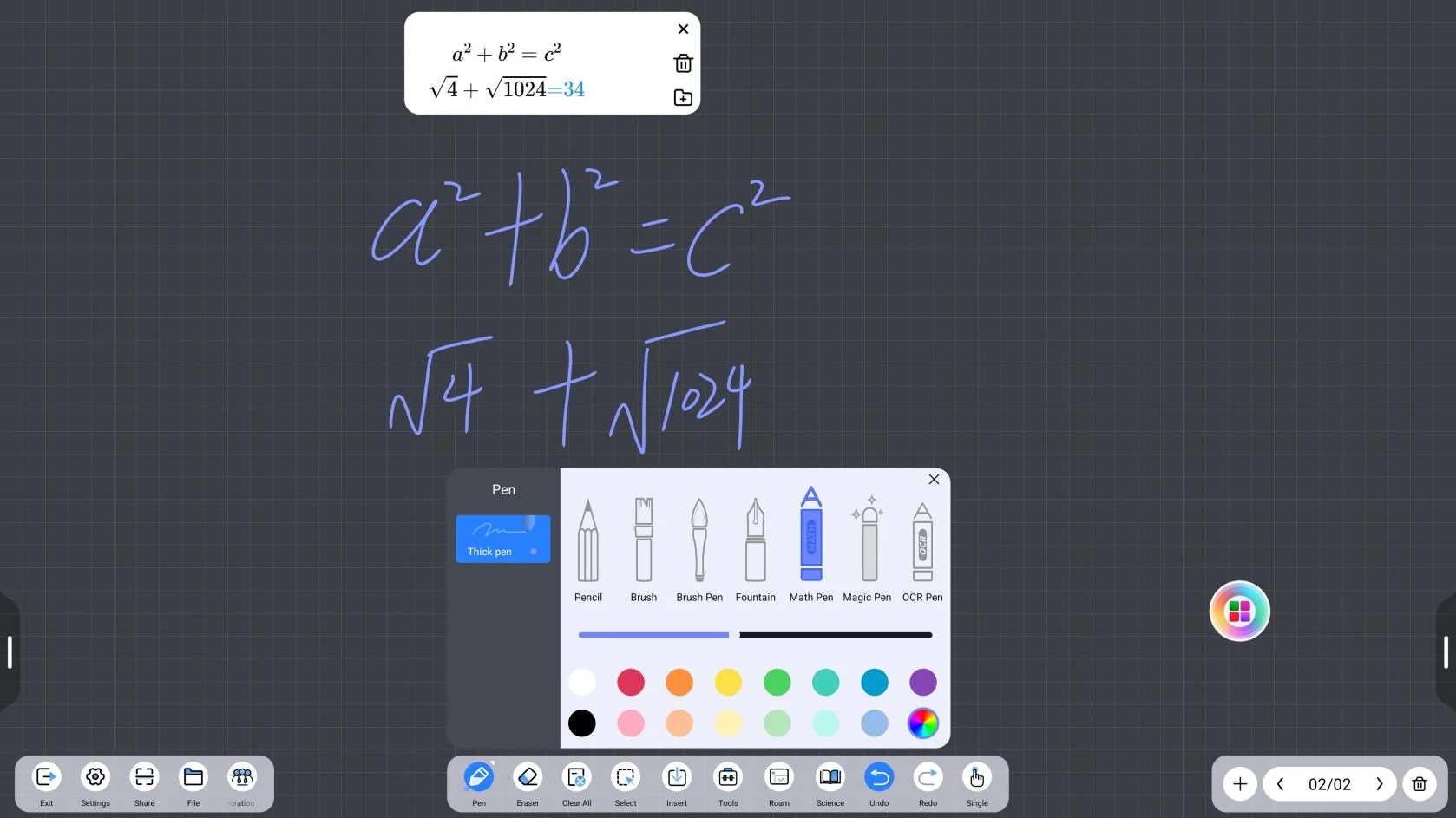
  • Brush tools: pencil, rough brush, magic pen, OCR pen, formula pen, long press the color plate to customize the color and synchronize the annotation
  • Formula Pen: Extract handwritten formulas and support simple math calculations
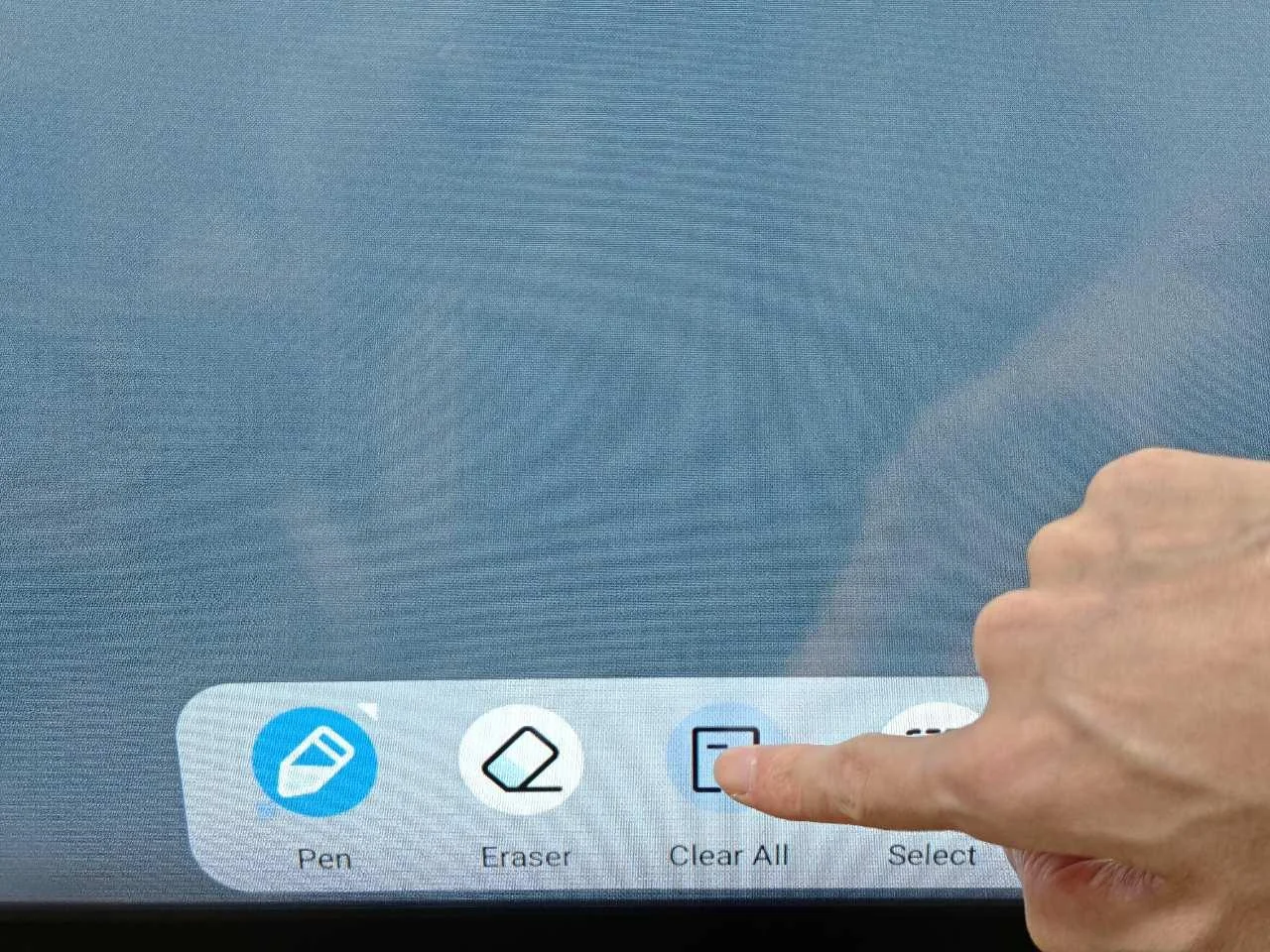
  • Eraser: universal, round, full screen, back hand erase (5 levels of adjustment)
  • Box selection tools: color, top, copy, delete, mirror, search, AI recognition, cropping, voice reading
  • Insert tools: graphics, tables, pictures, videos, documents, web pages, cameras, and notes, voting, mind maps, etc.
  • Subject tools: mathematics, physics, chemistry, biology, geography, music and other teaching plug-ins
Qtenboard 9679 Whiteboard Pen ToolsBrush tool
Qtenboard 9679 Formula Pen RecognitionFormula pen writing recognition
WHITEBOARD SETTINGS

Whiteboard settings

Writing, erasing, background and software capabilities are fully adjustable to adapt to different usage habits.
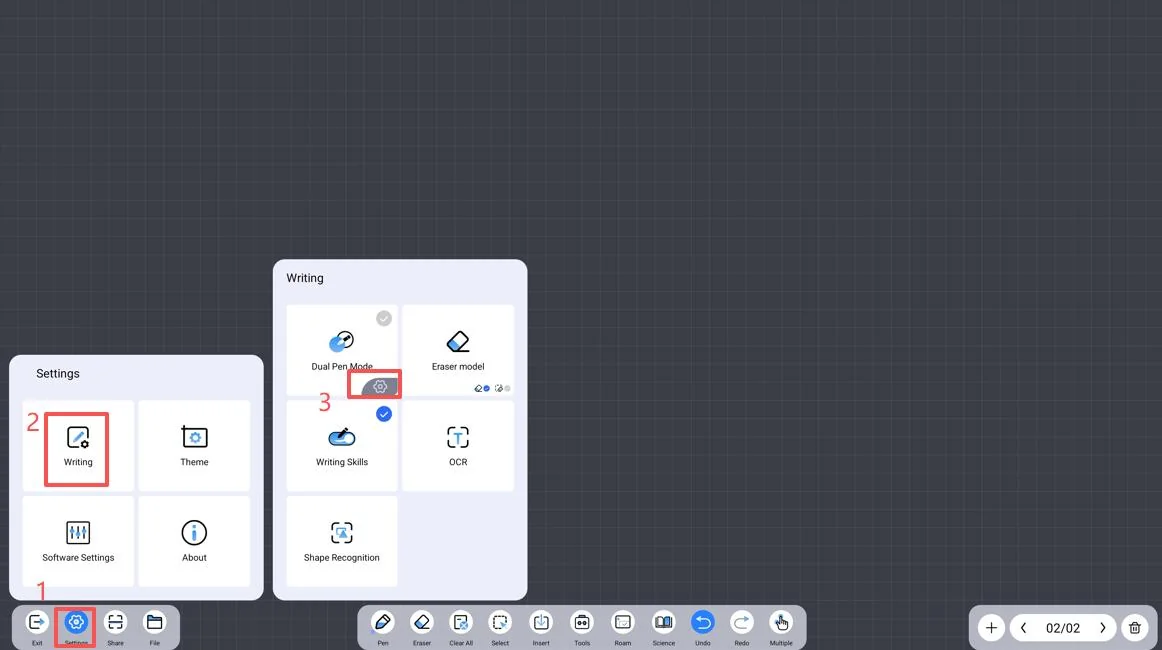
  • Double-color pen switch and touch range setting, eraser setting the same mode of operation
  • OCR and magic pen text recognition, support multi-language type settings and graphic recognition library
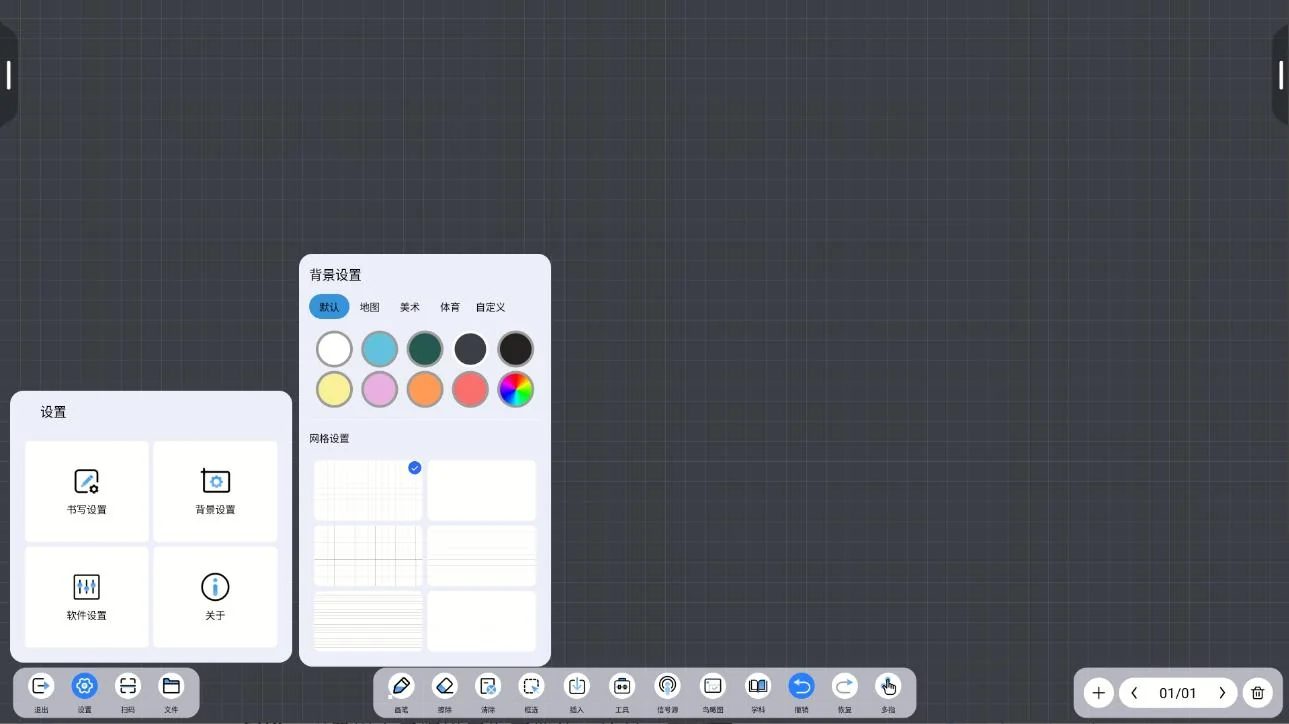
  • Background settings: canvas background color and grid independent settings, custom background support 2K resolution
  • Software settings: two-dimensional code sharing, LAN/public network, abnormal exit data recovery, text search in the box
  • Customize Toolbar: Insert up to 8 tools below the whiteboard; Bird's-eye view View Hidden Notes and Materials
Qtenboard 9679 Writing And Eraser SettingsWriting/Eraser Settings
Qtenboard 9679 Whiteboard Background SettingsBackground settings
COLLABORATION & FILES

Conference collaboration and document management

The results of the meeting are saved immediately, shared safely and circulated across the end.
  • File saving: supports source file, picture and PDF formats. The source file can be encrypted and saved to local/U disk/cloud disk
  • QR code sharing: supports encrypted sharing and ordinary sharing, and immediately distributes meeting records after the meeting.
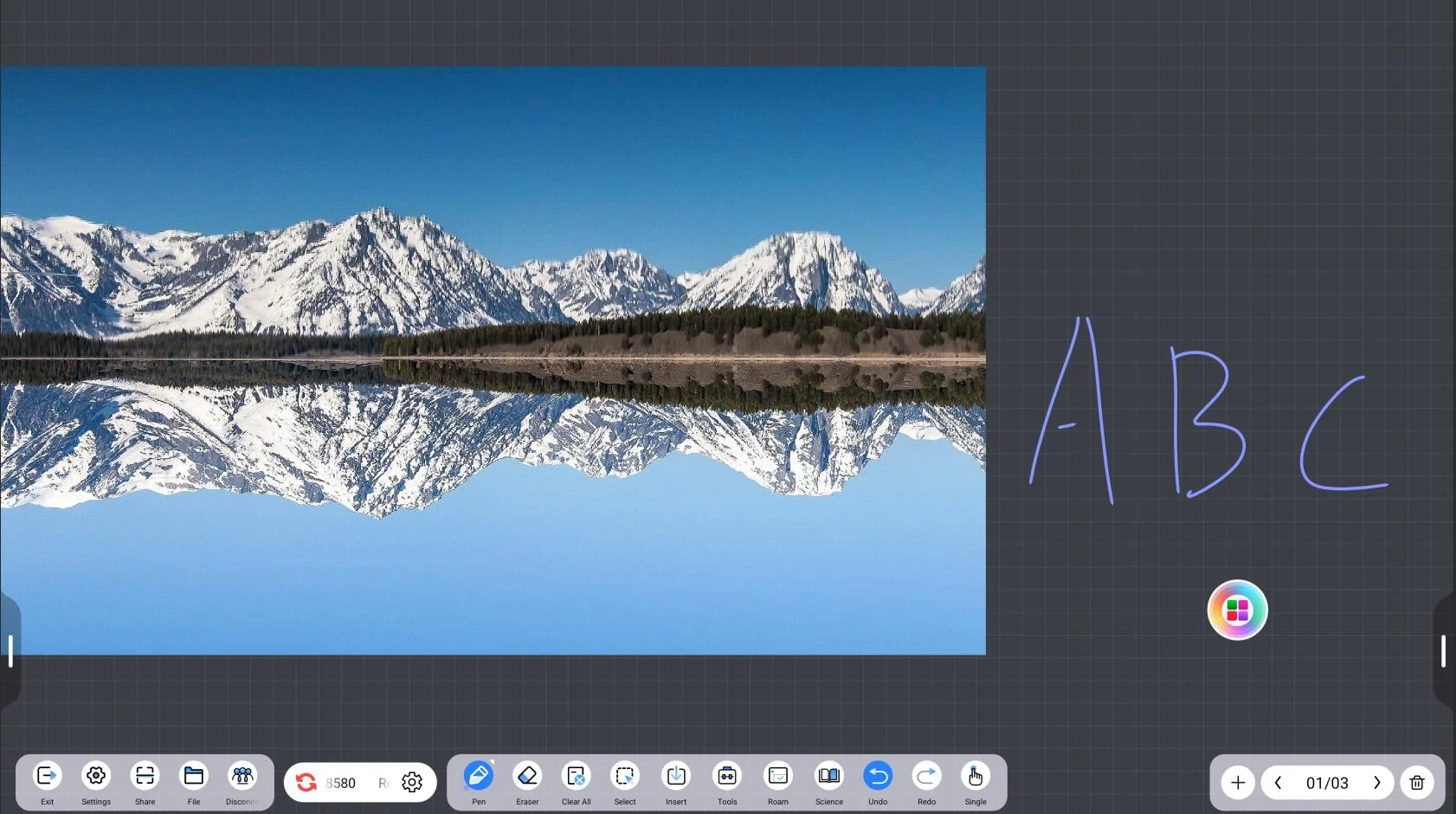
  • Collaborative co-creation: create a room, enter a room number to join, multiple people view the whiteboard and co-create
  • Cloud file: LAN cloud disk, supports mobile phone scan code upload and computer browser IP upload
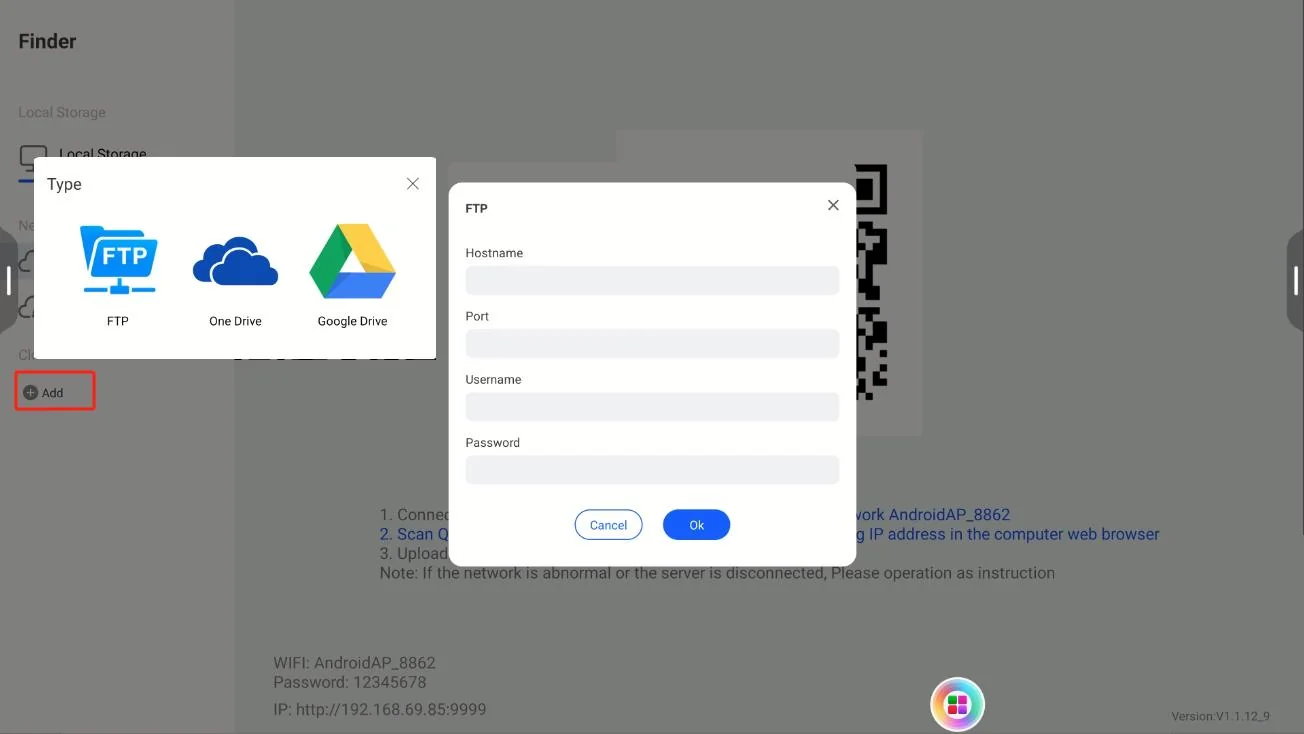
  • Cloud disk: FTP is directly deployed on local area network or public network, supporting OneDrive and Google Drive network disk access
Qtenboard 9679 Collaborative Creation RoomCollaborative co-creation
Qtenboard 9679 Cloud Drive FTP OneDrive Google Drive云盘接入(FTP / OneDrive / Google Drive)
WIRELESS PRESENTATION

Wireless screen mirroring

Multi-software adaptation screen projection device one-key screen projection, say goodbye to cable constraints.
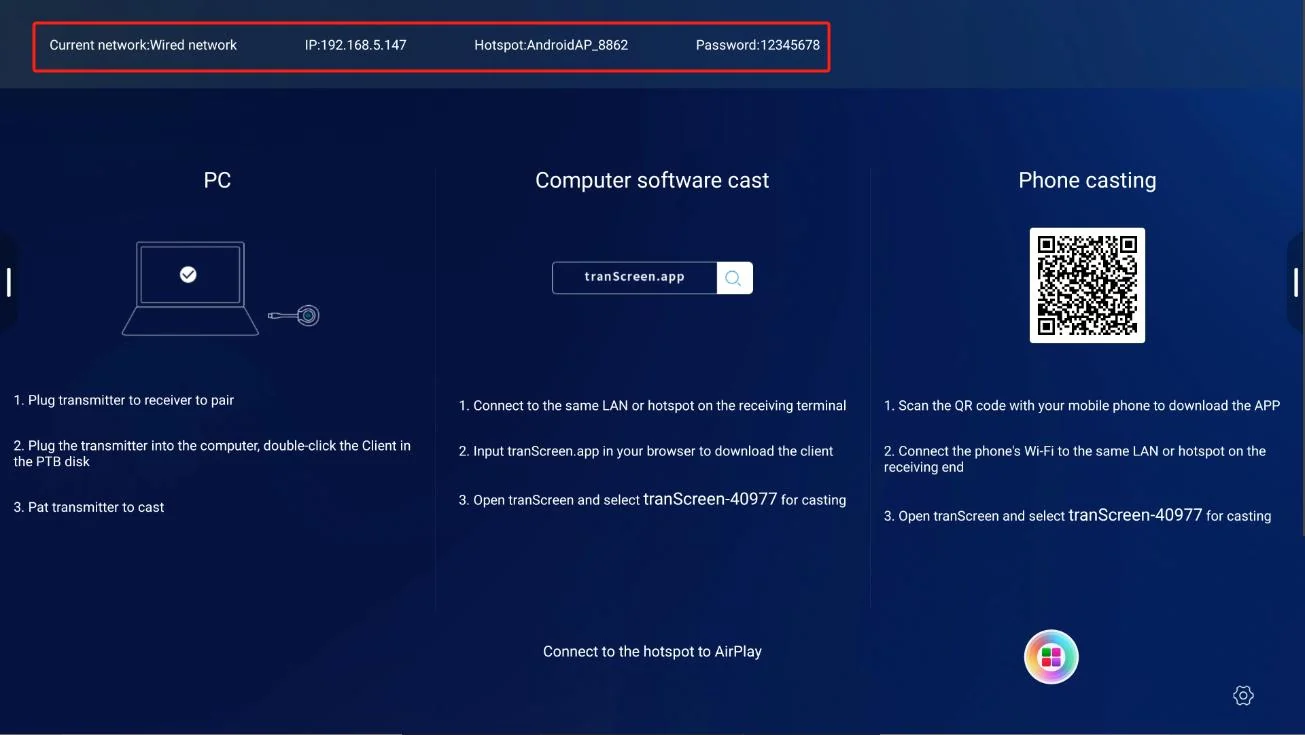
  • The system is adapted to mPhotool, Bozee and EShare, and is installed on demand for the first time.
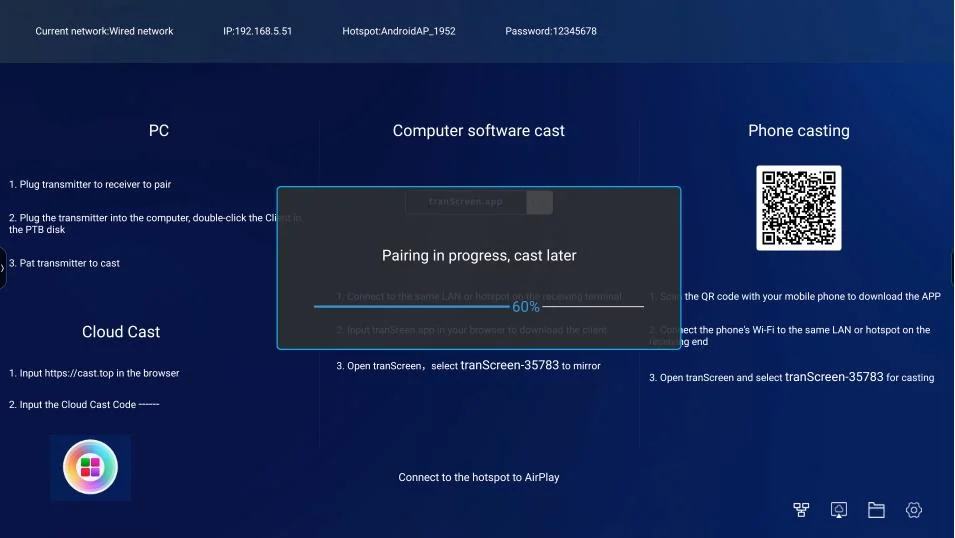
  • Wireless screen projection device (take mPhotool as an example): hot spot pairing, Client.exe connection, one-button screen projection
  • Replace the screen projection software: tablet management-download it again after uninstalling in the application
Qtenboard 9679 Screen Mirroring Software SelectionScreen software selection
Qtenboard 9679 Wireless Screen Mirroring ReceiverWireless Screen Cast Receiver
SYSTEM & SECURITY

System Settings and Security

Network, display, signal source and security policies are fully manageable and controllable, adapting to organizational management requirements.
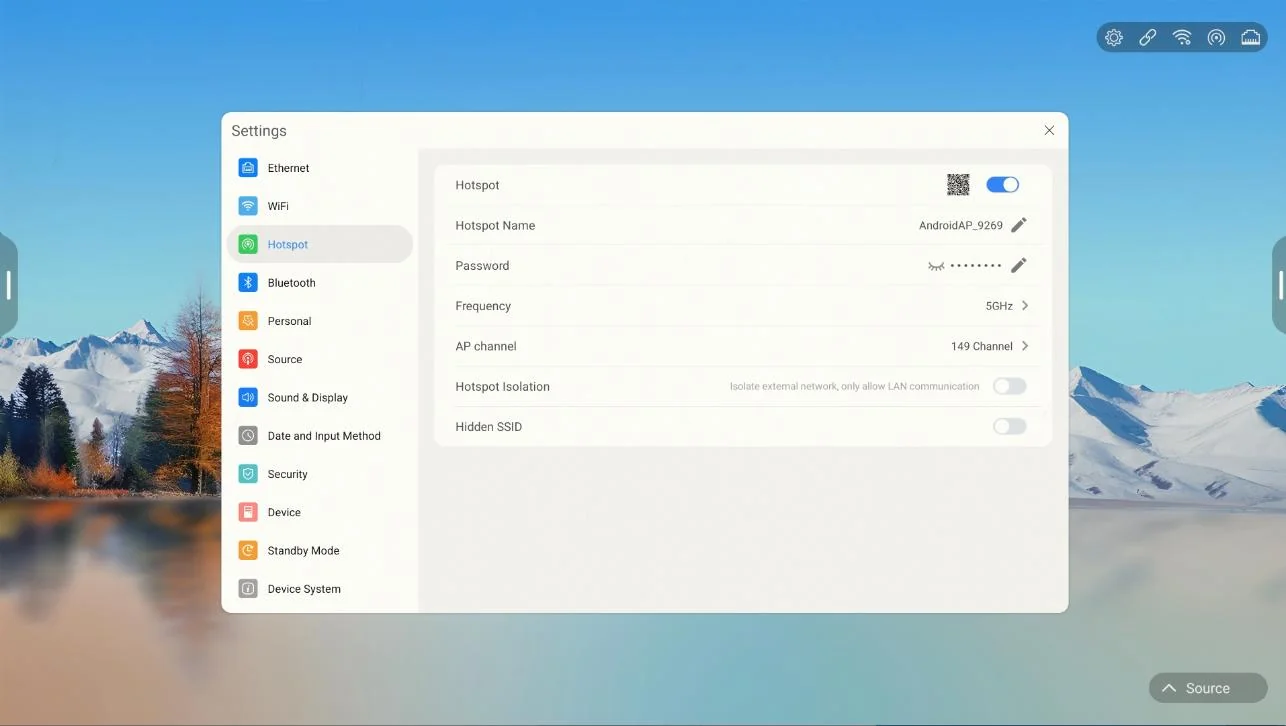
  • Network settings: Ethernet, WiFi, Hotspot, Bluetooth; Hotspot supports custom name, password and channel switching
  • Signal source: power-on state/power-on channel/custom name/PC power-on/wake-up in three seconds
  • Sound and display: microphone selection, automatic brightness of ambient light, rice paper/kraft paper/sketch paper/watercolor paper eye protection
  • Security settings: USB lock, HDMI lock, screen lock, pattern lock, APK lock, fingerprint lock
  • External devices: NFC, fingerprint module, pen wake-up, gesture control, server connection status detection
Qtenboard 9679 Hotspot SettingsHotspot Settings
Qtenboard 9679 Security SettingsSecurity Settings
SCENARIO TOOLS

Multi-Scene Accessibility

From welcome to discussion, covering the whole process of the meeting.
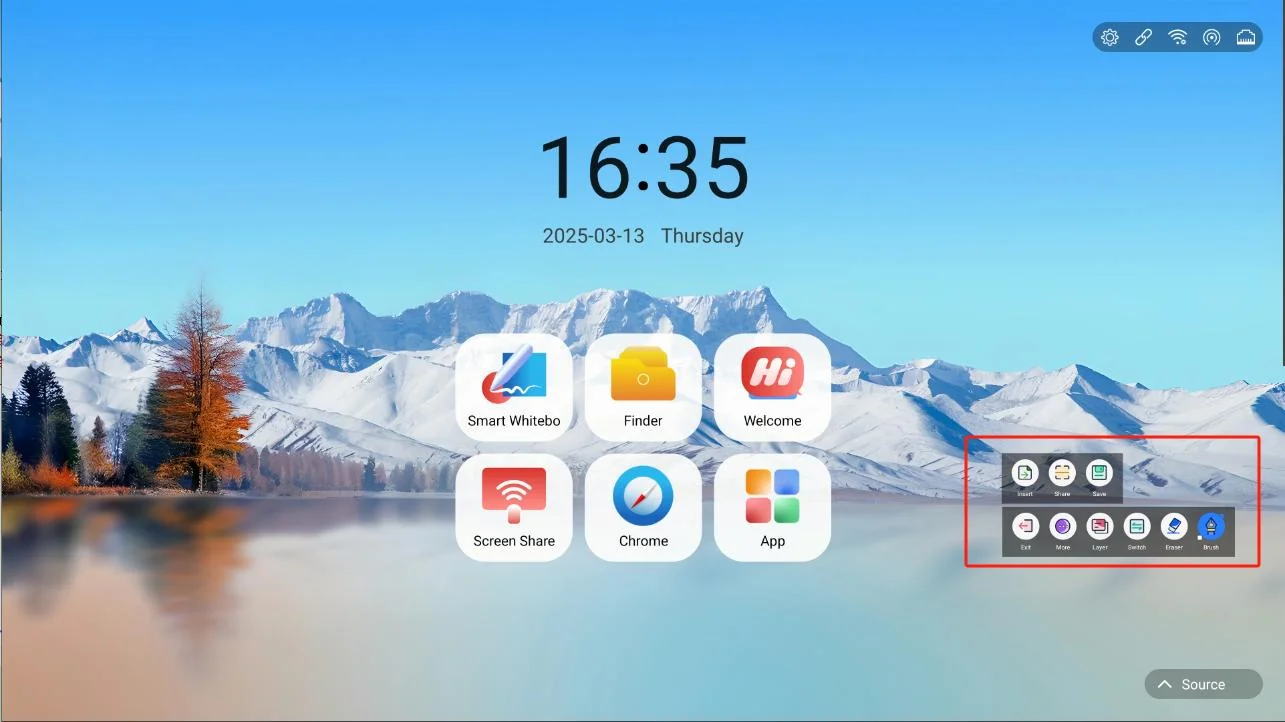
  • Welcome template: company, government, medical, education, advertising, transportation, automobile, manufacturing, clothing, construction and other scenes
  • Split screen mode: single screen, double screen (up and down/left and right), four screen, support for inserting pictures and videos
  • Sidebar and annotation: open annotation in any interface, and support sharing, saving and drawing board management
  • Quick settings: OPS/HDMI/front HDMI signal source switching, eye protection mode, brightness adjustment
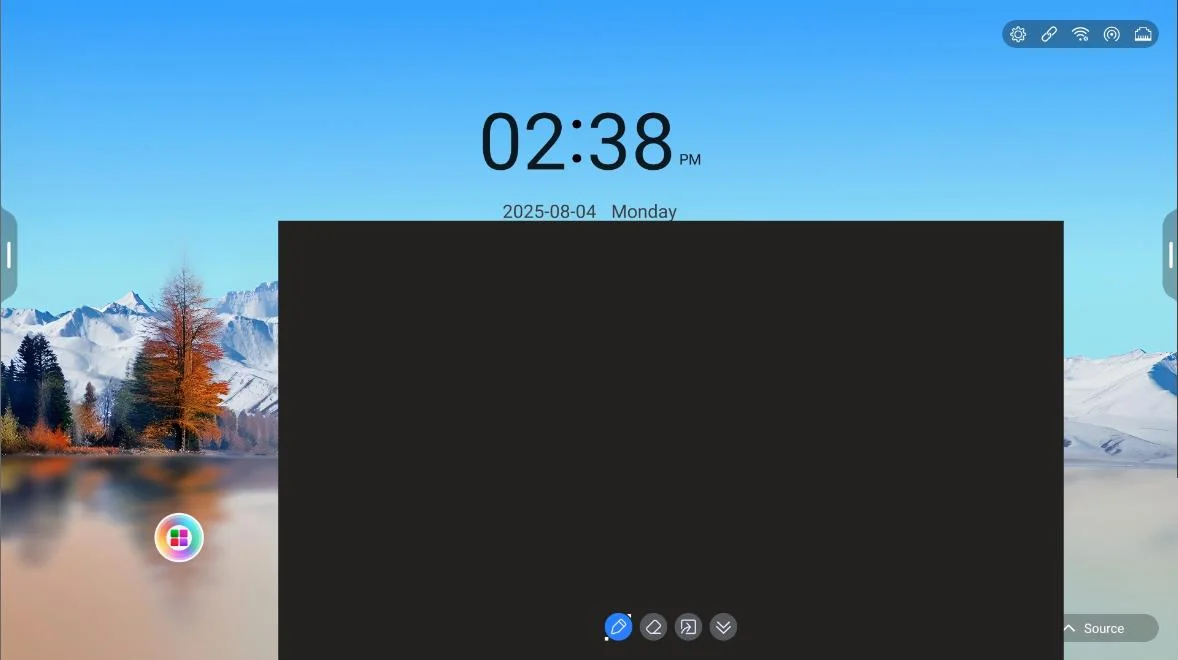
  • Window whiteboard: slide up to the bottom of any interface to support writing, erasing and importing whiteboard
Qtenboard 9679 Quick Settings PanelQuick Settings Panel
Qtenboard 9679 Window WhiteboardWindow Whiteboard
AI ASSISTANT

AI intelligent applications

From tools to assistants, make meeting whiteboards capable of understanding and dialogue.
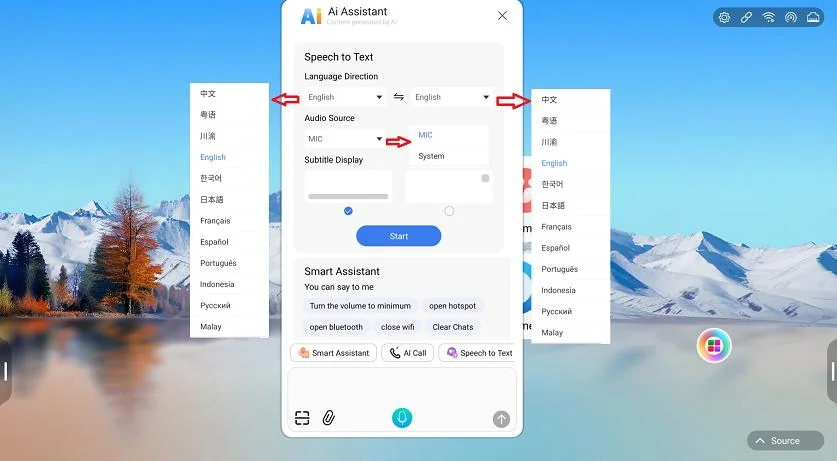
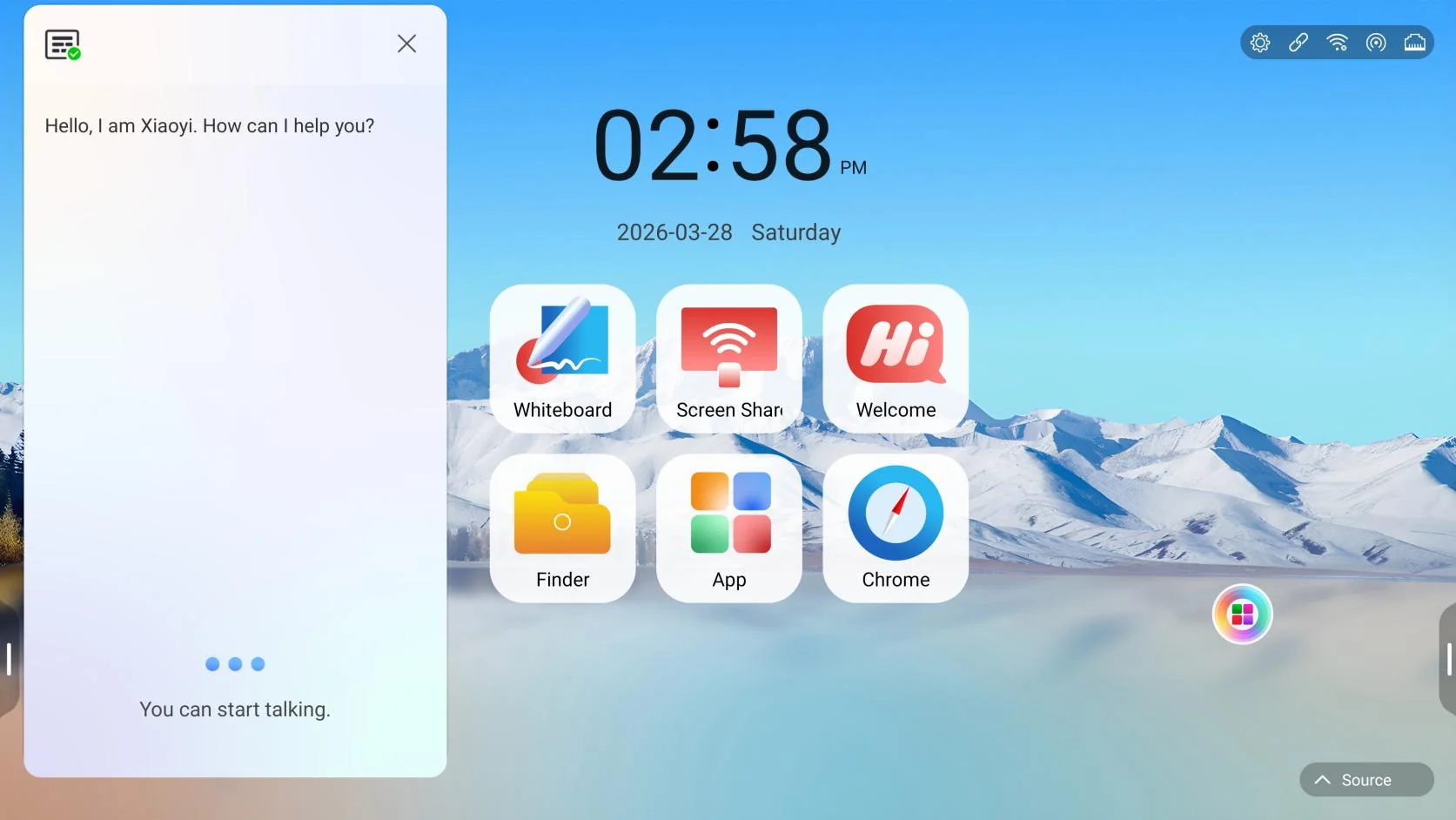
  • Intelligent Voice Assistant: Voice Interaction and Device Function Command Control
  • Voice to text: support multi-language translation, microphone and system to record dual scenes
  • Intelligent assistant: general knowledge question and answer and equipment function instructions, support voice, scan code, keyboard input
  • AI Virtual People Call: Live Chat with AI Virtual People
Qtenboard 9679 AI Assistant And Voice To TextAI Assistant and Voice-to-Text
Qtenboard 9679 AI Virtual Human CallAI Virtual Person Call
APPLICATION SCENARIOS

Typical application scenarios

A system that flexibly adapts to multi-industry conference and presentation needs.

Corporate Conference Room

Whiteboard discussion, wireless screen projection, two-dimensional code sharing, collaborative creation, and one-click archiving of post-conference documents make the conference output precipitated and traceable.

Teaching and training

Subject plug-in, formula pen, OCR/magic pen recognition, mind map, split-screen teaching and paper eye protection to build an efficient interactive classroom.

government and public institutions

Industry welcome template, USB/HDMI/screen/APK multi-layer security settings, server connection status monitoring, to meet the requirements of serious scene management.

Healthcare industry

Welcome to guide, medical record and plan discussion writing, multi-screen comparative display, improve the efficiency of consultation and academic discussion.

Advertising and media

Material split-screen display, web page/video insertion, and annotation review make creative review and proposal presentation more intuitive.

Transportation/Automotive/Manufacturing, etc

Industry welcome templates, product demonstrations, remote collaboration and screen display, adaptation of production lines, exhibition halls and scheduling meetings.

WHY QTENBOARD

Product Advantage and Program Value

To solve the three major pain points of scattered conference equipment, difficult to precipitate results and uncontrollable management in an integrated form.

01

One screen with multiple functions

Whiteboard writing, wireless screen projection, file management, AI application integration, reduce equipment investment and wiring costs.

02

Rich writing experience

A variety of pen types, formula and OCR recognition, two-color pen, multi-level eraser, adapt to different writing habits and teaching scenes.

03

Collaborative and efficient

Collaboration to create rooms, two-dimensional code encryption and sharing, cloud files and network disk circulation, instant precipitation of meeting results, instant response.

04

Flexible screen projection

Compatible with mPhotool / Bozee / EShare three screen projection software, wireless screen projection device one-button screen, suitable for multi-terminal.

05

Secure and controllable

USB/HDMI/screen/pattern/APK/fingerprint multi-layer protection, encrypted storage and sharing, to meet organizational management requirements.

06

Continuous evolution

OTA online upgrade, USB firmware upgrade, online APK upgrade to ensure long-term availability and continuous update of functions of the system.

DEPLOYMENT & SERVICE

Deployment, Upgrade, and Service Support

Flexible network deployment and improve the upgrade mechanism, so that long-term stable operation of equipment.

Flexible Network Deployment

Supports multiple access modes such as Ethernet, WiFi, hotspot, and Bluetooth. File sharing supports local area network (LAN) cloud disk and public network (WAN) environments.

  • FTP is directly deployed on LAN or public network
  • OneDrive / Google Drive access
  • Mobile phone scan code, browser IP dual-channel upload

System upgrade

Supports multiple upgrade methods and ensures continuous update of functions: OTA online upgrade, USB firmware upgrade (zip / bin/img), and online APK upgrade.

Terminal self-inspection and management

Tablet management provides equipment self-checking capability: home page detects peripheral status, application management (open/uninstall), network detection, sensor detection, and operation and maintenance are more worry-free.

Let the next meeting start with efficiency

Qtenboard 9679 intelligent conference whiteboard system, with an integrated solution to help enterprises, education and government and enterprise organizations to achieve "easy preparation before the meeting, high efficiency in the meeting, after the meeting can be precipitated" digital collaboration closed loop.

Get Qtenboard 9679 Solutions

The contents of this plan are organized according to the Qtenboard 9679 User Manual (Version 5.5), and the specific functions are subject to the actual equipment software version.

Previous:Interactive Whiteboard Control Solution

Return to list

Next article:K12 Interactive Whiteboard Classroom Solution Interactive Teaching Board Book Retention Resource Call-szqunmao