
 en
 中文

 Current location:
 Release date: 2026-10-13
 Clicks:
Interactive Flat PanelThe "Brain": Android, Windows and OPS Module Choice
From quick start, wireless screen projection and intelligent whiteboard to Office, professional software, enterprise domain management and remote operation and maintenance, analyze how Qtenboard Windows OPS dual system, Q AI framework and DMS equipment management with Android to help education, conference and OEM projects select suitable system configuration
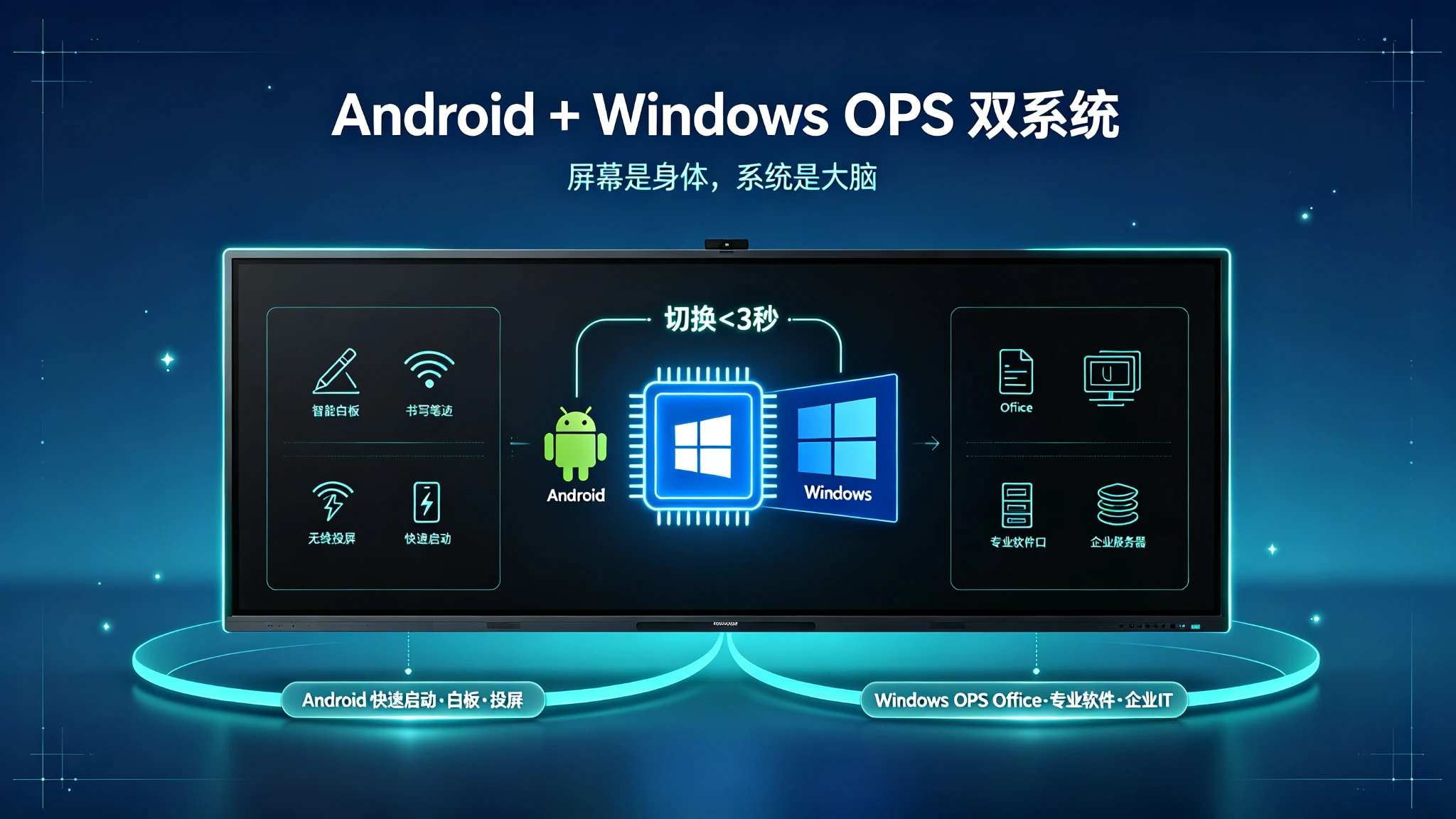
The same piece of interactive whiteboard, the system configuration is different, the use of may be completely different. In the basic teaching scenario, the teacher opens the whiteboard application, displays the courseware through wireless screen projection, writes, annotates and saves directly on the screen, mainly using browsers, teaching software and video content, without running complex Windows professional programs. In an enterprise meeting scenario, the meeting needs to run PowerPoint, Excel, Teams, Zoom or enterprise internal software, log in to the enterprise domain, access shared folders, VPN, printers and security policies, and connect to the existing Windows IT management system. In mixed application scenarios, Android whiteboard, wireless screen projection and video conferencing are used on a daily basis. Windows software is run in specific projects. Different departments have different requirements for software and management rights. They need to start quickly and have complete desktop system capabilities.
Android, Windows and OPS are not simply "low, medium and high" relationships, but three different computing and management architectures. Android is more like a quick-start smart terminal system that Windows provide a complete desktop application ecosystem, and OPS is a modular way to integrate Windows computing power into an interactive whiteboard.
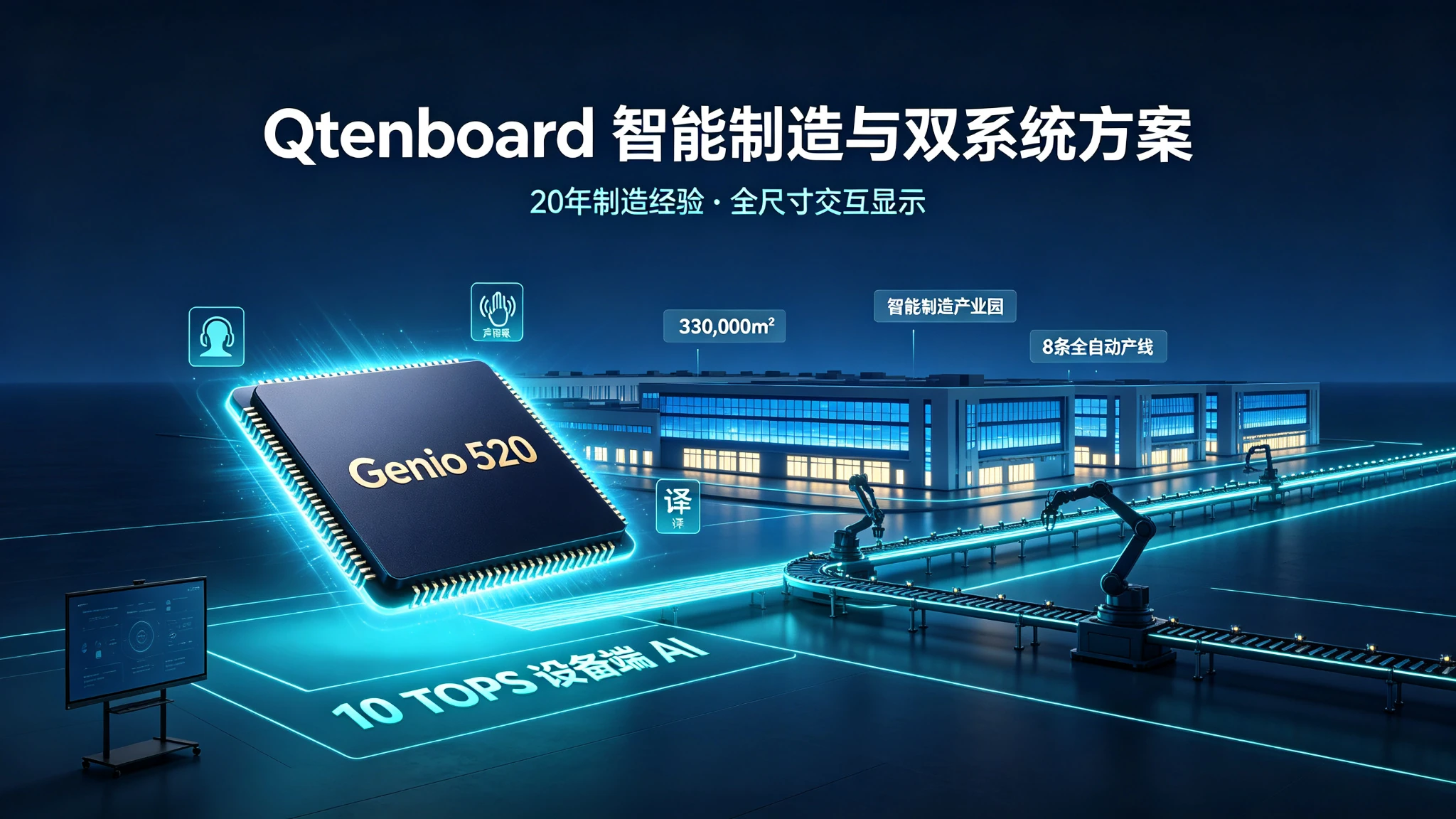
Qtenboard (Shenzhen Qunmao)Founded in 2005, we have been dedicated to interactive display manufacturing for 20 years. We operate a 330,000㎡ smart manufacturing industrial park in Shenzhen and Guangzhou, comprising 16 modern factory buildings and 8 fully automated production lines, with a daily output capacity of 200 units. Our solutions serve 120 countries and regions worldwide, and we have provided services to over 15,000 corporate clients to date. Qtenboard interactive whiteboard covers Android single system, Windows OPS and Android Windows OPS dual system solutions, supports 55-110 inch full-size segments, and is equippedQ AI System Level FrameworkandMediaTek Genio 520平台, offering complete system configuration options for education, conferences, and OEM/ODM projects.
1. Android system-fast, intuitive, suitable for high-frequency daily use
Android: Let the interactive whiteboard start quickly like an intelligent terminal
1. What is the Android responsible for in the interactive whiteboard?
The Android assumes basic functions in the interactive whiteboard: smart whiteboard, handwriting/annotation and erasure, file opening and saving, browser access, wireless screen projection, picture/video and web page playback, basic meeting application, application download and update, camera/microphone and audio management, as well as AI handwriting recognition, OCR and automatic summary (such as model support).
The Qtenboard supports Android 14/16 system configuration, the infrared touch scheme supports 20-50 point touch, the touch accuracy is 1.5mm, the single point response time is 7ms, and the multi-point response time is 10-15ms. The Q AI system-level framework deeply integrates handwriting recognition, multi-language OCR, and smart whiteboard functions into the Android system. The core transcription runs locally on the device and is not dependent on the network.
2. Android B2B advantages
Quick Start:The boot speed is usually faster, suitable for immediate use in classrooms and meetings, without waiting for the full desktop system to load, lowering the operating threshold for teachers and meeting hosts.
Simple operation:The touch interface is suitable for fingers and stylus, does not require complicated mouse, keyboard and file path operation, is suitable for non technical personnel to use, and can reduce training costs.
Suitable for wireless collaboration:Support mobile phone, tablet and computer screen. The Qtenboard scheme can simultaneously access multiple devices for screen projection, and can support up to 9 devices to simultaneously screen projection (subject to model and software version).
Equipment costs are easier to control:No need to purchase additional independent computers, suitable for large-scale classroom and conference room deployment, daily maintenance is relatively centralized.
3. Android applicable scenarios
- Conventional smart classrooms, small and medium-sized meeting rooms
- Daily enterprise station meeting, training room
- Showroom and customer reception area
- Need space for fast screen projection and whiteboard collaboration
- Budget-sensitive projects
Limitations of Android
- Unable to run full Windows desktop software natively
- Some internal applications only support Windows
- Professional CAD, engineering, financial, and industry software may not be compatible
- Complex file management, domain logons, and security policy support may be limited
- Some applications need to confirm the eco-compatibility of Google EDLA, Google Play or local applications
2. Windows Systems-Complete Desktop Software and Enterprise IT Capabilities
Windows: When an interactive whiteboard needs to be a complete computer
1. What is Windows suitable for running?
Microsoft Office, PowerPoint, Excel, Teams, Zoom, Google Meet browser version, CAD/BIM/design and engineering software, ERP/CRM and enterprise internal systems, professional teaching software, video editing/image processing and data analysis tools, enterprise VPN/domain login and security management tools.
2. Windows B2B advantages
Strong software compatibility:Can run a large number of traditional desktop programs, easy access to the customer's existing software system, suitable for the enterprise internal standardization of IT environment, do not need to re-find alternative applications for Android.
Suitable for complex workflows:Open multiple files and windows, run presentations, browsers, and conferencing software simultaneously, access corporate servers and shared folders, and use professional peripherals and USB devices.
Suitable for professional industry applications:Architectural design, mechanical manufacturing, engineering evaluation, medical teaching, financial analysis, government data systems, university research and professional laboratories.
3. Limitations of Windows
- Start-up and maintenance costs are usually higher than Android
- Virus, patch, driver and rights management more complex
- Enterprise IT team support required
- Windows version, license, and hardware configuration must be specified
- Touch, audio, camera and interface drivers need to be adapted
- Complex software experience can be significantly degraded if Windows modules are underperforming
4. Qtenboard Windows OPS配置
The Qtenboard OPS module supports Windows 10/11 genuine license, can be configured with Intel i5/i7 or the same level of platform, and supports 8GB/16GB and above memory and SSD storage. OPS module adopts industry standard slot design, which can be fully compatible with Qtenboard touch control, audio, camera and wireless screen projection, and supports enterprise domain login, MDM/EDR/VPN and security system docking.
3. OPS module-loading Windows into interactive whiteboard
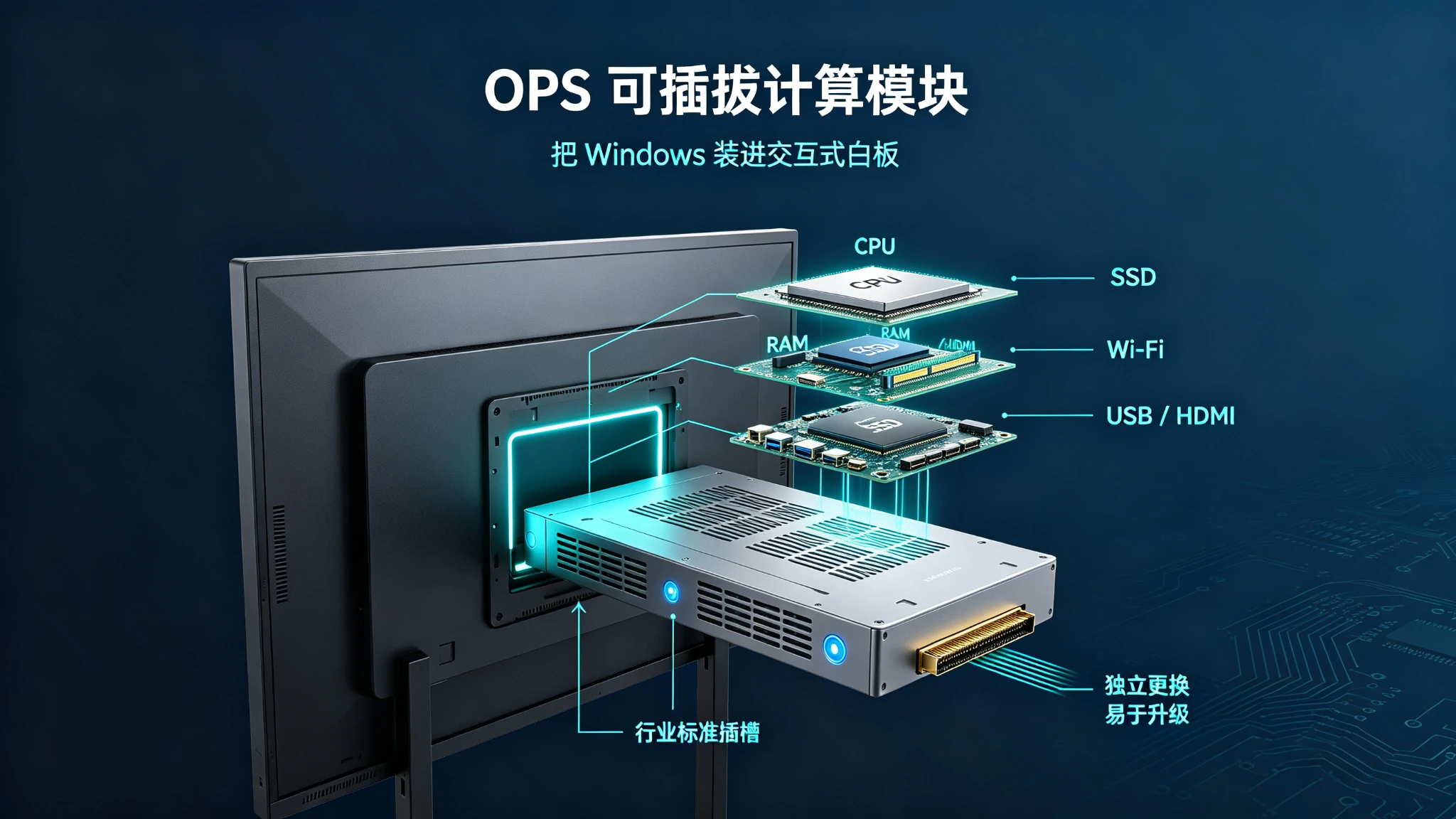
OPS is not an ordinary mini computer, but a modular computing platform for interactive display design.
1 What is OPS?
OPS usually refers to Open Pluggable Specification, which is a standardized design of pluggable computing modules for interactive display devices. It typically includes a processor, memory, SSD or other storage, a Windows system, a wireless networking module, graphics or graphics processing capability, USB/HDMI/audio and other interfaces, and a connection structure to the interactive whiteboard host.
Core Values:Integrate Windows computing power into the display, reduce the use of external computers, cables and desktops, and make it easy to install, remove and upgrade, so that interactive whiteboards have more complete computer capabilities.
2. The difference between OPS and external computer
| Comparison dimension | OPS Module | External Desktop/Mini PC |
|---|---|---|
| Installation method | Insert into screen body | Stand-alone or hang |
| Number of cables | Less | Power, video, USB and more |
| Equipment cleanliness | high | Depends on installation scheme |
| Replacement maintenance | Integral removable | Independent maintenance |
| IT Management | Can be incorporated into Windows equipment management | Can be managed independently |
| Upgrade method | Replace or upgrade a module | Replace the whole machine or internal parts |
| Compatibility | Screen and OPS standards need to be confirmed | Usually more flexible. |
| Initial cost | Medium to High | Depends on computer configuration |
| Suitable scenarios | Classroom, conference room, training room | Complex professional workstations or existing computer systems |
3. Project value of OPS
- Reduce desktop devices and make the screen directly into the Windows workstation
- Facilitate switching system for teachers and meeting hosts
- Facilits standardized volume deployment
- Ideal for Android for day-to-day collaboration, Windows for professional software
- Extend device lifecycle by replacing OPS modules
4. Potential risks of OPS
- Slots, interfaces, and sizes from different vendors may not be fully compatible
- Some OPS can only be adapted to a specific brand or series
- Drive, touch, and audio may need to be re-adapted when upgrading
- Low configuration OPS may not run complex Windows software
- If OPS is provided by a third party, the post-sales liability boundary may not be clear
5. Qtenboard OPS模块
Qtenboard OPS modules support industry standard slots, which can be upgraded to support different CPU/RAM/storage configurations, and Windows licenses are included. OPS is fully compatible with Qtenboard touch control, audio, camera and wireless screen projection. Failure can be replaced independently without affecting the use of the whole whiteboard. Qtenboard provide OPS module independent warranty to support enterprise security policies and remote management.
How to choose 4. Android, Windows and dual system?
Select systems by workflow, then select configurations by budget
1. Who is suitable for Android single system?
Recommended Customer:Schools that focus on whiteboards and cast screens, use only classrooms, small conference rooms, exhibition halls/reception areas and training corners for basic teaching applications, do not need to run Windows professional software organizations, and need to control bulk procurement costs.
Recommended features:4K display, 20/40/50 touch, whiteboard and annotation, wireless screen projection, browser, camera and microphone, Q AI recognition, basic device management, Google EDLA (if Google Play and Google Workspace are required).
2. Who is Windows OPS suitable?
Recommended Customer:Enterprises that need Office and Windows software, institutions that use enterprise domains, VPNs, and shared file systems, schools that run professional teaching software, design/engineering/medical and scientific research projects, multi-conference room deployments that require unified IT management, and enterprises that use professional video conferencing and collaboration software.
Recommended features:Windows genuine license, Intel i5/i7 or comparable platform, 8GB/16GB and above memory, SSD storage, dual-band Wi-Fi and cable network, enterprise security and remote management, multi-display output or professional graphics (if required).
3. Who is suitable for Android Windows OPS dual system?
Recommended Customer:Schools use Android teaching tools and Windows teaching software at the same time, enterprises need fast meetings and complex desktop software, multi-purpose training centers, universities and research institutions, mixed IT environment organizations, customers who want to extend the life cycle of equipment.
The Qtenboard dual-system solution supports fast switching between Android and Windows. The switching time is less than 3 seconds. After switching, touch control, audio, and network remain normal. Support file exchange, share USB/camera/audio/network, support PDF/PPT/Word/picture and video cross-system open.
When is an external computer more reasonable?
- Customer already has a uniformly configured conference host
- Requires high-performance discrete graphics
- Run complex CAD, 3D, video, or AI models
- The IT department requires the computer to be completely separated from the display device.
- Need centralized computer room management
- The screen is only displayed with the touch terminal and does not want to change the existing computer architecture.
Can the 5. system only look at the CPU name
It's the full platform that really impacts the experience, not the individual processor models
1. What does the Android side need to pay attention?
- Android version, CPU architecture, and number of cores
- RAM capacity, storage space, GPU capacity
- App Store and Google EDLA certification
- Wireless screen protocol, OTA upgrade cycle
- Q AI function operation mode
- Multitasking and split-screen capabilities
- DMS Device Management
2. Qtenboard hardware level AI:Genio 520 and 10 TOPS edge computing
Qtenboard’s Genio 520 interactive flat-panel platform is based on the MediaTek Genio 520 (MT8371) chip and redefines the capabilities of enterprise-grade interactive whiteboards at the hardware level. The 8th-generation MediaTek NPU is directly integrated into the interactive smart board.Dedicated AI acceleration for 10 TOPS-Real-time face detection for classroom attendance, gesture control in conference rooms, and AI noise reduction in medical consultation rooms are all running on equipment, with zero Internet dependence, zero cloud delay, and zero data privacy risks.
Based on TSMC's 6nm FinFET process, Genio 520 achieves high performance with low heat output, which makes Qtenboard fanless interactive flat panel design possible-for K-12 classrooms, hospital consulting areas, and administrative meeting rooms where acoustically quiet cannot be compromised Important. MediaTek’s official commitment to the Genio 520 is10 year standard supply life cycle(Q2 release in 2025, EOL 2035), eliminating the risk of obsolescence that consumer-grade SoCs are usually eliminated in 2-3 years.
3. What does the Windows OPS side need to focus on?
- Windows version and authorization
- CPU performance, memory capacity, SSD read/write speed
- GPU, Wi-Fi, and Bluetooth modules
- USB and display output, thermal design
- Driver support, security chip and encryption capabilities
- Remote recovery and system mirroring
4. Touch cross-system consistency
The purchaser must test: whether the writing under the Android is smooth, whether the touch under the Windows is equally accurate, whether the touch is normal after the dual system is switched, whether the palm suppression is effective in both systems, whether the multi-touch is restricted by the Windows drive, whether the stylus/eraser and gesture are consistent, and whether recalibration is required after switching from Android to Windows.
Qtenboard touch scheme supports 20-50 point touch, touch accuracy 1.5mm, single point response time 7ms, multi-point response time 10-15ms. Both systems support palm suppression and stylus operation, and there is no need to recalibrate after switching systems.
System configuration recommendations 6. different application scenarios
Classroom, conference room and training center should not use the same system scheme
1. K-12 Smart Classroom
Basic configuration:Android built-in system, 4K display, infrared multi-touch, whiteboard/annotation and projection screen, teaching software, remote device management, camera and sound reinforcement (if required by the project).
Upgrade configuration:Android Windows OPS for schools using Windows teaching software, Office and local resource management, enabling teachers to switch between Android and Windows.
Qtenboard education programmes:The 65/75 "is positioned as a suitable combination for K-12 and small and medium-sized classrooms, supporting 20 touch points, wireless microphone, teacher camera and remote device management. A key middle school in a province purchased 50 sets of 75-inch Qtenboard dual-system whiteboards, which were delivered in 25 days, with a failure rate of 0 in 1 year.
2. Corporate conference room
Android scheme is suitable:Whiteboard collaboration, wireless screen projection, basic video conference, fast station meeting, small team discussion.
Windows OPS scheme is suitable:Teams/Zoom/Office and on-premises apps, domain sign-in/VPN and shared files, multi-window collaboration, enterprise data analysis and presentations.
The dual system scheme is suitable:Daily use Android to quickly start meetings, switch Windows to run full desktop software when needed, and multi-department share meeting space, which requires both simple operation and complete IT compatibility.
3. Training center
The 75/86/98-inch interactive tablet is equipped with Android OPS dual system, which is Android used for fast whiteboard and screen projection, Windows used for course software, Office and video conference, supports recording and broadcasting/camera/microphone and external sound reinforcement, and is uniformly maintained through DMS equipment management system.
4. Engineering, Design and Research Space
Windows OPS or external high-performance computers, focus on professional graphics cards, 3D software compatibility and high-resolution output, confirm driver support when precision stylus or electromagnetic pen is required, and focus on external storage, network security, professional peripherals and data management.
5. Government and large public projects
Dual systems are usually more flexible. When it is necessary to meet the requirements of localization, network isolation, permission control and local software, compatibility tests should be carried out in advance, paying attention to operating system authorization, data processing, remote update, equipment traceability and local after-sales service. The procurement documents should clearly define the functional boundary between Android and Windows.
7. system switching, software compatibility and device management
The value of dual systems is not just "having two systems", but whether the two systems can work together.
1. System switching experience
Need to test: whether one-click switching is possible, whether the switching needs to be restarted completely, whether the switching time is stable, whether the touch control/audio and network are normal after switching, whether the current file can be saved, whether quick access to Windows from the Android is supported, and whether the administrator can restrict the switching permission of ordinary users.
The Qtenboard dual-system switching time is less than 3 seconds. After switching, the touch, audio, and network remain normal, and the Windows can be quickly entered from the Android. The administrator can restrict the switching permission of ordinary users.
2. Exchange of documents and content
- Android whiteboard content can be exported to Windows
- Windows whether the file can be opened directly in Android
- Do the two systems share USB, camera, audio, and network
- Whether to support PDF, PPT, Word, pictures and videos
- Is it possible to sync handwritten content to the cloud
- Do you need to log in repeatedly after switching systems
3. Enterprise accounts and permissions
- Whether the Android account and the Windows domain account are separate
- 是否支持Microsoft Entra ID/Active Directory
- Whether to support Google Workspace, single sign-on
- Support administrator/teacher/student and guest permissions
- Whether USB or Store can be disabled
- Can the device be remotely locked and cleared
4. Qtenboard DMS equipment management system
The Qtenboard is equipped with powerful DMS (Device Management System) software to realize centralized background control of all devices, making diversified operation and maintenance operations from cumbersome to simple. The core functions include: remote batch device control, time switch machine, full life cycle management (remote upgrade, monitoring, logging), private deployment options to enhance data security, batch command delivery to improve management efficiency.
AI-driven predictive diagnostics:The built-in AI module checks hardware health parameters such as panel temperature, internal voltage, and color values. If any indicator deviates from the normal range, the system will give early warning to avoid accidental shutdown of the equipment.
Mobile remote control:Easy remote operation through QR code scanning IP input, full control of content management, page switching, settings, wireless file transfer between mobile device and whiteboard, real-time screen mirroring for presentation.
8. system security, authorization and long-term maintenance
Buy the system is only the first step, continuous update and security management is more important
1. Android safety issues
- Whether the system provides OTA updates
- How long is the security patch cycle?
- Whether the application whitelist is supported.
- Support for disabling installations from unknown sources
- Is it possible to restrict USB file transfers
- Does Google Play or EDLA work in the target market
- Whether enterprise-level device management is supported
2. Windows safety issues
- Whether the Windows is genuine authorized
- Support for Enterprise Patch Management
- Compatible with antivirus, EDR and VPN
- Whether disk encryption is supported
- Whether the factory image can be restored
- Whether OPS failure affects the use of the whole whiteboard
- Whether the touch and drive are still stable after system update
3. Dual system security issues
- Whether Android and Windows share data
- Whether an attack on one system affects another
- Can the USB interface be accessed across systems
- Whether the camera and microphone can be called remotely
- Can the administrator turn off the recording and screen projection in a unified way
- Whether the data is stored locally or in the cloud
The core transcription of the Qtenboard Q AI runs locally on the device and is available without networking. This means that handwriting recognition and speech-to-text can be done without relying on the cloud, reducing data privacy risks at the architectural level. Private deployment options are Qtenboard supported for government, healthcare, and large enterprise customers that require private deployments.
4. Licensing costs
The purchase quotation shall be clear: whether the Android system is included, whether the Windows license is included, whether the OPS module is quoted separately, whether the Q AI function needs to be subscribed, whether the conference software needs an independent account, whether the DMS equipment management platform charges according to the equipment, whether the software upgrade and version maintenance are charged, and whether the warranty covers the system and OPS.
九、Qtenboard的Android、Windows OPS与OEM/ODM能力
From standard interactive tablets to dual system project scenarios, how do Qtenboard support customers?
1. Q AI system level framework
Qtenboard's launch ofQ AIIt is not a simple software plugin or cloud-based tool, but rather a native intelligence architecture deeply integrated into the hardware, software, and algorithm layers. AI are not add-ons, but are built into the native architecture of the device and can work reliably in real-world office and education scenarios-both online and offline.
Q AI four design principles:Local computing first, optional cloud collaboration, AI interoperability, scene-oriented design.
Q AI's core transcription runs locally on the device, eliminating cloud latency and network dependency. Qtenboard integrates a custom noise-canceling microphone array and on-device voice processing algorithms, ensuring clear audio capture even in multi-speaker, noisy environments. Core capabilities include real-time noise reduction, speaker diarization, support for 40 languages and dialects, industry-specific term recognition, and a customizable vocabulary. For global teams, real-time multilingual translation supports smoother cross-border communication, and the core transcription function runs entirely locally on the device and can be used without networking.
Qtenboard Q AI支持166 languagesVoice-to-text and real-time translation, covering regional dialects such as Cantonese, Vietnamese, and Malay. Thai language packs and OCR handwriting recognition have been added to Thai customers. Software-level language localization does not require hardware modification.
2. Conference AI Assistant
Qtenboard Q AI conference intelligence can record the content of the meeting without feeling, automatically complete voice to text, accurately distinguish different speakers, after the meetingWithin 5 secondsGenerate a structured meeting summary, refine core topics, to-do items, and organize the original 1-hour minutes.More than 75% reduction. Meeting minutes can be exported or synced to Microsoft Teams, Slack, or Google Workspace. The meeting summary mind mapping feature automatically captures key points and generates a visual mind map.
3. Android interactive tablet platform
- Android 14/16 built-in system
- Smart whiteboards and annotations
- 20-50 touch, 1.5mm accuracy, 7ms single point response
- Wireless screen projection, support up to 9 devices at the same time screen projection
- Q AI handwriting recognition and OCR,166 languages
- Video Conferencing, Applications and Browsers
- Multi-device collaboration, education and conferencing software
- EDLA configuration (if applicable)
4. Windows OPS dual system platform
- Built-in Android for fast whiteboard and screen projection
- Pluggable Windows OPS for full desktop software
- Support for education, conferences and training programs
- Processor, memory, storage and system version configurable by project
- Support customer's existing Windows software and IT systems (e. g. complete compatibility verification)
- Suitable for multi-scenario and long-term upgrade requirements
5. Full size product line
| Size | Typical applicable space | System configuration recommendations |
|---|---|---|
| 55/65 inches | Small conference room, small group teaching | Android single system or Android OPS |
| 75/86 inches | Standard classrooms, medium meeting rooms and training rooms | Android Windows OPS双系统 |
| 98/105/110 inches | Large-scale conference, lecture hall and exhibition project | Android Windows OPS dual system, support high load operation |
The same project can be used in different sizes and unified system architecture, which is convenient for mass deployment by education group, enterprise headquarters and multi-regional customers.
6. OEM/ODM with CKD/SKD support
- Customer brand Logo, startup interface
- Android system interface, Windows OPS pre-installed software
- Local language and keyboard configuration
- Teaching software or conference software pre-installed
- Remote device management, product size and touch configuration
- PACKAGING, BRACKETS AND ACCESSORIES
- CKD/SKD local assembly support
7. Manufacturing strength and quality assurance
- Established in 2005, 20 years of manufacturing experience
- 330,000 ㎡ industrial park, 16 factories and 8 full-automatic production lines
- SMT Patch Speed 120,000 Components/Hour
- Class 10,000 clean room completes touch panel manufacturing and optical bonding
- Zero-Bonding zero-fit technology, 1mm tempered glass
- 48 hours high temperature aging test (72 hours for some items)
- The one-time pass rate of the whole machine is ≥ 97%, and the abnormal rate of aging is <1.5
- International Certification: CE, FCC, RoHS, ISO9001, CCC
- Service 120 countries and regions, after-sales response ≤ 4 hours
10. B2B procurement selection list
When purchasing, don't just ask "is there a Windows", ask how the Windows works
System architecture
- Is the product Android single system, Windows single system, or Android OPS dual system?
- Can Android and Windows be switched quickly?(Qtenboard switching time <3 seconds)
- Do the two systems share touch, camera, microphone, audio, and network?
- Does the OPS slot support subsequent upgrades?
- Does the OPS module meet standard size and interface requirements?
Performance configuration
- What is the Android version, CPU, RAM, and storage?(Qtenboard support Android 14/16)
- What processor, memory, and SSD does Windows OPS use?(Qtenboard optional i5/i7)
- Does it support high-load software, 4K video, and multi-window operation?
- Does the thermal system support long-term operation? Do you need a discrete video card?
Software Compatibility
- 是否支持Office、Teams、Zoom、Google Meet?
- Is it compatible with the customer's existing instructional software or business systems?
- Does it support domain logons, VPNs, shared files, and printers?
- Is Google EDLA, Google Play, or Enterprise Store supported?
- Support for customer specific language and locale?(Qtenboard support 166 languages)
Security and Management
- Is the Windows licensed?
- How are Android and Windows updated?
- Does it support MDM, DMS, CMS, or enterprise device management? (DMS is Qtenboard available)
- Are permissions, app whitelists, and remote locks supported?
- Q Can the AI, camera, microphone and cloud services be turned off separately?
Delivery and after-sales
- OPS is a separate warranty?
- Can a system failure be remotely recovered?
- Is there a spare part for the OPS module?
- Do you need to do touch and drive calibration again after upgrading?
- Is localized deployment, training and long-term technical support available?
Eleven, common configuration errors
These system selection errors may be exposed only after project delivery
Myth 1: Think Android can completely replace Windows
Android can be used for basic whiteboard, screen projection and meeting, but professional software, enterprise domain and Windows-specific teaching software may still need to Windows OPS. The correct way: first list the software that the customer must run.
Myth 2: Only look at the OPS processor, not the complete configuration
Strong CPU does not mean good heat dissipation, storage, drive and touch experience. The right way: test CPU, RAM, SSD, GPU, touch, audio and network as a whole.
Myth 3: OPS module can be upgraded at will
Slot, interface, and firmware compatibility issues may exist between different vendors. The right way: Confirm specifications, module supply and upgrade policy. Qtenboard OPS modules support industry standard slots and can be upgraded later.
Myth 4: Dual system must be better than single system
Dual systems add cost, administrative complexity, and training requirements. If the customer only needs whiteboard and screen projection, Android single system may be more efficient. The right way: choose according to the actual workflow, rather than blindly pursuing high configuration.
Conclusion: The best system configuration is to allow customers to start quickly and continue to complete the work.
Android is suitable for quick start, whiteboard, screen projection and general applications. Windows is suitable for Office, professional software, enterprise domain and complex workflow. OPS is a modular way to integrate Windows capabilities into interactive whiteboards. Android Windows OPS dual system is suitable for mixed demand projects such as education, enterprise and training. Purchasing decisions should start with software, IT management, data security, upgrades, after-sales and TCO.
The display size of the interactive whiteboard determines "what can be seen", the touch system determines "how to operate", and the Android, Windows and OPS modules determine what work the device can do. For education, enterprise and government projects, system selection should not stop at "whether there is Android or Windows", but should further confirm software compatibility, switching efficiency, IT management, data security, upgrade ability and after-sales responsibility.
QtenboardBacked by 20 years of manufacturing experience, 330,000 ㎡ industrial park, 8 full-automatic production lines, Q AI system-level framework, Genio 520 platform (10 TOPS equipment-side AI) and DMS equipment management system, it provides Android single system, Windows OPS or Android Windows dual system solutions for education, conferences, training and OEM/ODM projects. Support 55-110 inch full-size segment, 166 language voice to text, 5 seconds meeting summary, 20-50 touch, 1.5mm accuracy, switching time <3 seconds. Serving 120 countries and regions worldwide, with a cumulative total of over 15,000 corporate clients.
According to the customer's application software, classroom or conference room environment, project budget, equipment management requirements and future upgrade plans, Qtenboard can provide Android single system, Windows OPS or Android Windows dual system solutions, and support the localization needs of different markets through OEM/ODM customization. All devices support lifetime free OTA updates, ensuring continuous evolution of AI capabilities; existing users can enjoy the latest features without needing to replace their hardware.
CTA:
· Get the System Selection Guide (PDF)
· Appointment Shenzhen/Guangzhou factory visit (or cloud visit)
· Contact sales team for project system configuration suggestions
 Previous:
 Return to list

 Partner Links:
