
 en
 中文

 Current location:
 Release date: 2026-09-23
 Clicks:
From distance teaching by lecturers, on-site tutoring by rural teachers, to whiteboard annotation in Q AI, student interaction and after-class resource sharing, this paper analyzes how Qtenboard support the coordination of urban and rural educational resources with 20 years of manufacturing experience and 330,000 ㎡ industrial park.
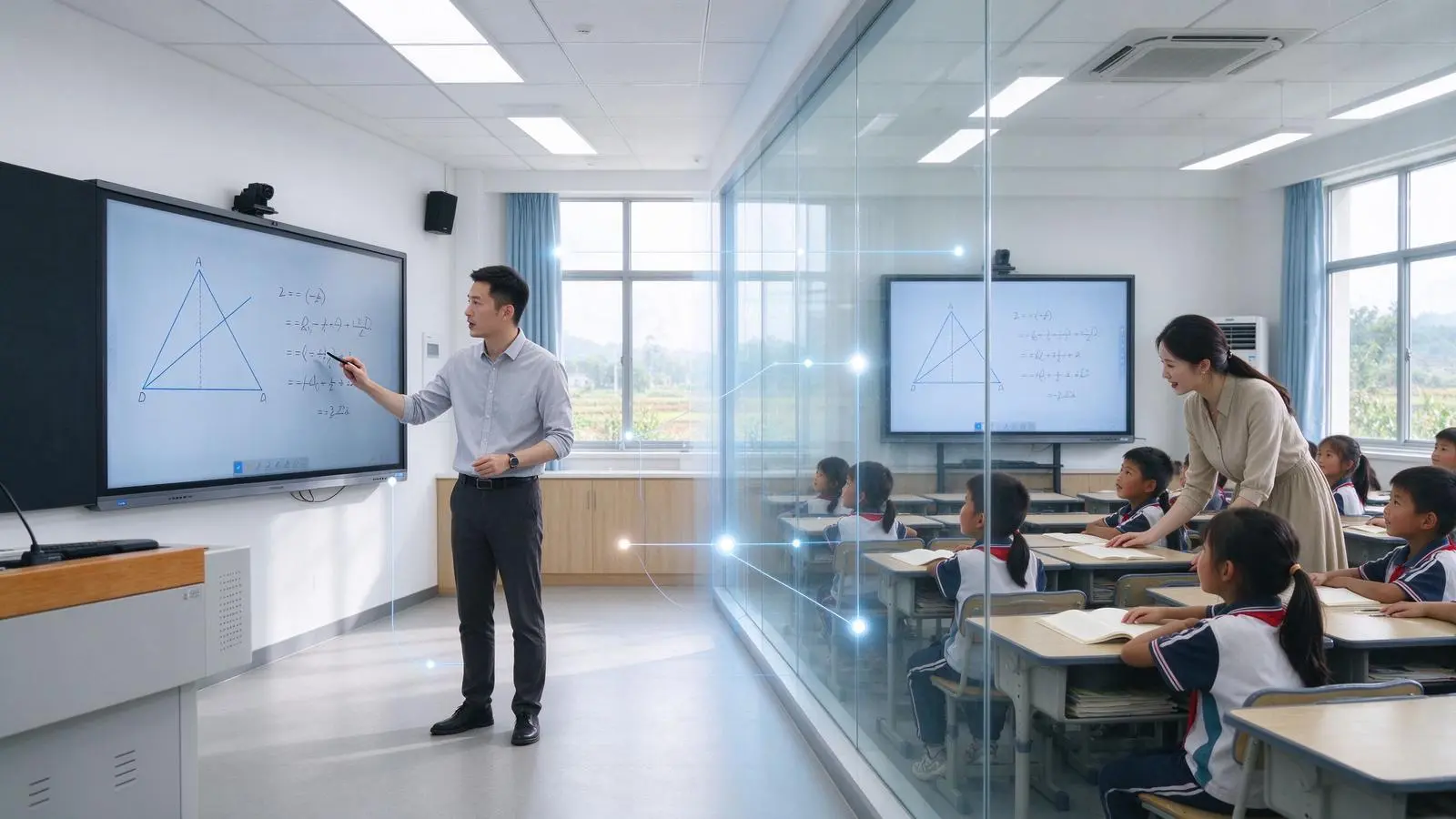
The real double-qualified classroom is not to broadcast the video of the city classroom to the rural school, but to let the lecturer, tutor and students work together in the same digital classroom. In the city lecture room, famous teachers explain the course in front of the camera, write formulas, display charts and play videos on the interactive whiteboard, annotate key contents through the whiteboard, and adjust the rhythm of the explanation according to the feedback from the rural classroom. In the rural receiving classroom, students watch the lecturer through a large screen. The local tutor organizes classroom discipline, auxiliary operation and answering questions. Students can write on stage or use terminals to participate. Classroom questions are fed back to the lecturer through cameras, microphones and platforms.
The interactive whiteboard undertakes the tasks of course presentation, digital writing, remote annotation and classroom content sharing, while the camera, microphone, video conference platform and network are responsible for connecting people and people. The infrastructure of a hybrid classroom typically includes an interactive whiteboard, a classroom-level camera, a microphone, a video conferencing platform, and a reliable network; the whiteboard is responsible for the content, and the video conferencing system is responsible for connecting participants.
Qtenboard (Shenzhen Qunmao)Founded in 2005, we have been dedicated to interactive display manufacturing for 20 years. We operate a 330,000㎡ smart manufacturing industrial park in Shenzhen and Guangzhou, comprising 16 modern factory buildings and 8 fully automated production lines, with a daily output capacity of 200 units. Our solutions serve 120 countries and regions worldwide, and we have provided services to over 15,000 corporate clients to date. Qtenboard interactive whiteboard covering 55-110 inch full-size segment, equippedQ AI System Level FrameworkandMediaTek Genio 520平台To provide a complete solution from hardware, software to equipment management for urban and rural double-qualification classroom projects.
1. what is a double class?
One speaker and one tutor to form distance collaborative teaching
1. The basic role of double-qualification class
The lecturers are responsible:Curriculum design, core knowledge explanation, key content blackboard writing, classroom questioning and interaction, learning progress control, curriculum evaluation and teaching feedback.
The tutor is responsible:Organize local classes, assist students in the use of equipment, manage class order, observe student reactions, collect questions, conduct local Q & A and personalized coaching, handle network/equipment and classroom emergencies.
Students are responsible:Watch and participate in remote courses, answer questions via whiteboard/personal terminal or voice, participate in group discussions, complete exercises and classroom activities, and view digital course content after class.
2. The difference between double-qualification class and ordinary live class
| Comparison dimension | Ordinary remote live broadcast | Dual-teacher classroom |
|---|---|---|
| Teaching method | Mainly to watch. | A combination of presentation, interaction and local tutoring |
| Teacher role | Usually only remote speakers | Local Tutor |
| Student participation | Chat, raise your hand or watch passively | Writing, answering questions, discussion and on-site feedback |
| Classroom management | Reliance on remote teachers | Local teachers are responsible for organizing and supporting |
| Technical requirements | Video and audio-based | Interactive display, audio and video and teaching platform collaboration |
| After-School Support | Content playback | Local coaching, data review and continuous Q & A |
3. What problems do double-qualification classes solve?
High-quality teacher resources are unevenly distributed, it is difficult to continuously obtain high-level courses in remote areas, there are insufficient professional teachers in rural schools, students cannot access rich curriculum content, a single training or live broadcast is difficult to form long-term teaching support, and the reuse rate of high-quality curriculum resources in urban schools is insufficient.
The Core Role of 2. Interactive Whiteboard in Double-teacher Classroom
One screen, connecting content, teachers and students
1. As a "common canvas" for distance courses"
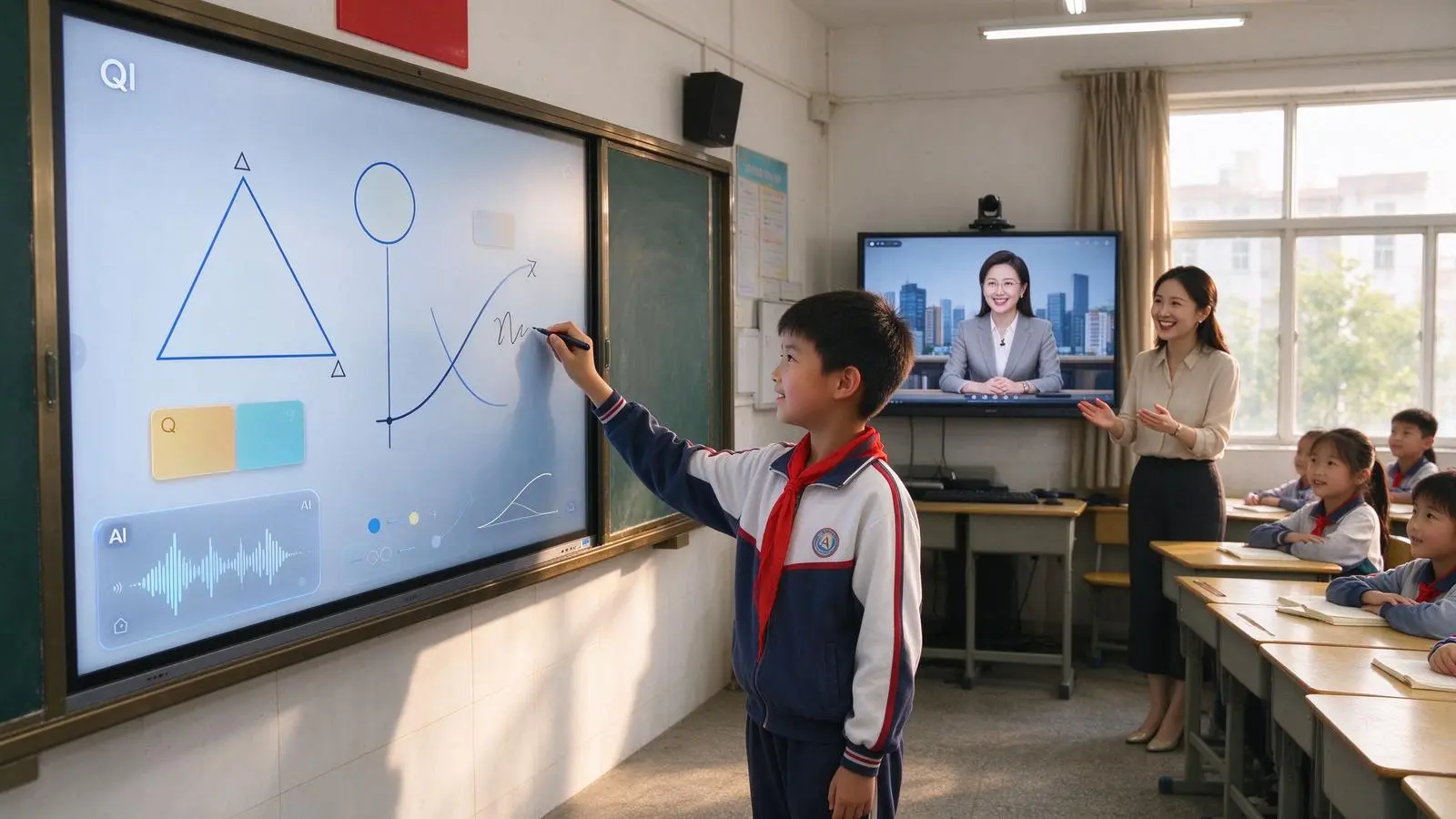
The lecturer writes at the city end and the handwriting is displayed at the village end simultaneously. Local teachers can add content on the same page. Students can take the stage to annotate or complete the answer. All participants share the same digital canvas.
The Qtenboard touch scheme supports 20-50 point touch, with a touch accuracy of 1.5mm, a single point response time of 7ms and a multi-point response time of 10-15ms. It is matched with Zero-Bonding zero-bonding technology and 1mm tempered glass to ensure smooth synchronization and no delay of remote annotation.
2. As the main teacher teaching window
Show PPT, PDF, web pages and videos, circle drawings and comments directly on courseware, switch whiteboard/video/pictures and teaching software, display students' answers and homework, and support multi-window teaching.
3. As an interactive entrance for rural students
Students can directly touch the operation, multiple students can write at the same time, support drag/classification/connection and sorting, through the personal terminal to send the answer, so that students from the viewer into a participant.
4. As a recording tool for classroom content
Save blackboard writing, save the host teacher's comments, record students' answers, export classroom materials, share after-class review content, support recording classroom or synchronization to the cloud (such as system support).
Qtenboard Q AI supports automatic saving of classroom blackboard writing, OCR recognition of handwritten content, and real-time translation of 166 languages, allowing rural students to review digital course content at any time after class.
How does 3. a double class work?
From pre-class preparation to after-class review, interactive whiteboard runs through the complete teaching process
1. Before class: the speaker and the tutor prepare lessons together
Teacher preparation:Course PPT and teaching resources, classroom questions, videos/pictures and experimental content, interactive activities, key blackboard writing pages, student exercises and evaluation criteria.
Preparation of tutors:Check the network and equipment, confirm the camera and microphone, turn on the whiteboard and meeting platform in advance, help students log in to the class, prepare local teaching materials/teaching aids and exercises, understand the students' foundation and the contents that need key guidance.
2. In class: remote explanation and local interaction are parallel
Teacher:Explain the course, write and comment on the whiteboard, observe the rural classroom through the camera, initiate questions and interactions, and adjust the course progress according to student feedback.
Tutor:Assist students to operate, maintain classroom order, collect students' questions, deal with equipment problems, organize local group activities, and provide supplementary explanations for distance courses.
Student:Watch the course content, participate in interactive questions, write on stage, answer through the microphone, submit answers using the terminal, participate in group discussions and after-class exercises.
3. After-class: course content precipitation and local tutoring
Save whiteboard notes, export courseware and annotations, share review materials, generate class summaries, arrange tutoring according to students' questions, host teachers check class feedback, analyze students' answers, and adjust the next course plan.
Qtenboard Q AI conference intelligence can record classroom content without feeling, automatically complete voice to text, accurately distinguish different speakers, after classWithin 5 secondsGenerate a structured classroom summary, refine core knowledge points and to-do items, and organize the original 1-hour time.More than 75% reduction。
What hardware is needed for 4. double-qualified classes?
Distance learning is not a screen, but a collaborative system
1. Interactive Whiteboard
Main function:Display remote teachers and teaching content, support teachers and students to write, save and share course content, host whiteboard software, teaching applications and video conferencing platform.
Qtenboard configuration:55-110 "full size, 4K UHD display, 20-50 touch, AG anti-glare and low blue light mode, handwriting and pattern recognition, Android 14/16 and Windows OPS dual system, wireless screen projection (up to 9 devices),48 hours high temperature aging test, remote device management.
2. Classroom camera
Need to cover the lead teacher, blackboard or interactive whiteboard, student body, student speaking area, lab and operation area. Selection highlights include wide-angle coverage, automatic viewfinder, teacher tracking or speaker tracking, 4K or 1080p picture quality, low-light environment performance, privacy occlusion, and compatibility with conference platforms.
3. Microphone and Audio System
It is necessary to solve the problems of clear voice of the lecturer, rural students' questions can be heard by the remote terminal, tutors can interrupt at any time, echo/howling and environmental noise can be avoided, and students in the back of the large classroom can also hear clearly. Optional configurations include array microphones, wireless neckline microphones, ceiling microphones, wall-mounted speakers, echo cancellation, automatic gain, and noise suppression.
4. OPS or external computing device
Run video conference software, play teaching courseware and high-definition video, connect school platform and browser, support Windows teaching software, handle multi-window and multi-channel content, and cooperate with camera/microphone and whiteboard touch.
Qtenboard OPS module is based onMediaTek Genio 520平台, equipped with the 8th generation NPU10 TOPS Device End AI, 6nm process without fan design, suitable for classroom mute environment. 10-year standard supply life cycle, suitable for long-term deployment of education projects.
5. Network and Infrastructure
Stable broadband, reasonable upload and download bandwidth, classroom Wi-Fi coverage, wired network backup, network security and rights management, UPS or stable power supply, equipment heat dissipation and installation space.
How does the 5. software platform connect urban and rural classrooms?
The hardware is responsible for the presentation, and the software is responsible for making the two classrooms truly collaborative.
1. Video Conference Platform
Support Zoom, Microsoft Teams, Google Meet, local distance learning platform, education dedicated live broadcast and interactive platform. Need to confirm whether to support screen sharing, whiteboard synchronization, remote student speech, classroom recording, group discussion, remote student microphone control, multi-classroom or multi-campus access.
2. Digital Whiteboard Software
Multi-person writing, remote synchronization, page management, handwriting color, graphic recognition, OCR, classroom saving, PDF and picture export, student homework display, after-school content sharing. Qtenboard Q AI supports 166 language handwriting recognition, figure and formula recognition, multi-language real-time translation.
3. LMS and course platform
Course materials release, assignment, student submission, performance management, learning progress, classroom playback, teacher resource sharing, account and rights management.
4. Qtenboard DMS equipment management system
Qtenboard is equipped with powerful DMS (Device Management System) software, enabling centralized backend control of all devices. The core functions include: viewing the online status of the device, remotely switching on and off, updating the whiteboard software, deploying applications in batches, checking cameras and microphones, monitoring storage space and network, managing device permissions, counting device usage, and remote fault diagnosis.
AI-driven predictive diagnostics:The built-in AI module checks hardware health parameters such as panel temperature, internal voltage, and color values. If any indicator deviates from the normal range, the system will give early warning to avoid accidental shutdown of the equipment.
Mobile remote control:Easy remote operation through QR code scanning IP input, full control of content management, page switching, settings, wireless file transfer between mobile device and whiteboard, real-time screen mirroring for presentation.
How do 6. get distance students to really engage?
The core index of double-qualification class is not "seeing" but "participating"
1. Multiplayer touch and on-stage interaction
Students can take turns to complete the topic on stage, many people can write or mark at the same time, the group can complete the flow chart together, the lecturer can comment remotely, and the tutor can assist locally. Qtenboard supports 20–50-point touch, enabling multiple users to write simultaneously without conflicts.
2. Student terminal collaboration
Students submit answers through tablets, computers or mobile phones. Teachers can selectively display students' homework. Multiple answers can be compared in parallel. Remote students and on-site students can participate together. It is suitable for classroom voting, in-class quizzes and group tasks.
3. Remote questioning and speaking
The students raised their hands, the teacher opened the microphone, the students spoke through the camera, the text questions were summarized to the whiteboard, and the tutor helped the students express and sort out the questions.
4. Classroom interaction design
Recommended:Questions before class, instant question and answer in explanation, group collaboration, student demonstration on stage, group task, class voting, remote experiment demonstration, end-of-class summary.
It is not recommended to do only:For a long time, the teacher explained one-way and only showed PPT. The students only asked questions through the chat window. After the class, there was no data preservation and feedback.
The Practical Value of 7. Urban and Rural Double Teachers Classroom
A screen, change not just classroom form
1. For rural schools
Get more high-quality curriculum resources, reduce the impact of insufficient professional development opportunities for teachers, participate in city school or education group courses, contact with science/art/English/programming and other characteristic courses, let students participate in richer interactive teaching, and review after class through digital materials.
2. To urban schools and lecturers
High-quality courses can serve more schools, curriculum resources can be reused, students in different regions can be learned through remote classrooms, a wide range of teaching feedback can be collected, digital curriculum assets can be formed, and the influence of teachers and the scope of educational services can be expanded.
3. To the local education administration
Promote the sharing of educational resources, unify the construction of distance teaching standards, unify equipment/platforms and services, monitor the use of school equipment, improve the efficiency of the use of special education funds, and support cross-campus teacher training.
4. to the students
Access to richer course content, increase opportunities for classroom participation, contact with different teachers and learning methods, understand knowledge through interaction/video/images and experiments, review blackboard writing and course materials after class, and improve digital collaboration and remote communication skills.
Interactive whiteboards can improve resource connectivity and classroom interaction, but cannot address the urban-rural education gap alone. Teacher training, curriculum quality, network coverage, equipment operation and maintenance and school management are equally important.
Challenges and Qtenboard Responses in the Construction of Double-qualification Classroom in 8.
After the equipment was installed in the classroom, the real project had just begun.
Challenge 1: Network instability
May affect:Video Caton, voice delay, whiteboard synchronization interruption, remote students can not participate, the rhythm of the course is interrupted.
Qtenboard response:Q AI core transcription runs locally on the device and can be used without networking, reducing network dependencies at the architectural level. Pre-class network speed measurement, use wired network as the main link, equipped with network backup, prepare offline courseware, so that whiteboard content can be saved locally.
Challenge 2: The equipment is complex and teachers will not use it.
May affect:The preparation time before class is too long, teachers rely on technicians, interactive functions are idle, and problems cannot be dealt with quickly.
Qtenboard response:Provide standardized operation procedures, train teachers and tutors, set up a one-click start-up classroom mode, provide remote technical support, prepare quick troubleshooting forms for common failures, and establish regional technical service teams. Qtenboard DMS supports remote troubleshooting and bulk software upgrades.
Challenge 3: Weakening role of local teachers
May affect:Tutors are only responsible for maintaining discipline, student problems can not be timely feedback, distance teachers do not understand the local learning differences, student participation decreased.
Qtenboard response:Clarify the division of labor between lecturers and tutors, prepare lessons together before class, arrange local interaction during class, evaluate students together after class, and establish a training and development mechanism for tutors.
Challenge four: equipment standards are not uniform
May affect:Different schools have different operating methods, inconsistent software versions, difficult remote debugging, increased types of spare parts, and increased batch management costs.
Qtenboard response:Formulate unified technical specifications, unified 33.33cm inch and system configuration, unified camera/microphone and platform, unified acceptance standard, unified equipment asset number, unified after-sales and upgrade process. Qtenboard fixed BOM and MES traceability to ensure batch consistency, and the one-time pass rate of the whole machine is ≥ 97%.
Challenge 5: Privacy and Data Security
Concern content:Student images, class recordings, student assignments, learning data, teacher accounts, course content, cloud storage and cross-border transmission.
Qtenboard response:Q AI core transcription runs locally on the device and can be used without an internet connection, reducing data privacy risks at the architectural level. Support user permission settings, obtain authorization for student images and recordings, clarify data storage locations, turn off unnecessary recording functions, conduct remote security management of equipment, and select a platform that complies with local education data policies. DMS supports private deployment options to enhance data security.
9. Qtenboard Double Teacher Classroom Solution
From an interactive whiteboard to a complete remote classroom, how do Qtenboard support the project landing?
1. Q AI system level framework
Qtenboard's launch ofQ AINot a simple software plug-in or cloud tool, but a native intelligent architecture deeply integrated into the hardware, software and algorithm layers. AI are not add-ons, but are built into the native architecture of the device and can work reliably in real-world classroom scenarios-both online and offline.
Q AI four design principles:Local computing first, optional cloud collaboration, AI interoperability, scene-oriented design.
The core transcription of the Q AI runs locally on the device, eliminating cloud latency and network dependency. Qtenboard integrate custom noise-canceling microphone arrays and local speech algorithms to ensure clear capture in multi-speaker, noisy classroom environments. Core capabilities include real-time noise reduction, speaker differentiation, 40 language and dialect support, industry term recognition, and custom vocabulary.
Qtenboard Q AI支持166 languagesVoice-to-text and real-time translation, covering regional dialects such as Cantonese, Vietnamese, and Malay. Thai language packs and OCR handwriting recognition have been added to Thai customers. Software-level language localization does not require hardware modification.
2. Conference AI Assistant
Qtenboard Q AI conference intelligence can record classroom content without feeling, automatically complete voice to text, accurately distinguish different speakers, after classWithin 5 secondsGenerate a structured classroom summary, refine core knowledge points and to-do items, and organize the original 1-hour time.More than 75% reduction. Class minutes can be exported or synced to Microsoft Teams, Slack, or Google Workspace. The Classroom Summary Mind Map feature automatically captures key points and generates a visual mind map.
3. Interactive whiteboard platform
- 4K UHD display, 55-110 inch full-size product line
- 20-50 touch, 1.5mm accuracy, 7ms single point response
- Handwriting and Annotation, AI Handwriting Recognition and OCR
- Figure and formula recognition
- Wireless screen projection, support up to 9 devices at the same time screen projection
- Android 14/16 and Windows OPS Dual System
- Camera, microphone and speaker kit
- AG anti-glare, low blue light and anti-flicker configuration
4. Size configuration of different classrooms
| Classroom type | Recommended size | Qtenboard configuration |
|---|---|---|
| small rural classroom | 65/75 inches | 4K, 20-50 touch, Android 14/16 |
| Standard elementary and junior high school classrooms | 75/86 inches | 4K, dual system, 20-50 touch |
| Large training classroom | 86/98 inches | 4K/5K, dual system, OPS optional |
| Lecture hall and large teaching space | 98/105/110 inches | 4K, high brightness, independent OEM production line |
5. Distance teaching hardware matching
Interactive whiteboard, classroom camera, microphone array, wireless or wired network interface, Windows OPS or external computer, sound system, mobile stand or wall hanging scheme, recording and broadcasting equipment, spare stylus and spare parts.
6. Software and platform docking
Video conference platform, cloud whiteboard, LMS, course content platform, student terminal screen, DMS equipment management system, Q AI voice to text and summary, multilingual and localization functions.
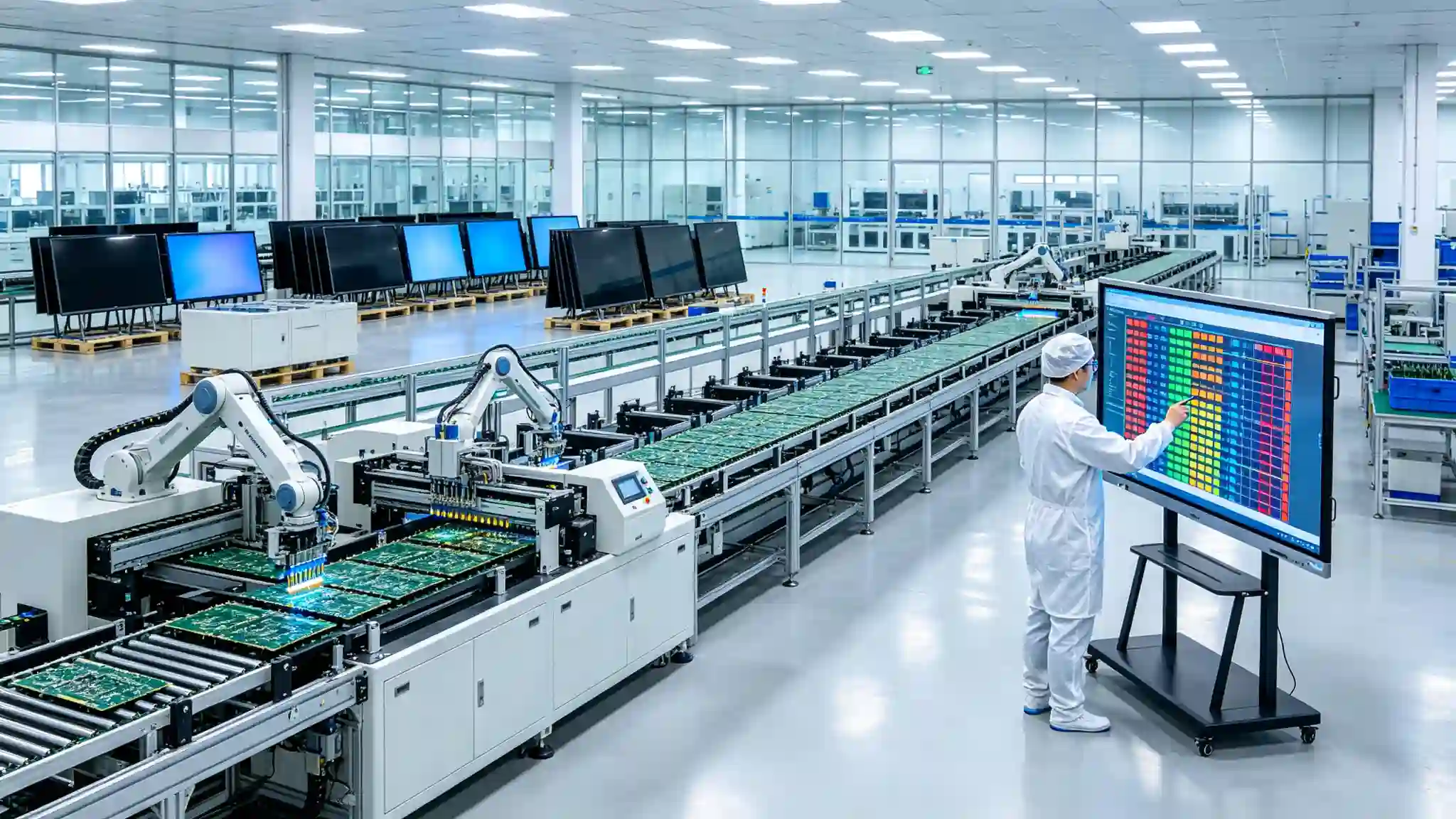
7. Manufacturing strength and quality assurance
- Established in 2005, 20 years of manufacturing experience
- 330,000 ㎡ industrial park, 16 factories and 8 full-automatic production lines
- SMT patch speed 120,000 components/hour, main board, sub-board independent production
- Class 10,000 clean room completes touch panel manufacturing and optical bonding
- Zero-Bonding zero-fit technology, 1mm tempered glass
- 48 hours high temperature aging test (72 hours for some items), comprehensive retest after aging
- The one-time pass rate of the whole machine is ≥ 97%, and the abnormal rate of aging is <1.5
- International Certification: CE, FCC, RoHS, ISO9001, CCC
- Service 120 countries and regions, after-sales response ≤ 4 hours
8. OEM/ODM and regional project support
Education brand Logo, startup interface and system language, local course software, customized camera/microphone and bracket, local certification, SKD/CKD local assembly, regional dealer training, equipment batch management, local spare parts and after-sales plan. Dedicated OEM production line: Customization does not affect the lead time for standard products; the lead time for customized orders is extended by only 3–5 days.
10. Double-qualification Classroom Project Purchase List
Purchaser needs to evaluate equipment, platforms and services simultaneously
Display and Interaction
- Is the screen size suitable for the last row of students?
- Is 4K and anti-glare supported?
- Does it support multiplayer touch and low latency writing?(Qtenboard 20-50 points, 7ms response)
- Is handwriting recognition, OCR, and graphic recognition supported?
- Do you support Android, Windows OPS, or dual systems?(Qtenboard supports dual systems)
Audio and video
- Does the camera cover teachers, students, and the whiteboard?
- Does it support automatic framing or teacher tracking?
- Can the microphone cover the entire classroom?
- Is echo cancellation and noise suppression available?
- Do the speakers cover the students in the back row?
platform and network
- Is the video conferencing platform used by the school compatible?
- Is LMS and course material sharing supported?
- Does it support student terminal interaction?
- Are the network bandwidth and wireline backup plans confirmed?
- Does the device support remote management and bulk upgrade? (DMS is Qtenboard available)
Project implementation
- Does it include installation, commissioning and network testing?
- Is training provided for lecturers and facilitators?
- Is local spare parts and maintenance support provided?(Qtenboard service to 120 countries, after-sales response ≤ 4 hours)
- Are warranty, response time and escalation policies clear?
- Calculate five year total cost of ownership?
11. How to measure the effect of double-qualification class?
We can't just count how many screens have been installed, but also see whether the classroom has really changed.
1. Equipment operation index
Equipment online rate, success rate of course connection, equipment failure rate, number of network interruptions, remote failure resolution time, frequency of classroom equipment use, software upgrade success rate.
2. Teaching process indicators
The number of students' participation, the number of students' on-stage operations, the number of classroom questions, the completion rate of interactive activities, the frequency of collaboration between the lecturer and the tutor, the preservation rate of classroom materials, and the number of after-school review visits.
3. Teaching outcome indicators
Student homework completion rate, classroom test performance, course attendance rate, student satisfaction with the course, changes in teacher preparation and finishing time, differences in student participation between urban and rural areas, and changes in subject performance (e. g., after scientific evaluation).
4. Pilot project proposals
Select one or several urban schools and one or several rural schools, select the same subject and similar grade, run a complete teaching cycle, compare the classroom process before and after the use of the equipment, record the feedback from the network/equipment/teachers and students, do not attribute all the changes in pure grades to the equipment, and use the results for subsequent expansion decisions.
XII Common Misunderstandings
Double-qualification classes are not as simple as "installing equipment and turning on live broadcast"
Myth 1: Make Double-qualification Classes into Remote TV Classes
Students can only watch the lead instructor, with no local interaction and no remote feedback. The right way: design student operations, questions, homework and group activities.
Misunderstanding 2: Only purchase display screen, not build audio and video system
Remote teachers can not hear students, students can not see teachers and whiteboard. The correct way: synchronous planning camera, microphone, audio and platform.
Misunderstanding 3: Ignoring the training of tutors
The tutor was unable to handle the equipment and classroom interaction. The right way: include tutors in the process design before, during and after class.
Myth 4: Ignoring the rural network environment
The live broadcast platform is operating normally on the urban side, but the rural side is frequently Caton. The correct way: field network test, backup link and offline data parallel. Qtenboard Q AI core transcription runs locally, reducing network dependency.
Myth 5: Only one-time project budget
Lack of training, renewal, spare parts and maintenance after equipment installation. The right way: Use a five-year TCO and full lifecycle budget.
Misunderstanding six: the equipment coverage is equal to the teaching effect
Installation completion does not represent teacher use. The correct way: continuous statistics of equipment utilization, interactive data and teaching feedback.
Conclusion: The value of a screen lies in making two classrooms truly one classroom.
The double-qualified classroom solves the problem of connecting educational resources, not a simple video transmission problem. Interactive whiteboards allow remote content, teacher annotations, student interaction, and classroom material sharing to occur in the same space. Cameras, microphones, networks, video conferencing platforms, LMS, device management and teacher training are equally important. Urban lecturers and rural tutors should form a collaborative rather than alternative relationship.
The real value of distance learning is not to allow rural students to "see" the urban classroom, but to enable them to participate in it, ask questions, complete tasks and get continuous feedback. An interactive whiteboard in the double-qualified classroom is not only a digital platform for the lecturer, but also an interactive entrance for rural students, and a platform for the preservation, sharing and reuse of course content.
QtenboardBacked by 20 years of manufacturing experience, 330,000 ㎡ industrial park, 8 full-automatic production lines, Q AI system-level framework, Genio 520 platform (10 TOPS equipment-side AI) and DMS equipment management system, it provides a complete scheme from 55-110 inch hardware, 20-50 touch, 166 language AI to Android/Windows OPS dual system, OEM/ODM customization and CKD/SKD localization for global double-qualification classroom projects. Serving 120 countries and regions worldwide, with a cumulative total of over 15,000 corporate clients. All devices support lifetime free OTA updates, ensuring the continuous evolution of AI capabilities.
When display, touch control, audio and video, network, teaching software and teacher training form a complete closed loop, a screen really has the ability to connect urban and rural education. Qtenboard can provide holistic support from hardware selection to distance learning project delivery around classroom conditions in different countries, regions and schools, helping education partners build more interactive, continuous and scalable dual-teacher classrooms.
CTA:
Obtain a guide to the selection of double-qualification classroom solutions (PDF)
· Appointment Shenzhen/Guangzhou factory visit (or cloud visit)
· Contact sales team for project proposal
 Previous:
 Return to list

 Partner Links:
