
 en
 中文

 Current location:
 Release date: 2026-10-20
 Clicks:
Walking into the outpatient hall of any large hospital, the most frequently heard questions are almost the same: "What floor is the xx department on?" "Where can I get my inspection report?" "Is the doctor visiting today?" "How much is this test?" these problems are very simple in a single point of view, but when superimposed during the morning rush hour, it is enough to keep the guidance desk at full capacity for a long time, and also allow patients to repeatedly turn back in the complex hospital area.
The value of the hospital inquiry machine is precisely the transfer of these high-frequency, repetitive, relatively fixed-answer questions from the manual window toAll-weather online, available at any time, unified caliberon the self-service terminal. This article is presentedQUNMAOOrganize. QUNMAO focuses on the research and development and manufacture of commercial display and self-service terminals. Information inquiry machines, queuing and calling machines and payment self-service terminals are all our long-term delivery product lines and are also the most commonly used terminals in hospital information projects. Based on these delivery experiences, this paper is aimed at the hospital information department, outpatient management department, medical information integrators and purchasing leaders. From medical inquiry requirements, point layout, content and interaction design, aging and barrier-free, docking with HIS and other systems, deployment effect evaluation to purchasing points, the system clearly tells how to plan, land and accept a set of hospital inquiry machine scheme.
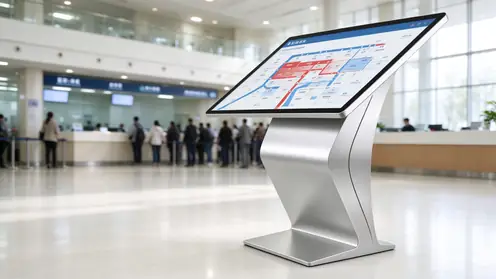
What problems do 1. hospitals need inquiry machines to solve?
Hospital is one of the places with the highest information density and the most anxious users in public places. Patients often come to the hospital with physical discomfort, unfamiliar environment and limited time. The demand for information has three characteristics:Urgent, scattered, error-prone. Understanding these three points is the starting point for designing a query machine.
Typical distress on the patient side of the 1.1
- Can't find the way:There are often many buildings, multiple entrances and cross-floor departments in large hospital areas. Patients who see a doctor for the first time are easy to go to the wrong building and take a long way;
- Unclear process:There are many links in registering first, waiting for a doctor, checking again, taking a report again and again. Once the sequence is wrong, it will queue up repeatedly;
- Information asymmetry:Whether the doctor visits, whether the examination needs an empty stomach, and how much the cost is, they often have to ask many times on the spot;
- Older and mobility groups more difficult:Mobile phone operation is not skilled, vision and hearing loss, resulting in online channels are not friendly to them.
1.2 operational pressure on the hospital side
- The guidance desk and consultation desk are occupied by a large number of repetitive problems, and the time of nursing and guidance staff cannot be invested in the work that requires more professional judgment;
- Different staff on the same issue of the caliber is not completely consistent, prone to disputes;
- Department relocation, stop diagnosis, temporary adjustment and other information, by paper bulletin update slow, narrow coverage;
- It is necessary to improve medical experience and satisfaction evaluation without increasing manpower.
Positioning of 1.3 inquiry machine: "information diversion" rather than "business substitution"
It needs to be clear that the core positioning of the hospital inquiry machine isInformation inquiry and medical guidance. It is different from the self-service machine that undertakes the transaction functions of registration, payment and invoice printing: the former focuses on "telling patients where to go, how to go and what to check", while the latter focuses on "handling business for patients". The two can work together on the same line, but they should be designed differently in terms of system authority, security level and equipment specifications. If the hospital also plans self-service registration payment, QUNMAO also providesPayment self-service terminalwithVertical self-service terminal(For more models, seeSelf-service terminal), and can be combinedSelf-service terminal solutionAccording to the hospital business software configuration; waiting link need to take the number triage, can matchQueue calling machine. If you want to understand the selection logic of the whole category first, you can read.Kiosk Full Product Line Guide。
If you are not familiar with the structure, shape and parameters of the query machine itself, it is recommended to read the basic article first:"Touch query machine (query machine) product details: what is the query machine, morphological classification and technical parameters"; If you want to know more about the application of inquiry machine outside the hospital, please referInventory of Application Scenarios of Touch Query All-in-One Machine。
Detailed explanation of the four core query functions of 2.
Around the whole process of patient medical treatment, the hospital inquiry machine usually carries the following four types of core functions. Different hospitals can go online in stages according to their own information basis: first do "public information inquiry" that does not rely on personal information, and then gradually access "personal information inquiry" that requires identity verification ".
2.1 Department Navigation: Solving "Where to Go"
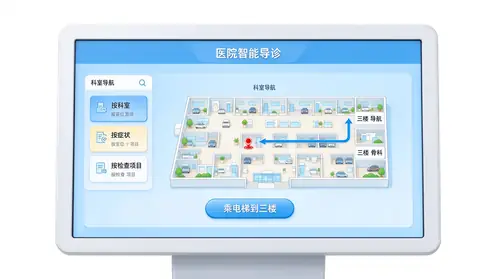
Department navigation is the most frequently used function and should be designed to cover three search paths because patients remember different information:
- Search by department:Patients know which department to go to, such as internal medicine, orthopedics, ophthalmology, can enter according to the first letter, pinyin or classification tree;
- Search by symptom or disease:Patients only know "headache" and "cough", and the system gives suggestions for visiting departments (as a guide reference, not a substitute for doctor's judgment);
- Search by inspection item or functional area:Such as blood, B- ultrasound, CT, pharmacy, toll office, toilet, elevator, etc.
The results page must also be givenText Path and Graphic Path: Text description: "From the current position, take the elevator to the third floor, turn right and go straight for about 50 meters"; The graphic shows the plan, floor plan and highlight route of the hospital area. For the courtyard area across buildings, outdoor walking routes and building entrance signs should also be given. If the hospital needs to extend the navigation to all areas of the hospital, it can be combined withGuidance and wayfinding system solutions, let the inquiry machine and the corridor guide screen share the same set of map and point data.
2.2 doctor scheduling: solving "who visits"
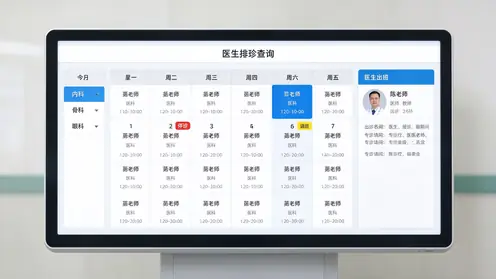
The value of doctor scheduling inquiry lies inReduce invalid runs. Patients can check the visiting doctors, visiting hours, office location and number source status of the day and the next few days by department (if docked with the registration system). Design points include:
- Display in a calendar way, the number of weeks at a glance, to avoid the elderly users rummaging in the multi-layer menu;
- The information of stop diagnosis and shift adjustment is marked with significant colors, and synchronized with the hospital scheduling system in real time, so as to avoid the trust damage of "showing out on the screen and stopping on the spot;
- The doctor profile (professional direction, professional title) shall be displayed in accordance with the contents issued by the hospital;
- Only public information is displayed, and no data related to the patient is displayed, so it can be used without authentication.
2.3 Report Query: Resolving "Where are the results"
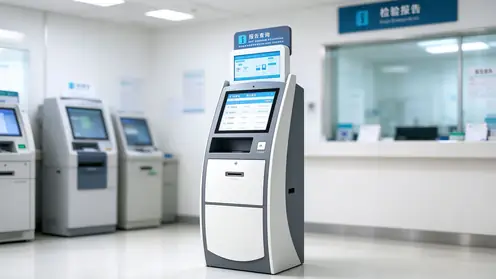
The report query involves personal health information and is one of the four types of functions with the highest security requirements. There are two common implementation methods, which should be selected according to the hospital information conditions:
- Status query type:After the patient verifies his identity through the medical card, medical insurance card, ID card or two-dimensional code, he only inquires "whether the report has been issued and where to receive it" and does not display the body of the report on the screen. This method has low risk and is suitable as a starting plan;
- Content viewing and printing:After verifying the identity, you can view or print the inspection results. You need to interface with LIS, RIS/PACS and other systems, and be equipped with a printing module and stricter privacy protection.
No matter which method is adopted, it should be matched.Anti-peep measures(Anti-peep film or narrow viewing angle panel, bevel structure),Session Timeout Auto Exit, and a clear prompt to "please take the card and log out before leaving.
2.4 Fee Inquiry: Resolving 'How Much Does It Cost"
Fee inquiries are divided into two categories: one isPublic Price Query, that is, the public announcement of charging standards for medical service items, drugs and consumables, which belongs to public information and can be directly queried; the other category isPersonal expense inquiry, such as the cost details of the current visit and the unpaid status, identity verification is required. It should be noted that the price information should be uniformly maintained by the hospital's finance and price departments. The inquiry machine only displays the information and does not allow on-site modification. It also displays the data update time to prevent patients from taking expired information as the current standard.
Recommended on-line cadence:In the first stage, on-line department navigation and doctor scheduling (without personal information, low risk and quick effect); In the second stage, public price and process guidelines will be added. In the third stage, personal reports and cost inquiries will be launched after the safety assessment is completed. The phased promotion can not only release the pressure of guidance as soon as possible, but also facilitate the information department to gradually complete the interface and safety construction.
What QUNMAO can do on the query function landing
- Provideinformation inquiry machineHardware: horizontal, vertical, wall-mounted and other forms, screen size and touch mode (capacitive or infrared) by point selection;
- Reserve peripheral positions by function: card reader, two-dimensional code scanner, thermal printer, camera, complete assembly and testing before leaving the factory;
- Pre-install Windows or Android system environment, cooperate with hospital information department, HIS or self-service software manufacturer to deploy query program, and complete joint debugging;
- For projects that only do public information inquiry in the first phase, standard models can be used to go online quickly first, and peripherals can be added in the second phase as needed to avoid excessive one-time investment.
QUNMAO provides a stable, open and extensible terminal platform. The business logic is mastered by the hospital and the software side to avoid being locked by a single software platform.
3. point planning: outpatient hall, triage desk and each floor
The use effect of the inquiry machine, three points depends on the equipment, seven points depends on where it is placed. The basic principles of point planning are:Place it where the patient is "in trouble", not where the equipment is "convenient to place".。
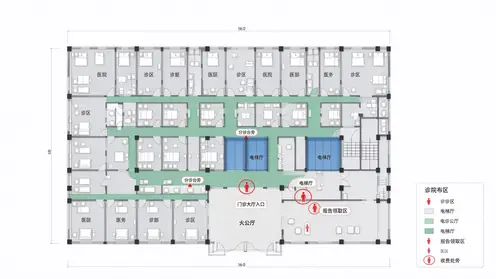
3.1 key points
- Next to the entrance of the outpatient hall and the guidance desk:The first decision-making point after the patient enters the door is to assume the role of "overview and diversion". It is recommended to configure large-size equipment and form a complementary position relationship with the guide table, instead of blocking it in front of the guide table;
- Triage desk and waiting area:It is used to inquire about the doctor's visiting, waiting notes and examination preparation requirements, and reduce repeated inquiries to nurses;
- Elevator hall and stair entrance of each floor:To solve the problem of "no department can be found when you arrive at the floor", it is suggested to unify the style with the floor guide video screen and have the same data;
- Inspection Section, Imaging Section and Report Collection Area:Place report query equipment, need to reserve identity card reading and printing space, and pay attention to the privacy distance of patients when queuing;
- Near the charge office and pharmacy:Provide price and take medicine process query, reduce the window to explain the pressure;
- Emergency entrance and inpatient department hall:To process guidance, visit regulations, floor navigation, content should be concise and direct.
3.2 Location Details
- Avoid the middle of the active line:The front of the equipment needs a parking space. If it is facing the passenger flow channel, it will cause congestion and accidental touch;
- Reserved queuing and wheelchair swing space:It is recommended to set aside enough standing and turning areas in front of the equipment;
- Control the light:Avoid the window direct and strong reflection position, if can not avoid, should choose high brightness and with anti-glare treatment of the screen;
- Power and Network Front:The embedded point on the ground or wall shall be determined in the decoration stage to avoid the influence of the bright line on the beauty and safety in the later period;
- Easy access:The back or side of the equipment should ensure that maintenance personnel can open the door to repair and replace peripherals.
The applicable positions of different forms of equipment are also different: the hall should use vertical large screen, the triage and elevator hall should use wall hanging or horizontal type, and the report receiving area should use horizontal type with card reading printing. The specific application of horizontal structure in the hospital can refer:Application Scheme of K-type Horizontal Inquiry Machine in Hospital: Self-service Registration, Payment and Report InquirywithApplication Scheme of L-type Horizontal Inquiry Machine in Hospital and Exhibition Hall: Navigation, Inquiry and Interaction。
QUNMAO's help in point and deployment loops
- According to the hospital floor plan, passenger flow and light conditions, assist the integrator and the hospital to evaluate the points, and give the combination suggestions of vertical, horizontal and wall hanging;
- Provide requirements for equipment dimensions, openings, wiring and power network points, so as to facilitate pre-embedding in advance during the decoration stage and avoid open wires in the later period;
- Provide prototype by point for pilot, verify the experience with real patients before batch delivery;
- Cooperate with the integrator to complete installation, commissioning and on-site training, and provide technical data required for installation and acceptance.
4. content design: map navigation and text plus voice broadcast
The experience of the hospital inquiry machine depends to a large extent on the content design, not the screen size. Good content design follows one principle:Let a person who has never used this type of device get an answer in 30 seconds without looking at the instructions。
4.1 Home Page: Less and Accurate Entrance
The first page only retains the core 4 to 6 entrances, such as "department navigation", "doctor's visit", "report inquiry", "charging standard", "treatment process" and "convenient service". The entrance uses large-area color blocks, simple icons and clear text, avoiding the use of buttons with only icons but no text, and avoiding the use of professional terms (for example, "blood drawing test" instead of "blood sampling test").
4.2 Map Navigation: Understood Routes
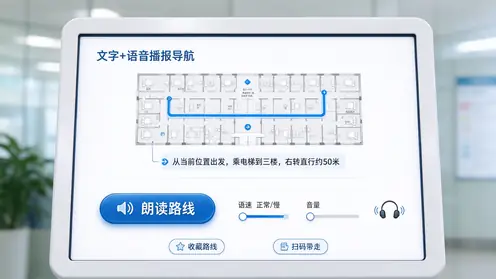
- The map shall take the "current position" as the starting point, automatically highlight the route, and do not require the patient to find the position in the plan;
- Floor switching should be intuitive, prompting "take the elevator to several floors", and special instructions should be given to the situation of changing elevators in different buildings;
- Use a reference description ("turn left after passing the pharmacy"), which is easier to understand than a simple distance number;
- Support to bring the route to the mobile phone through the two-dimensional code, which is convenient for patients to watch while walking.
4.3 Text and Speech: Dual-Channel Threshold Lowering
Voice broadcasting is especially important for the elderly, people with poor eyesight and people with difficulties in literacy. It is suggested to have: one-click reading of the current page content, sentence-by-sentence reading of route instructions, adjustable speech speed and volume, and optional earphone or directional speaker in noisy environment. The speech text should be proofread manually, and the interface text cannot be directly generated and read aloud, otherwise problems such as wrong reading of professional nouns and vague route description will easily occur. For pages involving personal reports, external voice is turned off by default to avoid privacy disclosure.
4.4 Content Operations: Keeping Information "Live"
Once the query machine has expired information, the patient will lose trust. It is suggested to establish a content maintenance mechanism: the corresponding functional departments shall be responsible for the location, scheduling and price of departments, and the information department shall issue them uniformly. Temporary notices (stop diagnosis, construction detour, epidemic prevention and control requirements) can be pushed to all equipment with one click; Conditional hospitals can passContent Management System (CMS) SolutionsCentralized release, sub-regional and sub-time scheduling.
QUNMAO Support for Content Publishing and Navigation
QUNMAO's query machine supports time switch machines, remote content updates and sub-regional scheduling.Digital Signage Content Management (CMS) SolutionUse it together to release information such as notification, stop diagnosis, detour and so on at one time and synchronize multiple units. When navigation needs to be extended to corridors and floors, it can be usedQUNMAO Searching and pathfinding system solutions, so that the query machine and the video guide screen share the same set of point data, can also be matchedQtenboard smart electronic class board/indoor digital signageCarry the education, calling number and information release of the waiting area and floor.
5. Ageing and Barrier-free Design
Among the users of the hospital, the elderly patients account for a high proportion and the frequent follow-up of chronic diseases, which is the group that the inquiry machine must give priority. Ageing and accessibility are not "additional options", but hospital scenario solutions.Basic requirements。
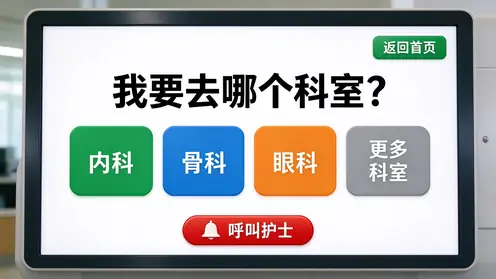
Ageing of 5.1 Interface and Interaction
- large font with high contrast:The text and button text are significantly enlarged, and the background and text contrast are strong, avoiding light gray characters, thin lines and fancy baselines;
- Large buttons with sufficient spacing:The touch target area is enlarged and the interval is opened to reduce the false touch caused by hand tremor or rough fingers of elderly users;
- Fewer levels, fewer options:Common functions should be completed in two to three steps as far as possible, and there should not be too many options on each page;
- Explicit "back" and "back to home":Fixed position, fixed style, can exit at any time, to avoid users trapped in the deep page;
- Elder mode:Provide a key to switch the "big word mode", open the font size to further enlarge, streamline functions;
- A key to help:Set up the entrance to call the guidance personnel, and reserve manual support for problems that cannot be solved by the machine.
Barrier-free design of 5.2 hardware
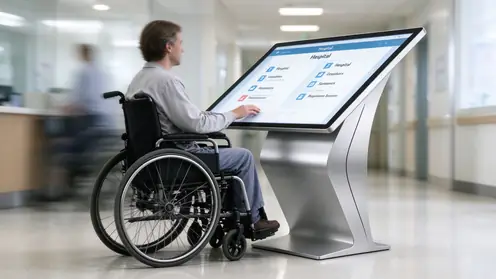
- Operating height:The screen and peripheral entrance shall be within the reach of wheelchair users and standing users, and can refer to the relevant requirements of the national barrier-free design specification and be confirmed by field measurement;
- Low Type or Adjustable Structure:At least one low-level device is set at the key point, or the inclined screen structure is adopted to take into account different heights;
- Knee Space:Adequate space is reserved below the equipment for wheelchair users to enter, and there should be no protruding base to block it;
- Position of card reading and object taking:The position of the card reader and ticket outlet shall be within the scope of access, and there shall be obvious instructions;
- Corner safety:Use rounded corners or anti-collision treatment to reduce the risk of collision between visually impaired users and children;
- Voice and Tactile Cue:Provide voice guidance for visually impaired users, if necessary, with tactile keys.
Measured recommendations:Suitable for aging cannot rely solely on design review. It is suggested that after the equipment is in place, real patients of different ages (especially the elderly) are invited to conduct on-site trial, record the time of completing the task, the card point and the wrong touch position, and iterate the interface accordingly. The improvement obtained in this way is often more effective than any parameter adjustment.
Hardware Support of QUNMAO in Ageing and Accessibility
- Tilt screenK-type horizontal query kioskwithL-type horizontal inquiry machine, standing and sitting posture are easier to see, reach, and reduce false touch;
- Can be customized according to the requirements of the hospital low-level models, knee reserved space and rounded anti-collision structure;
- The screen size, resolution and brightness can be matched according to the display requirements of the "large character mode" to ensure that the information under the large font is not crowded;
- The shell and the glass surface are easily wiped to meet the requirements of frequent cleaning and disinfection in hospitals.
The difference between the two horizontal structures can be read.What is the difference between K type and L type horizontal inquiry machine。
6. docking with HIS and other hospital systems
Hospital query machine can provide accurate, real-time information, the key lies in the existing hospital information system docking. For the Information Section, the issues of greatest concern are:Which systems to connect? How to ensure security? Will it affect the existing business?
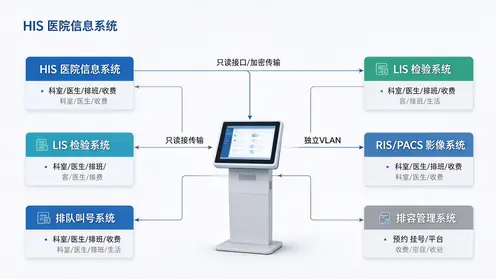
6.1 common docking objects
| Docking system | Data provided | Corresponding function | Nature of Data |
|---|---|---|---|
| HIS (Hospital Information System) | Departments, doctors, scheduling, charging items, medical records | Department navigation, doctor scheduling, cost inquiry | Mainly public information, personal information needs to be verified |
| Appointment registration platform | No. source, reservation status | Number source inquiry, reservation information | Public Information and Personal Information |
| LIS (Inspection System) | Inspection Report Status and Results | Inspection Report Query | sensitive personal information |
| RIS/PACS (Imaging System) | Check Report Status and Results | Image Report Collection Prompt | sensitive personal information |
| Queueing and numbering system | Waiting sequence and calling status | Waiting progress display | Semi-public information |
| Unified Identity/Medical Card System | Identity verification | Entrance of Personal Information Inquiry | sensitive personal information |
| Content Management System | Contents of notice, announcement and education | Home and Standby Content | Public information |
6.2 docking mode and principle
- Interfacing via interface or integrated platform:The existing integration platform of the hospital or the standard interface provided by the manufacturer (such as WebService, RESTful, etc.) is preferred to avoid direct connection to the core database;
- Read-only priority:Query services mainly read data and do not write data to the business system to minimize the impact on the core business;
- Network isolation:The query machine should be deployed in an independent network segment or a dedicated VLAN when accessing the hospital intranet, and only necessary ports and addresses should be opened through access control;
- Caching and Demote:Public information is recommended to be cached locally on the device side, and basic queries can still be provided when the network is disconnected, and it is clearly prompted that "the information may not be up to date";
- Interface responsibility is clear:The interfaces of HIS and other systems are provided by the original manufacturer or the hospital information department. The application party of the inquiry machine is responsible for the docking development and joint debugging, and the responsibilities of all parties are clearly stated in the contract;
- Joint debugging and pressure measurement:Before going online, perform function debugging, concurrent stress test, and abnormal scenario test (interface timeout, null data, repeated query, etc.).
What can QUNMAO do in the system docking link
- Delivered in an open terminal, pre-installed systems, peripheral drivers and browser-locked environments, without binding proprietary software;
- Provide Windows and Android two platforms, easy to connect the hospital client program or browser page;
- Before leaving the factory, cooperate with integrators to complete the joint debugging and aging test of card readers, code scanners, printers and other peripherals to shorten the on-site debugging cycle;
- Provide equipment-side technical data to the hospital information department to facilitate interface review, network division and security assessment.
7. Privacy and Information Security
Medical information is sensitive personal information, and security should be taken into account in the equipment selection and scheme design stage, rather than remedied after online. The hospital should combine the "Personal Information Protection Law", "Data Security Law" and the relevant requirements of the industry authorities to jointly evaluate the plan with the information security department.
- Minimization principle:Only display the information necessary to complete the query, the report body, sensitive diagnosis and other content as far as possible not to directly display on the public screen;
- Identity Verification:Personal information inquiry must be verified by medical card, medical insurance card, ID card, two-dimensional code, etc., and there is a limit on the number of failures;
- Session security:No operation automatically returns to the first page and clears the session; Empty the cache and input records when exiting;
- screen anti peep:Equipped with anti-peep film or using inclined structure, equipment placed in the direction to avoid the rear queue to see;
- System lock:Kiosk mode is enabled to block system shortcut keys, taskbar and unauthorized applications. The external interface is built-in or locked;
- Transfers and Logs:Encrypted transmission is used for communication with the background, and necessary access logs are kept for audit and traceability;
- Camera and recording:If the device has a camera, it should be clearly used, prompted to inform, and follow the relevant provisions of the hospital.
QUNMAO Device Configuration on Privacy and Security
QUNMAO can be configured with Kiosk locking mode, built-in external interface or lock design, anti-peep film or narrow viewing angle panel according to hospital safety requirements, and reduce the risk of watching peep through inclined plane structure and placement direction. The equipment supports self-starting and abnormal self-recovery, and cooperates with remote management to facilitate the information department to discover offline equipment in time. For points involving personal reports, horizontal models are recommended to be preferred.
Suggestions on Hardware Configuration of 8. Hospital Scenarios
| Location point | Recommended Form | Common sizes | Touch control | Peripherals | Key focus |
|---|---|---|---|---|---|
| Outpatient Hall Entrance | Vertical | 43-55 inch | Capacitive or infrared | Code scanner (with route) | Visual distance, anti-reflection, map interaction |
| Guidance/triage | Horizontal or wall-mounted | 27-43 inches | Capacitor | Scanner | No blocking of guidance and operating height |
| Floor elevator hall | Wall or vertical | 32-43 inches | Capacitor | On demand | It is unified with the video guide screen and occupies a small area. |
| Report collection area | Horizontal | 27-43 inches | Capacitor | Card reader, code scanner, thermal printer | Identity verification, anti-peeping, privacy distance |
| Toll Office/Next to Pharmacy | Vertical or wall-mounted | 32-43 inches | Capacitor | On demand | Price update, process guidance |
| Low barrier-free point | Low horizontal | 21.5-32 inch | Capacitor | Card reader | Wheelchair accessible, knee space |
The hardware requirements for a hospital environment also include:
- Easy to clean and resistant to disinfection:Screen glass and shell coating should be able to withstand daily alcohol wipe, the gap design to minimize dust and dirt residue;
- Touch stability:Capacitive touch screen response to wet fingers, after disinfection is more stable, but also easy for elders to operate;
- Continuous operation:The outpatient service period is long, the equipment should be able to support long-term stable operation, with overheating protection and automatic recovery strategy;
- Mute:The waiting area is quiet, and low-noise heat dissipation design is recommended;
- System selection:If you need to connect with the hospital Windows client or browser business, the Windows scheme is preferred; the content display and navigation-based optional Android scheme.
The selection method of screen size and configuration can be referred.How to Choose the Screen Size and Configuration of K-type Horizontal Inquiry Machine: 17-inch to 43-inch ControlFor the structure and anti-accidental touch design of horizontal models, please referStructural Design and Ergonomics of K-type Horizontal Inquiry Machine. To view the existing query machine model and specifications, you can enter QUNMAO Information query machine product classification: For details of vertical K-type inclined plane touch inquiry machine, seeK-type inquiry machine product detailsFor details of outdoor/horizontal infrared touch inquiry machine, seeOutdoor K-type inquiry machine product details。
What 9. QUNMAO can do for the hospital: in which links to help
The preceding chapters discussed methods; this chapter addresses a more direct question:If the hospital chooses QUNMAO, in which specific phases of the project can we provide assistance?
Who is 9.1 QUNMAO?
QUNMAO (Qunmao) is the brand of Shenzhen Qunmao Display Technology Co., Ltd. It focuses on the research and development, manufacturing and service of commercial display and interactive terminals. Its products cover information inquiry machines, queuing and calling machines, payment self-service terminals, digital signage, LCD splicing screens, etc. QUNMAO has its own factory and supports OEM/ODM. Hospital projects can start from standard models or be customized according to point and peripheral requirements.
Support Scope of QUNMAO with Each Link of 9.2 Hospital Project
| Project link | Help provided by QUNMAO | Corresponding product or scheme |
|---|---|---|
| demand and selection | Combined with point position, passenger flow and light, the shape, size and touch scheme are suggested. | information inquiry machine、Detailed Product Description of the Query Machine |
| Hardware & Customization | Customization of appearance, size, color, logo and peripheral positions, low position and anti-peep configuration | K-type horizontal query kiosk、L-type horizontal inquiry machine |
| System and docking | Pre-installed systems and drivers, with HIS and self-service software side of the joint adjustment of peripherals and programs. | Self-service terminal solution |
| Navigation and Content | Map point sharing, centralized content publishing and sub-regional scheduling | Guidance and wayfinding system scheme、CMS Content Management Solution |
| Number pickup and waiting | The number picking machine, window screen and number calling are linked to form a "query-number picking-waiting" moving line. | Queue calling machine |
| Self-service business such as payment | Expand registration payment self-service terminal beyond inquiry | Payment self-service terminal、Vertical self-service terminal |
| Pilot and Delivery | Prototype pilot, aging and functional testing before mass production, factory inspection | Kiosk Product Overview |
| Installation and Aftermarket | Cooperate with integrators for installation and commissioning, on-site training, and provide quality assurance and spare parts support | Industry Solution Overview |
9.3 QUNMAO is suitable for the type of medical institution it serves
- General Hospital:Multi-building, multi-floor, large passenger flow, focusing on the lobby and floor navigation, report collection area of the layered configuration;
- Junior College hospital and oral, ophthalmology and other outpatient:The number of departments is small, the process is fixed, the process guidance and scheduling inquiry are given priority to, and the number of equipment is streamlined;
- community health service center:The proportion of elderly patients is high, more emphasis on large word mode, voice and low equipment;
- Physical Examination Center:To move line guidance and project progress query-based, can be linked with the queue number;
- maternal and child and children's hospital:Pay attention to corner safety and low position design, and the content should be adapted to accompany family members.
9.4 QUNMAO's approach to cooperation
- Direct cooperation with hospital information department:The hospital puts forward the demand, and QUNMAO cooperates to complete the equipment selection, prototype and delivery;
- Working with System Integrators:Integrator is responsible for the overall program and software, QUNMAO provides terminal hardware, peripheral integration and technical support;
- Cooperation with medical software manufacturers:Software vendors provide inquiry and self-service business programs, and QUNMAO provides a terminal platform that has been jointly adjusted;
- OEM/ODM:Customize the appearance, structure and peripheral solutions according to the customer's brand and specifications.
Schematic and Effect Evaluation of 10. Deployment Scheme
10.1 Schematic Deployment Scenario
The following table is a schematic plan to illustrate the configuration of the outpatient building of a large and medium-sized general hospital,Not a specific hospital case. The actual equipment quantity shall be calculated according to the outpatient volume, floor structure and peak passenger flow, and determined after site survey.
| regional service department | Configuration | Main functions | Phase |
|---|---|---|---|
| Outpatient Hall | 43-55 inch vertical, several sets | Department navigation, doctor scheduling, treatment process | First phase |
| Elevator hall on each floor | 32-43 inch wall mount, 1 set per floor | Navigation and waiting information of the department on this floor | First phase |
| Triage Desk/Waiting Area | 27-43 inch horizontal or wall-mounted | Visiting information and examination preparation tips | First phase |
| Report collection area | 32-43 inch horizontal, with card reading and printing | Report Status Query or View | Phase II and III |
| Toll Office/Pharmacy | 32 inch vertical or wall hanging | Price inquiry and medicine taking process | Phase two |
| Accessibility points | Low horizontal, at least 1 set | Basic Query and Navigation | First phase |
10.2 equipment quantity calculation
The number of devices can be estimated by peak usage:Number of units required ≈ number of inquiries in peak hours × average single time duration (seconds) ÷(3600 × target occupancy rate). For example (assumed value): the outpatient hall is used by about 150 people per hour during peak hours, with an average of 60 seconds each time. if the average occupancy rate is expected to be controlled within 50%, the number of units required is ≈ 150 × 60 ÷(3600 × 0.5)= 5 units. The actual passenger flow statistics on site shall prevail, and redundancy shall be reserved to deal with faults and maintenance.
Assessing 10.3 Effectiveness: Using Data, Not Feelings
The deployment effect must be measurable and verifiable. It is recommended that the hospital collect data for a period of time before and after the launch for comparison. All indicators are subject to the hospital's own statistics:
- Changes in manual consultation volume and high-frequency problem types at the guidance and consultation desks;
- The average time for patients to find the target department, or the feedback frequency of "going to the wrong floor;
- The average daily usage of the query machine, the average duration of a single use, and the bounce rate of the home page;
- Use proportion of each function (department navigation, doctor scheduling, report query, cost query);
- The success rate and abandonment rate of the first query, reflecting whether the interface is easy to use;
- Equipment on-line rate, number of failures and average repair time;
- Patient satisfaction surveys and changes in the volume of complaints, especially in the elderly patient population.
Through these data, the hospital can judge which functions are worth expanding and which points need to be adjusted, and can also provide well-documented results to superior departments or hospital leaders instead of general "experience improvement".
Eleven, hospital inquiry machine procurement points.
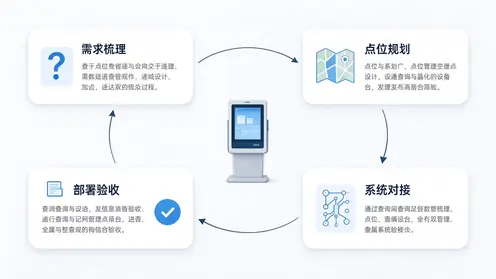
11.1 requirements and technical documentation go first
- Clarify the scope of functions (only for public inquiries or personal reports), point list and installment plan;
- Make clear the docking system list and the responsible party of the interface, so as to avoid finding that the interface is not provided until the equipment arrives;
- Write down the specific requirements for aging, accessibility and privacy protection in the bidding or procurement documents, rather than just "meet the requirements".
Key points of 11.2 hardware evaluation
- Touch and Display:Touch accuracy and response, screen brightness and visual angle, anti-glare processing;
- Structure and surface:Sheet metal thickness, corner treatment, easy cleaning, access door locks;
- Heat dissipation and stability:Continuous operation test results, overheat protection, mute level;
- Peripherals and Expansion:Reservation and integration capabilities of card readers, code scanners and thermal printers, and whether standardized installation positions are adopted;
- Systems and Security:Kiosk locking, interface protection, and remote management and upgrade capabilities.
11.3 Software and Content Evaluation
- Whether large-character mode, voice broadcast and multi-language (foreign-related hospitals) are supported;
- Whether it has the ability of centralized content release and sub-regional scheduling;
- Whether there is a network disconnection cache and demotion strategy;
- Whether the log, permission and data security measures meet the hospital information security requirements.
11.4 Service and Delivery Assessment
- Prototype and Pilot:First, make a prototype trial at a point, verify the experience with real patients, and then purchase in batches (QUNMAO can provide prototype cooperation pilot according to the point);
- Installation and Debugging:Whether point survey, installation, joint debugging and training are provided;
- Warranty and Spare Parts:Warranty period, response time, key component replacement method;
- Manufacturer capacity:Manufacturing scale, customization and OEM capabilities, past medical scenario delivery experience, and requirements for verifiable qualification and testing documentation.
11.5 Arrival Acceptance List
- The appearance structure is not damaged, the corners are handled safely, and the access door and lock work normally;
- Display no bad point, uniform brightness, strong light environment is still readable;
- Full-screen touch accuracy and multi-touch functionality are normal; performance with wet fingers and while wearing gloves meets expectations.
- During the aging test, there were no system crashes, automatic reboots, or overheating alerts.
- Card reader, scanner, printer and other peripherals to identify stable, drive and application compatible;
- Kiosk mode is active, external interfaces are restricted, and the system automatically restarts on boot and recovers from abnormalities.
- Data communication with systems such as HIS is stable, and the network outage and recovery scenarios comply with the design.
- Suitable for aging and barrier-free functions (large-character mode, voice, low-position equipment) are confirmed by field trial;
- Complete documentation: specifications, certification documents, installation and maintenance manuals, warranty instructions and spare parts list.
For more details of installation, commissioning and acceptance, please referCustomization Process of K-type Horizontal Inquiry Machine: Detailed Explanation of Customization of Appearance, Size and Function Module. If the hospital plans to take the number and triage at the same time, it can be linked.Qunmao Queuing Number Calling Machine(For specific models, seeQueuing machine product details page) and"Hospital queuing machine program", to form a complete line of "query first, then pick up the number, then wait for consultation.
XII. Frequently Asked Questions
What is the difference between a hospital inquiry machine and a self-service registration payment machine?
The inquiry machine is mainly based on information inquiry and medical guidance, and does not involve capital transactions. The self-service registration and payment machine is responsible for business handling, involving payment, bill, identity verification and higher security compliance requirements. The two can be deployed together and connected back and forth on the moving line, but they should be designed separately in terms of system authority, peripherals and security level.
HIS docking has not been completed, can you go online first?
Sure. First, online content that does not rely on real-time data, such as hospital navigation, department location, treatment process, charging standard publicity, etc., and manually maintained through the content management system; After HIS and other interfaces have the conditions, they will gradually access real-time functions such as doctor scheduling and report query. The key is to establish clear content maintenance responsibilities to avoid long-term information not updated.
Do report queries have to be printed?
Not necessarily. Status inquiry can be made first to inform the patient whether the report has been issued, the location and time of collection; If you need to view or print the results, you need to interface with the inspection system and configure the printing module, while strengthening privacy and security measures. The specific method should be evaluated by the hospital information department and the medical department.
Elderly patients will not use it. Is the equipment still valuable?
The value depends on the design. Through large-character mode, voice broadcast, low-level and one-click help, the inquiry machine can become an "auxiliary tool" rather than an obstacle for elderly patients. At the same time, it is also common and effective to arrange volunteers or guides to assist in the use of equipment during peak hours. The usage data and feedback of elderly users should be specifically tracked after going online, and continuous optimization should be carried out.
Do you want to choose a high brightness screen?
Depends on the location. It is recommended to increase the brightness and cooperate with anti-glare treatment for the obvious lighting positions of the hall near the window and the atrium. For corridors and waiting areas with stable indoor light, conventional commercial display brightness is usually sufficient. In the end, the field measurement shall prevail, and the readability shall be checked during the day and night.
What should I do when the equipment fails, will it affect the guidance?
The design should be carried out at the plan stage: the key points should be reserved for manual guidance as a backup; Multiple devices are used in distribution, and a single failure does not affect the whole; Timely discovery of offline equipment through remote monitoring; Agreement with suppliers on response time and spare parts strategy. At the same time, the fault prompt page of all equipment should clearly inform "this machine is out of service, please go to the guidance desk" to prevent patients from waiting in front of the faulty equipment.
Who will maintain the contents of the inquiry machine?
It is suggested to adopt the division of labor of "functional departments are responsible for content and information department is responsible for release": department location and process are maintained by outpatient management department, shift arrangement is maintained by medical department, price is maintained by financial and price department, and information department is responsible for system operation and unified release. Clarity of responsibility is a prerequisite for long-term accuracy of information.
Summary
The success of the hospital inquiry machine does not depend on a certain number on the parameter table, but on whether the patient's "three problems" are really solved ":Where to go, who to find, what to check. From demand sorting, point selection, to content design, aging and accessibility, to docking with HIS and other systems and privacy protection, every link will affect the final use effect. Staging construction, easy before difficult, and using data to assess effectiveness are the more secure paths for most hospitals.
QUNMAO around horizontal, vertical, wall and other forms to provideInformation query all-in-one machineAnd customized solutions, according to the hospital's point environment, peripheral requirements and system environment to complete the configuration, and with the integrator to complete the docking and acceptance. When a hospital needs more complete in-hospital self-service, it can be combinedSelf-service terminal solutionwithSelf-service terminal productsUnified planning; To compare the configuration of query machines in different industries, you can continue reading.Application of Query Machine in Government Affairs and Banking ScenarioswithInventory of Applicable Scenarios of K-type Horizontal Inquiry Machine、Inventory of Applicable Scenarios of L-type Horizontal Inquiry Machine。
Do you need a hospital inquiry machine plan, or do you want to talk about the location and selection first?
QUNMAO (Qunmao) supports the rapid launch of standard models, and can also be customized according to point, peripheral and system environment, and provides prototype pilot and joint commissioning acceptance services.
Contact us to obtain the hospital inquiry machine plan.Or call:+86 137 1431 7162
 Previous:
 Return to list

 Partner Links:
