 Current location:
Home
> News > Product News > Query machine
 Release date: 2026-10-27
 Clicks:0
After the ordering machine raises the ordering speed in the front office, the pressure will naturally shift to the back kitchen: orders are more concentrated and intensive. If the back kitchen still relies on hand-copied, oral or stacked paper receipts, the order of meals will be chaotic, and the order of missing orders and overtime will also increase.QUNMAOThe self-service ordering machine supports Ethernet, WiFi and optional 3G/4G networking, pre-installed Windows 10/11, and supports customization of ordering software. It can deliver orders to each station in an orderly manner according to the dining method of the back kitchen of the store.
This article focuses on "how to link the ordering machine with the back kitchen", and in turn explain what KDS is, how to flow orders, how to arrange priorities, how to warn overtime, how to coordinate multiple screens, how to cover the bottom of orders, and what needs to be confirmed when selecting and docking.QUNMAOThe hardware parameters of the ordering machine are all from the QUNMAO factory specifications.
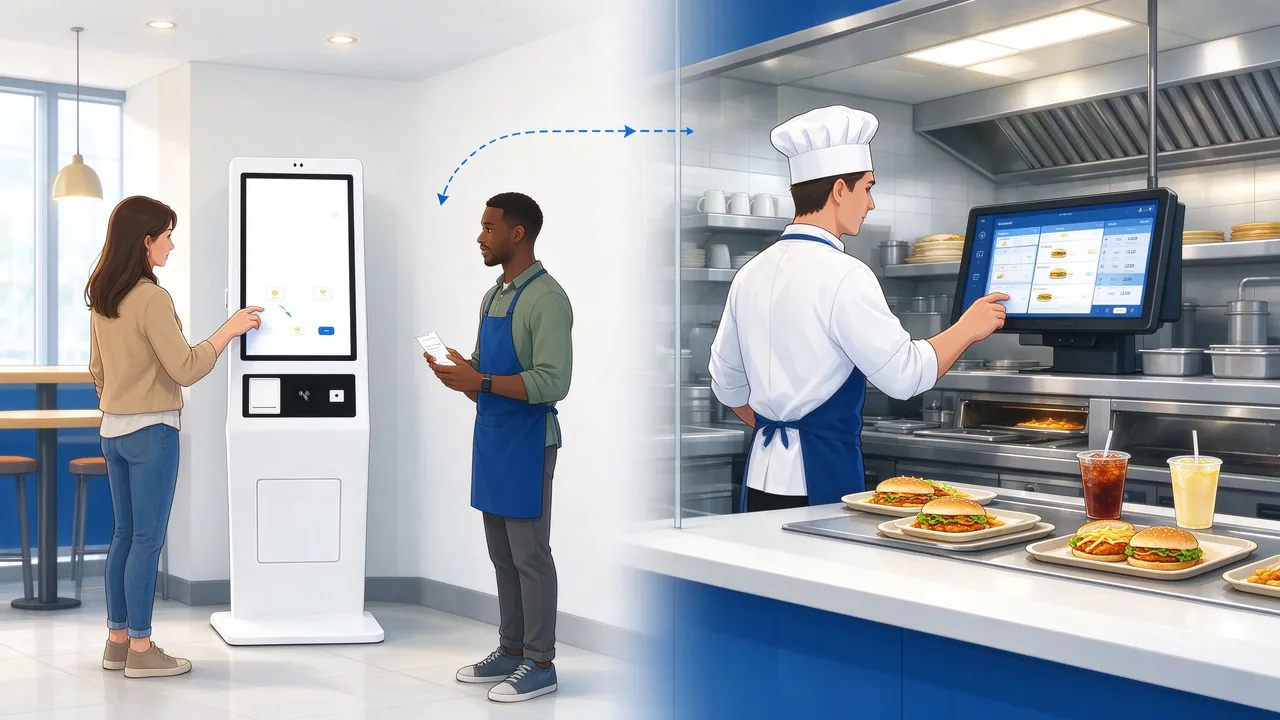
Under the traditional cash register mode, a cashier can only process one order at a time, and orders are delivered to the back kitchen one by one and at a uniform speed. After the self-service ordering machine goes online, multiple customers can order orders at the same time, and the rhythm of orders arriving at the back kitchen becomes faster and more concentrated, especially in the afternoon and evening peaks. The bottleneck in the front hall was opened, and the pressure point of the back kitchen was changed.
If the order receiving method of the back kitchen does not keep up, common problems will appear one after another: the receipt is printed and piled at the ticket exit, and no one tore it off in time; The drinks, hot dishes and cold dishes in the set meal are not separated, and each station waits for each other. Urgent orders are mixed in ordinary orders, and customers come back to ask after waiting for a long time. The order was changed or returned, but the kitchen did not received the update. These problems are not big on a single look, and when they are added together, they will eat up some of the efficiency advantages brought by the ordering machine.
QUNMAOIt is a brand of Shenzhen Qunmao Display Technology Co., Ltd. and an OEM/ODM source factory for LCD commercial display. In the ordering machine program,QUNMAOThe front office ordering terminal and order push logic are designed as a whole: the ordering machine is responsible for receiving orders, paying and issuing tickets, the ordering software customizes the order splitting, routing and receipt according to the meal delivery process of the store's back kitchen, and the back kitchen can use the customer's existing KDS system or use the kitchen printer.
If you don't know the overall configuration of the ordering machine, you can look at it first.QUNMAO Self-service Ordering Payment TerminalProduct classification, or comparisonQUNMAO Self-service Ordering Payment TerminalwithQUNMAO order payment all-in-one machineTwo product pages confirm the model; For reference, please refer to the store location, moving line and online process.Self-service ordering machine store deployment guide。
KDS stands for Kitchen Display System. It uses a display screen to replace the paper receipt in the kitchen: after the order enters the system, it is distributed to each kitchen screen according to the dishes and stations. the chef checks the order content on the screen, confirms the meal after it is finished, and then synchronizes the status back to the front hall. Compared with paper receipts, orders on the screen can be changed, timed, sorted, and not missed due to paper stacking.
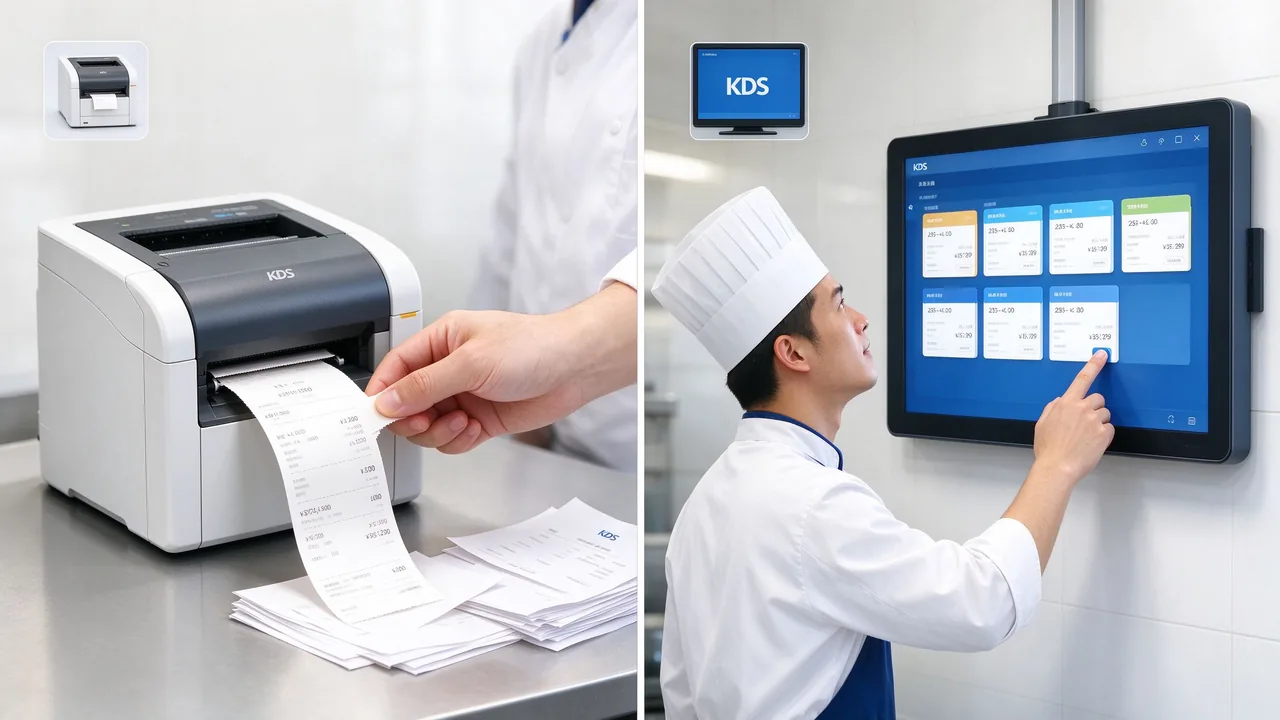
| Contrast Item | Kitchen printer | KDS Galley Display System |
|---|---|---|
| Order Presentation | Paper receipt, need to be manually torn off, hung up or discarded | Screen queue, automatically cleared after meal confirmation |
| Change Order and Return Order | Reprint or verbal notice required | Change of screen synchronous display after order update |
| Timing | Judging by the chef by experience or by time. | Each order can be with countdown and color tips |
| Consumables | Thermal paper needs to be continuously replenished | No paper consumption |
| Data | Usually no meal data | Can record meal duration, overtime orders, etc., used to repeat the plate. |
| Suitable for stores | Stores with few workstations, small order volume and sensitive to equipment input | Stores with many stations, intensive peak orders, and wishing to manage meal delivery efficiency |
The two methods can be used together: KDS is the main method, kitchen printer is used as backup, and orders can still be made when the network or equipment is abnormal.
QUNMAO ordering machineIt has a built-in 80mm thermal printer, which is used to print the customer's meal receipt and issue the ticket immediately after the payment is successful. The display or printing of the back kitchen is undertaken by the KDS system or kitchen printer selected by the store,QUNMAOThrough ordering software customization, the order is pushed in the format, station and timing required by the back kitchen. This not only retains the store's existing investment in back kitchen equipment, but also allows the front office to order meals and back kitchen meals to form a coherent link.
From the customer's "confirmation" to the back kitchen to get the order, there are several links in the middle. Only by understanding what has happened in each link can we judge where problems are easy to occur and where to do the bottom line.
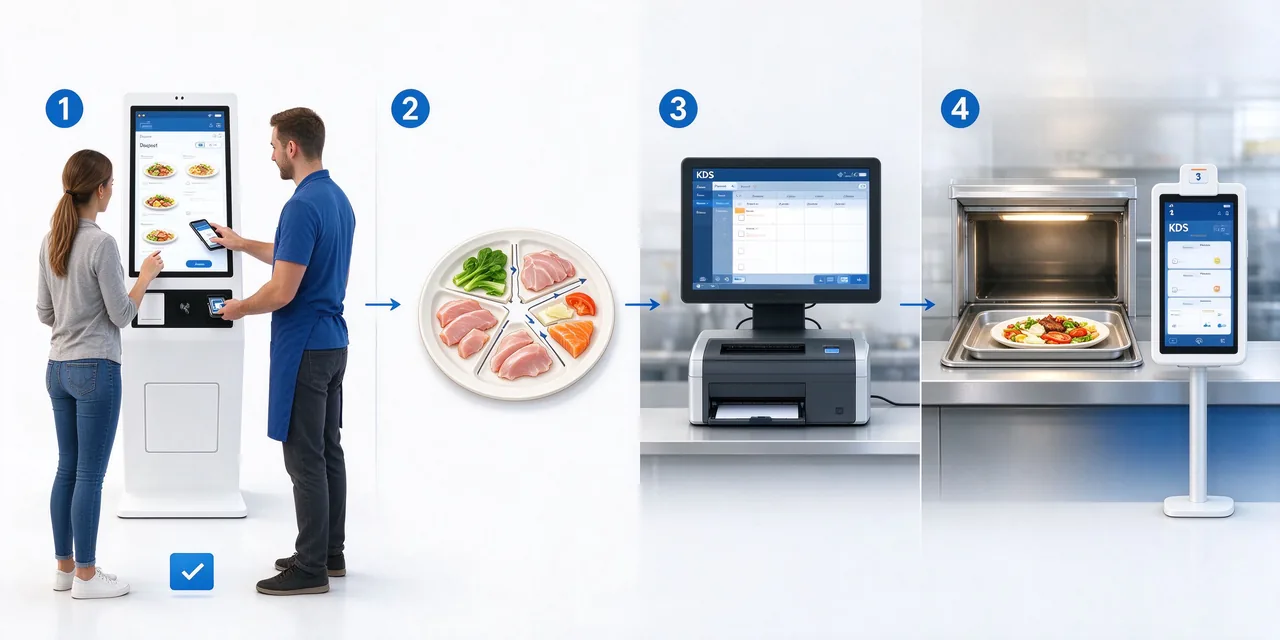
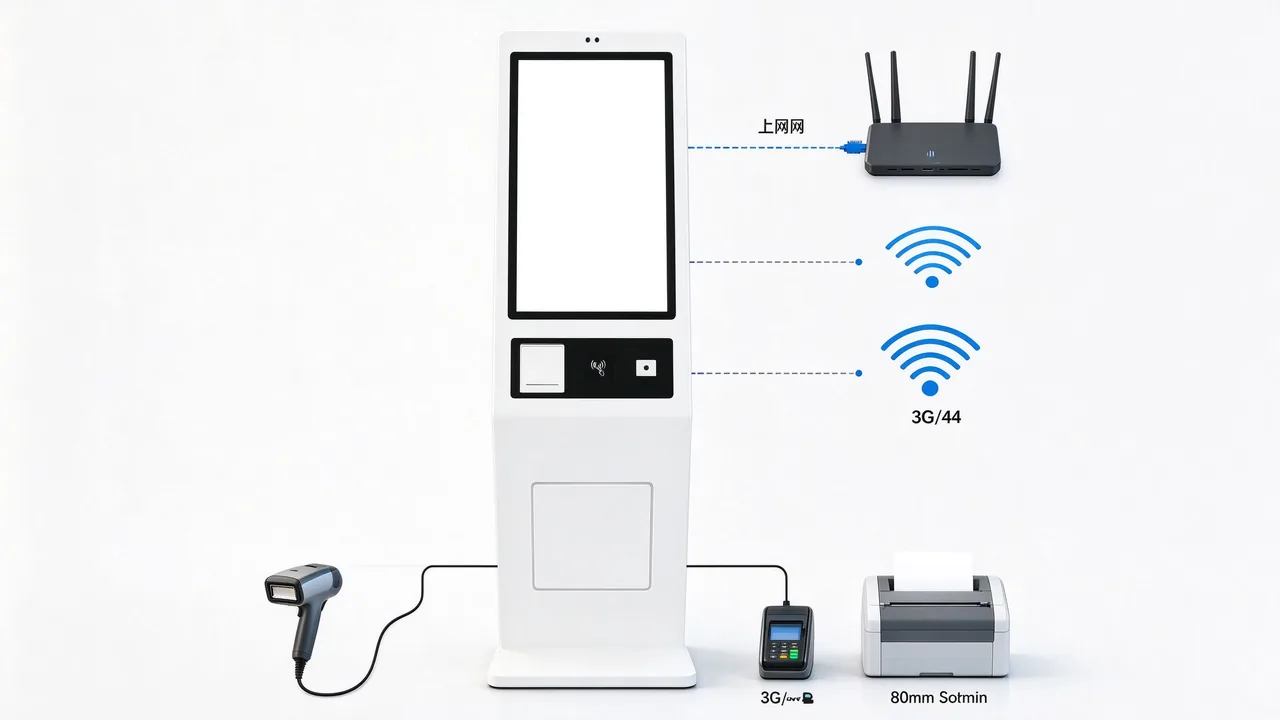
The ordering machine must be docked with the back kitchen system, first of all, it depends on what conditions the terminal has. The following table lists all the parameters in the QUNMAO plant specification:
| Docking link | QUNMAO order machine specifications | The significance of the kitchen linkage |
|---|---|---|
| Network transmission | Ethernet RJ45 × 1, support WiFi and Ethernet, optional 3G/4G | Orders can be sent via wired, wireless or cellular networks, depending on store network conditions. |
| Operating system | Windows 10/11(15.6-inch and 27-inch Android 13 versions) | Compatible with mainstream ordering and back kitchen software to facilitate docking with existing systems in stores |
| Software Deployment | Support the installation of third-party software, support boot self-start | The ordering program runs automatically with startup, and stores do not need to start manually every day. |
| Interface | DC× 1,USB× 4,RJ45× 1,Audio× 1,VGA× 1,HDMI× 1 | USB port can be expanded peripherals, network port for order transmission |
| Issue a ticket | 80mm thermal printer | Instant printing of customer's meal receipt and order voucher |
| Payment peripherals | Barcode and two-dimensional code scanning, POS terminal reserved holes, NFC card swiping (21.5 inches, 32 inches) | After the successful payment status is confirmed, the order will be issued to the kitchen. |
| Audio | Two built-in high-quality speakers | Can be used for voice prompts such as payment success, meal call number, etc. |
| Operations Management | Support custom on/off time, one key on/off with light | Switch on and off the same as the store's business and kitchen preparation time. |
Data source: QUNMAO factory specifications for each model. NFC is not listed in the 15.6-inch and 27-inch specifications. If there is any need, it can be confirmed at the project stage.
The time point when the order is issued should be carefully chosen. After the customer orders the order, it will be issued, which may lead to the waste of the customer giving up the payment and the kitchen has already started to prepare the meal. After the payment is successful, it will be issued again, which can ensure that every order made by the kitchen is a paid order.QUNMAOWhen ordering software is customized, the result of successful payment is usually used as the trigger condition for order routing, while special modes such as "order first and settlement later" are retained to meet the operating habits of different stores. For the docking and exception handling of the payment link itself, please referPOS terminalwithCashier SolutionSupporting equipment and processes in.
Order transmission depends on the network, once interrupted, the kitchen will not receive orders.QUNMAO ordering machineAt the same time, Ethernet and WiFi are supported, and 3G/4G can be selected. It is suggested that stores should be mainly wired network, WiFi should be used as backup, and conditional stores should be added with cellular network to form three links. When the ordering machine and the kitchen equipment are placed in the same LAN, the transmission of orders does not rely on the external Internet, which can reduce the impact caused by fluctuations in the external network.
Each station of the back kitchen may face dozens of orders at the same time. How to sort directly determines the waiting time and satisfaction of customers.QUNMAOThe ordering software will first confirm the sorting rules with the store and then write the order routing logic.
The most basic rule is first-in, first-out, queuing in chronological order of successful payments. On this basis, the following priorities can be superimposed:
A set meal often contains drinks, hot dishes, cold dishes and snacks, which are made by different stations. If the whole order hits the same exit, each station will wait for each other. A more reasonable approach is to split the list according to the attribution of the dishes: drinks are sent to the beverage station, hot dishes are sent to the hot dishes station, cold dishes are sent to the cold dishes station, and finally collected at the exit.
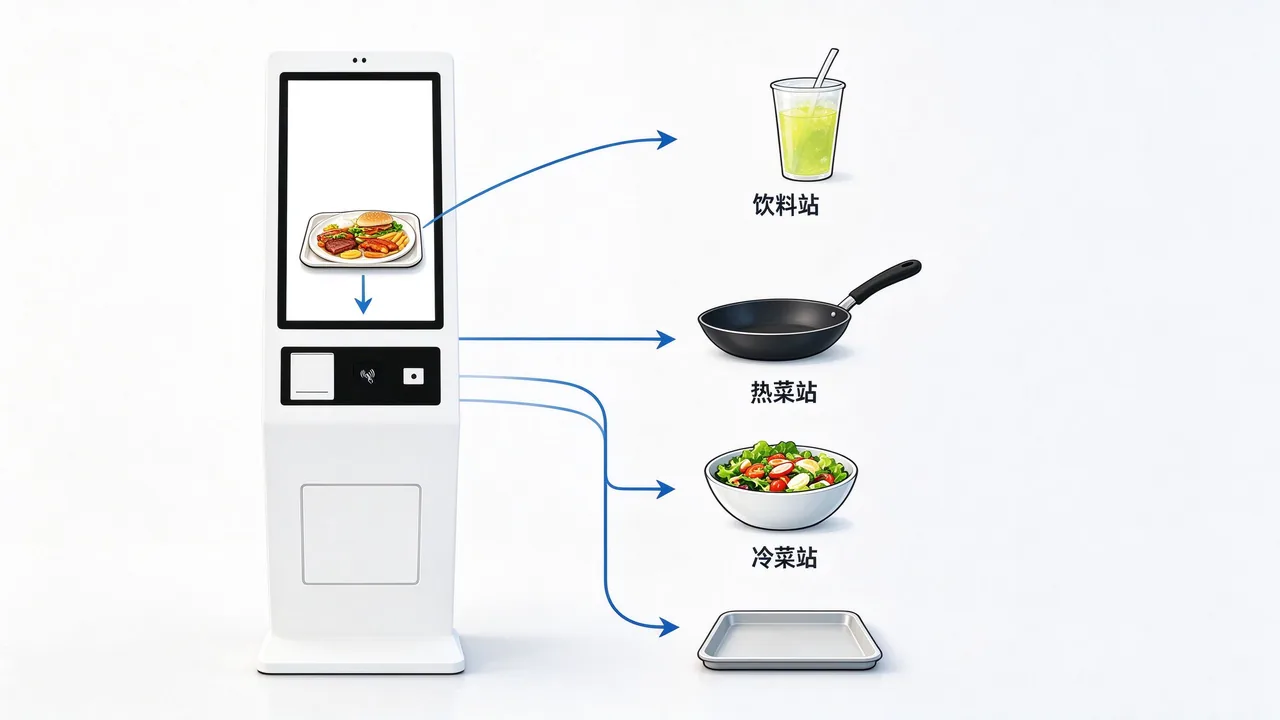
The order splitting depends on the "corresponding table of dishes and stations" in the ordering software ". This form needs to be provided by the store before going online,QUNMAOCustomize the routing rules accordingly and verify them one by one during the on-line test. If the layout of multiple stores of chain brands is the same, they can share the same corresponding table, and stores with different layouts can be adjusted separately. The overall selection and management of the ordering system can be combined.Self-service terminal solutionto plan.
Whether using a KDS screen or a paper receipt, it is recommended to use color or logo to indicate the order status. The common practice is to use regular colors for newly arrived orders, warning colors for orders close to the meal time limit, and eye-catching colors for orders that have expired. The threshold value needs to be set according to the length of the dish production time, for example, the time limit for drinks is short, the time limit for hot dishes is long, and different thresholds are adopted for different stations to prevent all orders from becoming "overtime" or appearing "normal".
Meal overtime is one of the main sources of customer complaints. Let the back kitchen see the overtime, let the front office can urge the order, let the manager can resume the offer, are the three things to be solved in this part.
First set a target meal duration for each dish, and then start timing from the moment the order enters the station. The target duration should not be one size fits all: hot dishes cooked on the spot are very different from pre-made cold dishes and drinks. Stores can be set according to experience first, and then adjusted according to actual data after running for a period of time.
When the order is close to the target duration, the screen or receipt will give a reminder. After exceeding the target duration, it will be upgraded to an overtime order, prompting the store manager or the person in charge of the outlet to pay attention. The reason for overtime orders needs to be recorded, whether the material preparation is insufficient, the station is too busy, or the order is missed. These records are the basis for subsequent optimization of the station and scheduling.
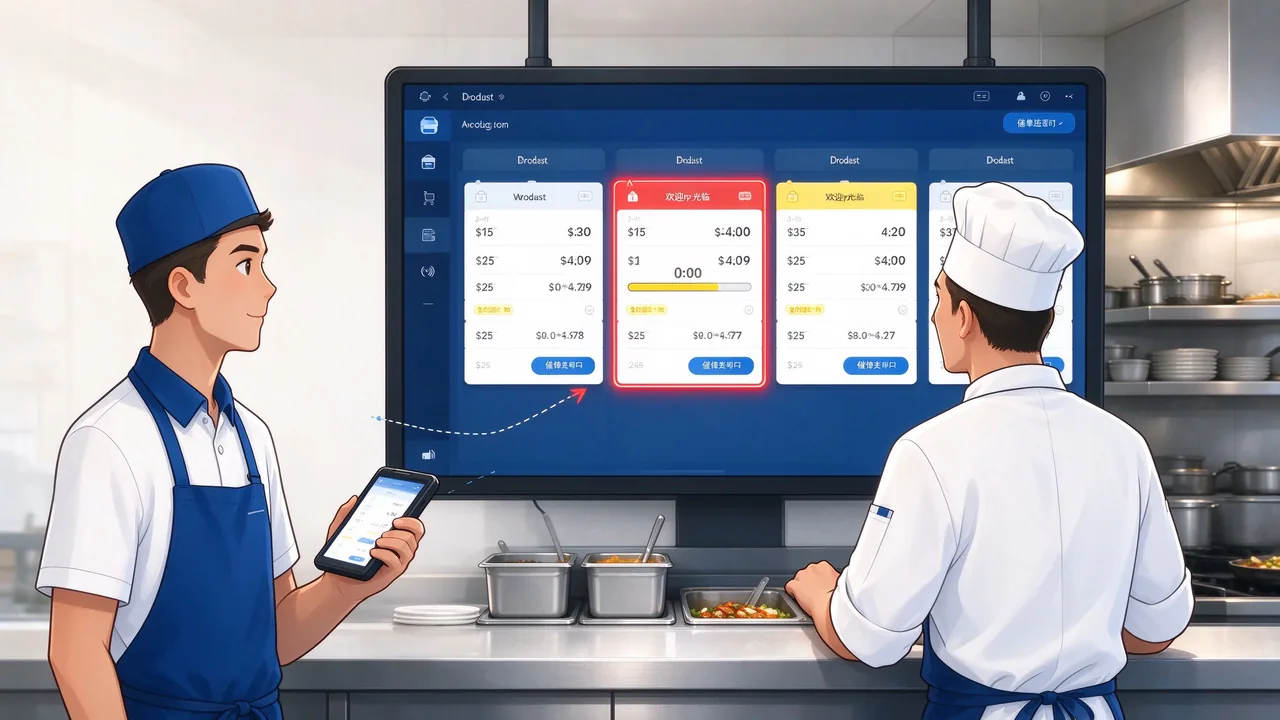
When customers come to inquire, the clerk needs a clear reminder entrance instead of running to the back kitchen for oral communication. The ordering software can provide order reminder operation: the front office marks the order reminder, the order reminder mark appears on the back kitchen screen or receipt synchronously, and the back kitchen returns the status after processing. The time and processing results of each reminder are recorded, which not only reduces the confusion of oral communication, but also provides a basis for the resumption of service quality.
A store that uses self-service ordering usually has more than one screen: the screen for customers to order, the screen for receiving orders from the kitchen, the screen for summarizing meals at the exit, and the screen for notifying customers to pick up meals. The four screens perform their respective functions so that information flows smoothly.
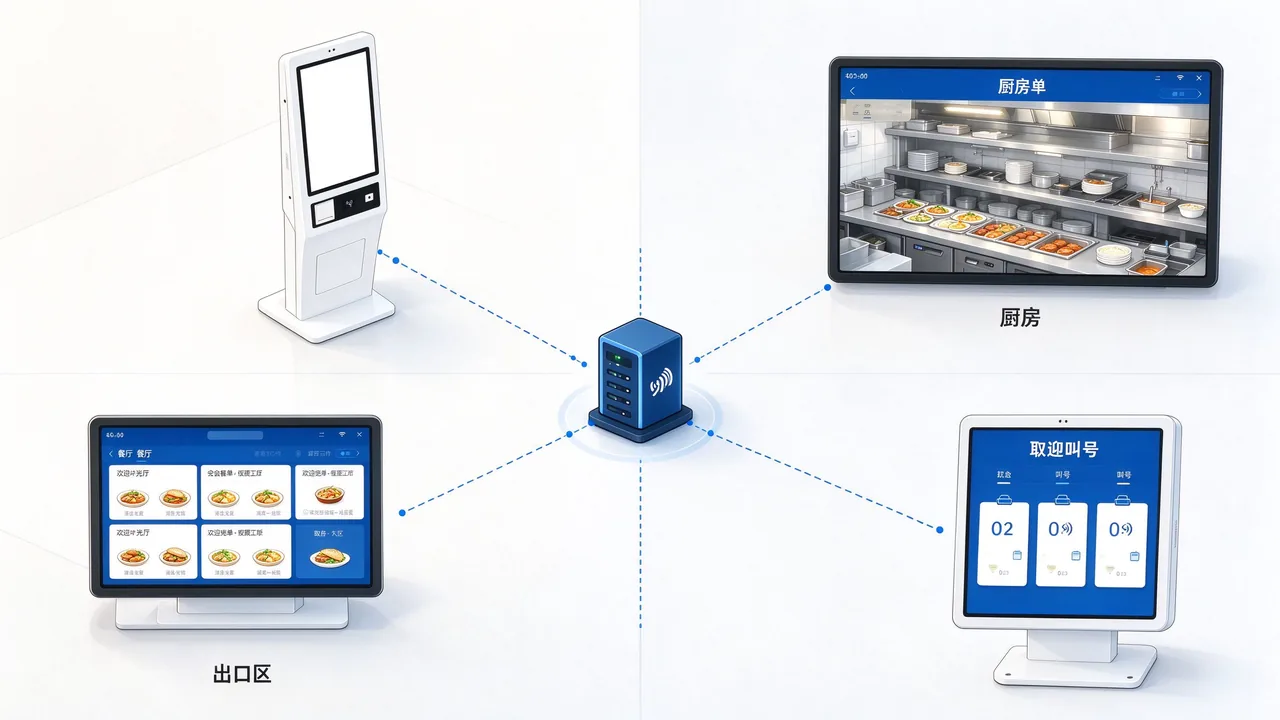
Customers choose and pay for meals by themselves, print the receipt after successful payment, and send out the order. According to the store space, you can choose 15.6-inch desktop, 21.5-inch or 32-inch floor, 27-inch wall hanging (base can be added).
Each station only sees the dishes it needs to make and confirms the post-meal status. Stores can use the existing KDS system or use the kitchen printer.
Centrally display the meal delivery progress of each station to help the meal delivery staff judge which order has been prepared and which order is still waiting for a certain station.
Notify the customer to pick up the meal after the meal is finished, and reduce the number of inquiries around the meal outlet. This link can be combinedQueue calling machineorQueuing TerminalTo achieve, the complete call process can be referred.Solution of queuing number calling machine in restaurant。
In addition to the order-related screen, the store's menu display screen and promotional advertising screen can also manage the content in a unified way. ThroughDigital Signage CMS Solution, stores can update the menu and activity screen centrally to keep the information of the ordering machine, menu screen and food pick-up screen consistent.
It is inevitable that there will be abnormalities in the process of order transmission: network jitter, software restart and wrong station routing configuration will make the back kitchen not receive the order. The goal of designing the bottom-up mechanism is to make every paid order finally visible to the back kitchen.
Reliable order transmission requires the coordination of three actions: the back kitchen returns a receipt to the ordering machine after receiving the order; The ordering machine will automatically resend the receipt if it does not receive the receipt within the set time. If multiple retransmissions are still unconfirmed, a reminder will be triggered and a backup order issuing method will be enabled, such as making up a paper receipt in the back kitchen. Every issuance, retransmission and confirmation should be recorded so that you can trace what happened to each order afterwards.
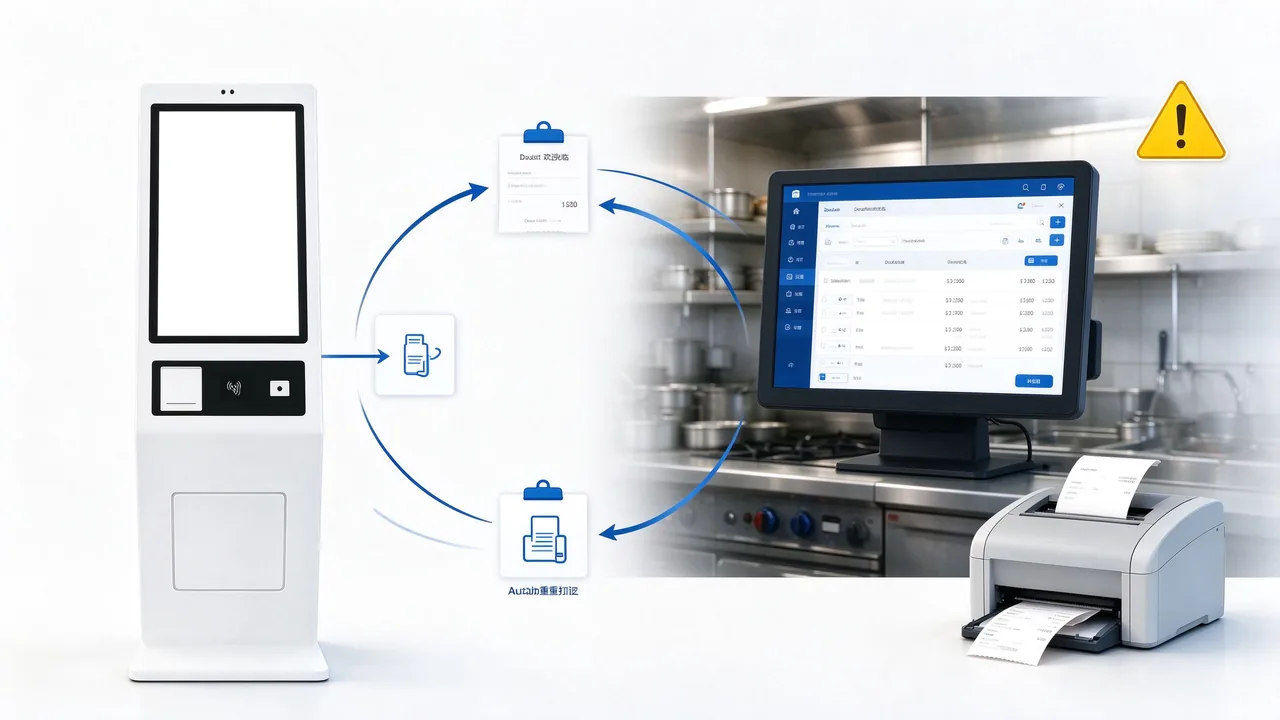
For stores with large orders, it is suggested that the back kitchen should use the dual-channel mode of "KDS as the main part and kitchen printer as the backup": KDS is only displayed on the screen when it is normal. Once KDS does not receive a receipt for a long time, the system will automatically issue the order in the kitchen printer.QUNMAOThis switching logic can be implemented in ordering software customization, and withSelf-service ordering payment terminalThe network master and standby design of the, so that the order transmission more layer of protection.
The need for linkage between the ordering machine and the back kitchen has become more prominent as the scale of deployment has expanded. The difference between a dozen orders in a single store can be made up by labor. When dozens of stores and hundreds of equipment are running at the same time, the order rules must be unified and the circulation must be traceable. The following three projects are from the project case page of QUNMAO's official website, announcing the region, format, number of equipment and completion time:
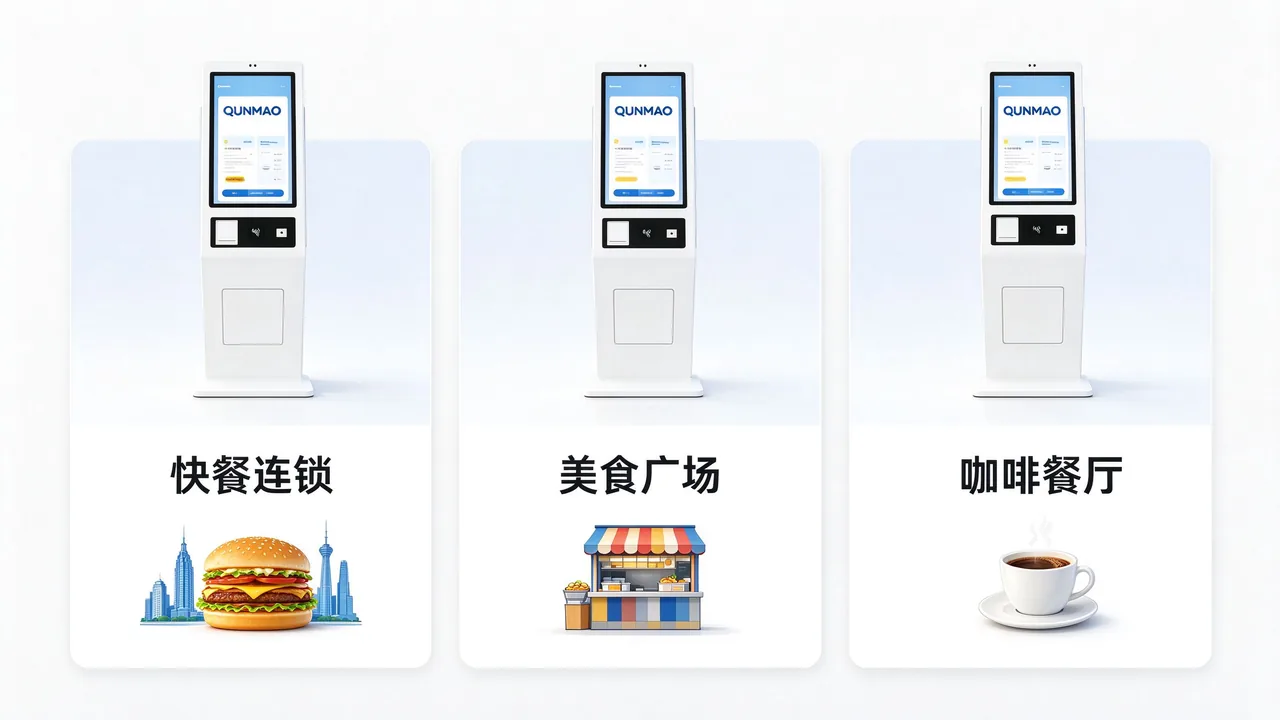
| region | Business format | QUNMAO ordering machine quantity | Completion time |
|---|---|---|---|
| New York, USA | Fast Food Chain Buffet Ordering Deployment | 156 units | August 2026 |
| Dubai, United Arab Emirates | Food Plaza Self-service Ordering Terminal | 88 | February 2026 |
| Milan, Italy | Cafe & Restaurant Buffet Ordering Terminal | 50 units | August 2025 |
Project information source: QUNMAO official website Self Service Kiosk Case page. The project's back-kitchen order method is subject to the customer's actual system, which is not described in detail in this article.
The following analysis is based on the operational characteristics of these three types of formats and is used to illustrate the common requirements for the deployment of ordering machines of different sizes on the flow of orders from the kitchen.
The New York project is a fast-food chain deployment, with a total of 156 QUNMAO ordering machines. Chain fast food is characterized by standardized menus, concentrated peak passenger flow, and simultaneous operation of multiple stores. The order priority, order splitting and meal delivery time limit of the back kitchen need to be consistent in each store to ensure a stable brand experience. The selection and scheme of fast food stores can referFast food restaurant self-service ordering machine solution。
Dubai project for the food court, a total of 88 units. Many merchants in the food court share the ordering terminal. Orders need to be accurately distributed according to the merchants. When the concurrency is large, it relies more on reliable receipt and retransmission mechanisms to avoid sending orders to the wrong stalls. Scenarios for bulk ordering and centralized billing, which can be comparedCanteen self-service ordering machine solution。
Milan project for the cafe and restaurant, a total of 50 units. Drinks and meals coexist, and there are many customization options. Orders need to clearly present specifications, ingredients and special requirements to the back kitchen to reduce errors.
这三个项目的共同点是:设备数量多、分布广,点餐机的联网、软件和外设配置必须标准化,才能批量交付、批量运维。QUNMAO作为源头工厂,从整机硬件到点餐软件定制都可以按项目统一规划,这也是连锁品牌选择点餐机时看重的能力。门店采购前的机型选择,可以对照Fast food restaurant, dinner, milk tea shop ordering machine how to choose。
点餐机与后厨联动是否真正起了作用,需要用数据来判断,而不是凭感觉。建议门店在上线前后各取一段时间,使用同一套指标对比:
| Indicator | Definition | 采集方式 | Purpose |
|---|---|---|---|
| 下单到出餐时长 | 从支付成功到后厨确认出餐的时间 | 点餐软件记录订单时间戳 | 衡量整体出餐速度 |
| 单品超时率 | 超过目标出餐时长的订单占比 | 按工位、按品类统计 | 找出瓶颈工位与菜品 |
| 漏单与重打次数 | 需要补发或补打小票的订单数量 | 系统日志 | 评估订单传输可靠性 |
| 高峰每小时出单量 | 高峰时段每小时完成的订单数 | 按小时汇总 | 评估后厨承载能力 |
| 催单次数 | 顾客因等待而发起催单的次数 | 催单记录 | 反映顾客等待感受 |
对比时要注意:上线前后取相同类型的时段(例如同为工作日午高峰),避免节假日等特殊因素干扰;先看趋势,再看绝对值。门店间的横向对比,也要考虑工位数量与客流差异。
点餐机与后厨联动的项目,前期把以下事项确认清楚,上线阶段会顺畅很多。
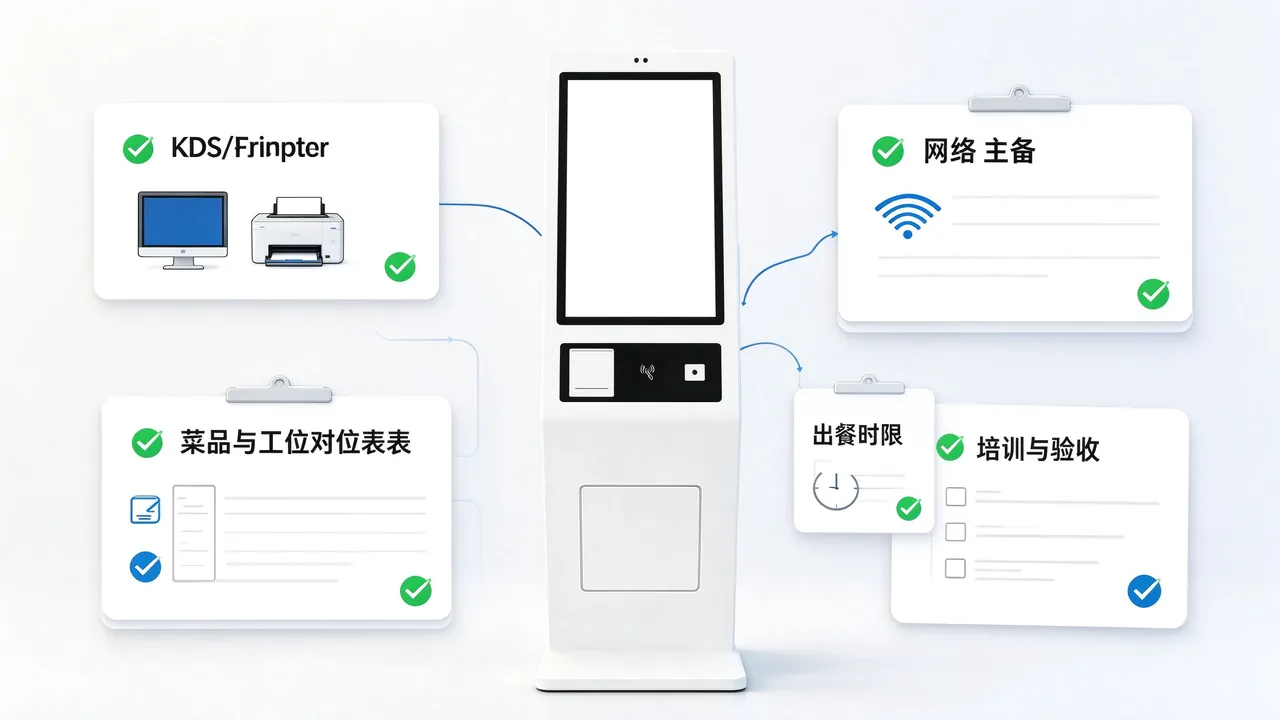
需要把前台收银与点餐终端搭配规划的门店,可以参考Cashier Solution;点餐机与扫码点餐的取舍,可以看Which is better, self-service ordering machine or scanning code ordering?;更多自助终端设备与行业方案,可以查看自助终端机全产品线指南。
QUNMAO点餐机通过以太网、WiFi或可选的3G/4G联网,订单在支付成功后,经点餐软件按菜品与工位拆分,送到后厨的KDS系统或厨房打印机。点餐软件支持定制,可以按门店的后厨流程设置路由规则。
工位少、订单量不大的门店用厨房打印机即可;工位多、高峰密集、需要计时与数据复盘的门店更适合KDS。两者也可以并用,以KDS为主、打印机为备份。QUNMAO点餐软件可以按这种方式定制订单切换逻辑。
QUNMAO点餐机支持以太网与WiFi,并可选3G/4G,门店可以设置多条网络链路。点餐机与后厨设备在同一局域网内时,订单传输不依赖外部互联网。具体的断网处理规则,在点餐软件定制阶段确认。
取决于工位数量:通常每个独立出餐的工位(如饮品、热菜、冷菜)配置一块屏或一台打印机,出餐口另配一块汇总屏。具体数量建议在门店勘察和菜品与工位对应表确认后再确定。
可以。QUNMAO点餐机预装Windows 10/11,支持安装第三方软件,也支持点餐软件定制,可以按已有KDS或收银系统的接口规范对接订单数据。
QUNMAO点餐机提供15.6寸台式、21.5寸落地、27寸壁挂(可加底座)和32寸落地四种机型,均为1920×1080分辨率、G+G电容20点触控,内置80mm热敏打印机,可根据门店空间与客流选择。
QUNMAO可以根据你的业态、门店数量、后厨出单方式和现有系统,提供点餐机选型、软件定制与对接建议。告诉我们你的需求,我们会整理对应的机型规格书与方案资料。
对QUNMAO点餐机与后厨联动方案有任何疑问,欢迎随时联系我们,获取一对一选型与对接建议。
Contact Us Partner Links:

 en
 中文

 Previous:
 Return to list

